How Odoo Handles Label Printing During Goods Receipt (GR)
Label printing during the Goods Receipt (GR) process in Odoo helps generate product labels immediately after items are received into inventory. It ensures that every product entering the warehouse is properly identified, priced, and ready for tracking, which supports clear inventory management and efficient warehouse operations.
Processing the Goods Receipt
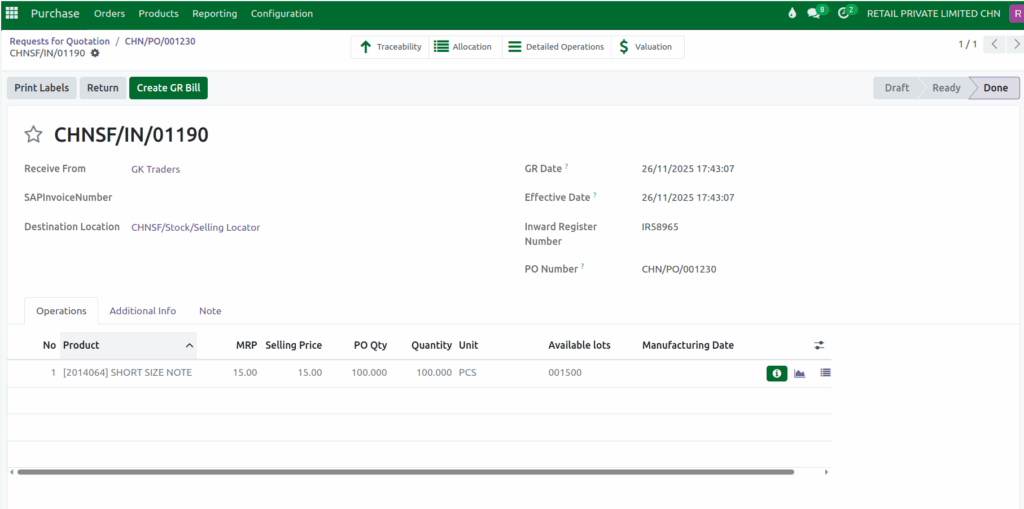
After confirming a Purchase Order (PO) in Odoo, the system displays a “Receive Products” button. Clicking this button begins the Goods Receipt (GR) process, which is used to record the actual goods that arrive from the vendor.
When you initiate the GR, Odoo automatically generates a Goods Receipt Document Number, helping you keep a clear record of the transaction. You will also need to enter a unique IR Number (Inward Register Number) for the receipt, which acts as a mandatory identifier for tracking purposes.
Before completing the GR process, the Print Labels button will not be available. The GR must be validated first, and once the validation is done, the Print Labels button will appear.
Quantity Options for Printing Labels
When printing labels during a GRN, Odoo offers two ways to decide how many labels will be printed. The first option is Operation Quantities, where the quantity cannot be changed. In this mode, the system prints labels based on the exact GRN quantity, ensuring that the number of labels always matches the number of items received.

The second option is the Custom mode, which allows users to enter any quantity they want before printing. This is useful when only part of the stock needs labels or when additional labels are needed for packaging or storage purposes.
Label Format Details
Odoo supports multiple label styles, including 3×7 with QR Code and Price, 3×7 with Lot Number, 3×7 Unbranded, and Jewellery Sticker formats. Once the label type is selected, a PDF file is generated showing the product information exactly as it will appear on the printed labels.
Each label format serves a different purpose. The 3×7 with QR Code and Price label includes the product name, QR code, MRP and selling price, making it useful for retail stores where fast scanning and visible pricing are important.

The 3×7 with Lot Number label displays both product information and the lot number.

The 3×7 Unbranded label keeps the layout simple by showing only the product name and barcode, making it suitable for internal operations or bulk shipments.

The Jewellery Sticker label is specially designed for jewellery products and includes the product name, barcode, and price in a compact, foldable format suitable for small items such as necklaces, earrings, and rings.

