How does SAP Resync Works in Odoo
SAP Resync is a feature that allows users to manually resend data between Odoo and SAP. It is particularly useful when automatic syncing fails or when there is a need to correct or update data. By selecting a specific date range and type of data, users can control exactly what information gets re-synced, ensuring that both systems remain accurate and up-to-date.
Accessing SAP Resync
To access the SAP Resync feature, start from the main dashboard and navigate to the Inventory module. From there, click on Products, and under the SAP API section, select SAP Resync. This will open the SAP Resync pop-up window where all resync actions can be performed.
Resync Process and SAP Log
Within the SAP Resync window, users can define the period for which the data should be synced. The “From Date” and “To Date” fields allow users to select the start and end dates for the resync. Only records within this date range will be considered, helping to focus on the specific data that needs to be updated or corrected.
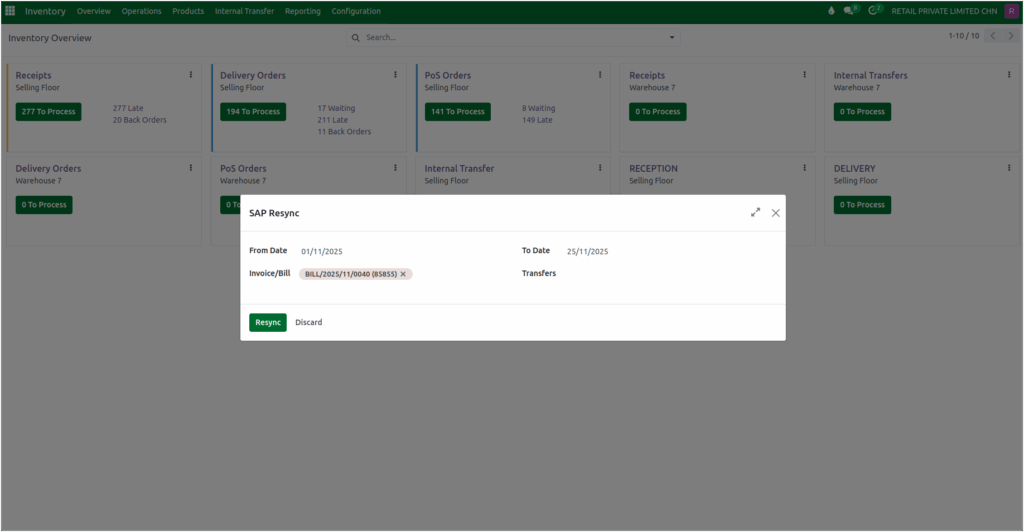
The system allows users to select which documents should be re-synced. The Invoice/Bill field always displays GR Bill and Invoice document numbers, while the Transfers field shows transfer document numbers. Users can enter document numbers in either field or both, depending on the type of data they want to sync.
Once the desired documents are selected, clicking the Resync button will send the data to SAP. If users want to cancel the operation, they can simply click Discard to close the window.
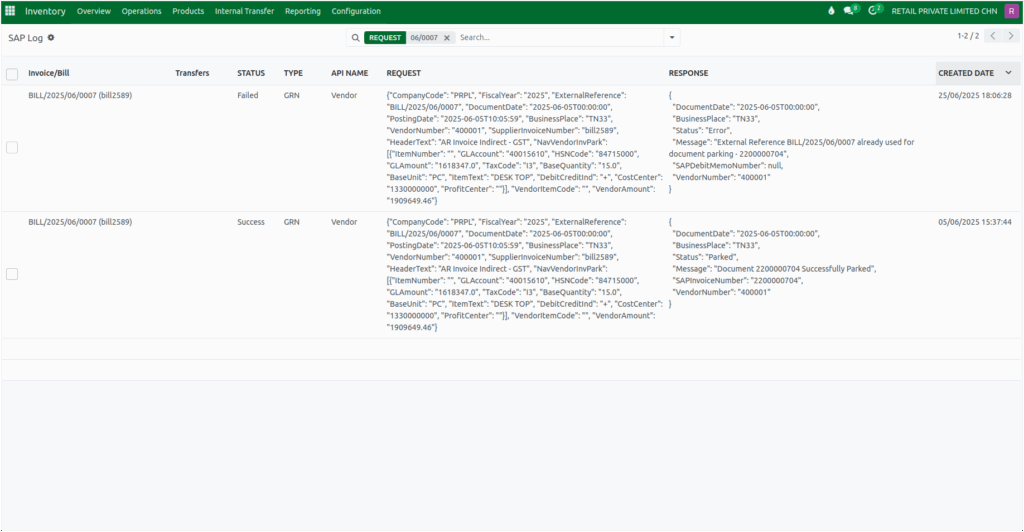
After starting the resync process, the system processes and sync the selected data to SAP. To track the resync activity, users can access the SAP Log screen by navigating to Products under Inventory and selecting SAP Log in the SAP API section. The log provides detailed information about all resynced data, making it easy to monitor the process and verify completed updates.
Common Errors
A common error occurs when a document that has already been synced is attempted to be synced again, which happens when SAP prevents the reuse of the same external reference for the documents.
For example, an error message such as “External Reference BILL/2025/06/0007 already used for document parking – 2200000704” indicates that the reference has already been used in a previous sync. Being aware of this helps users avoid duplications and ensures smooth data synchronization.