How Odoo GR Bill Syncs to SAP
Syncing GR Bills to SAP in Odoo helps ensure accurate accounting and smooth operations between inventory and finance systems. A GR Bill represents the vendor invoice generated after receiving goods, confirming that payments are only made for the items actually received. In Odoo, this process involves creating a GRN (Goods Receipt Note) and then linking it to a vendor bill.
Configuring GL Account Codes for GR Bill
Before syncing with SAP, it’s important to configure GL (General Ledger) account codes. Navigate to Settings → Inventory → SAP API Integration to set the account codes for discounts, TCS, freight charges, round-offs, and other relevant expenses. For example, freight charges at different percentages have separate GL codes.
Additionally, tax configurations for GRN in SAP are set under Invoicing → Configuration → Taxes. Correct GL account setup ensures that all amounts are posted to the right accounts when syncing GR Bills with SAP.
Integration Workflow for GR Bill to SAP
Once a vendor bill is created from the purchase order, it can be synced to SAP. The system records details like the vendor bill number, source PO, document and posting dates, vendor details, and accounting information such as GL accounts, cost centers, tax codes, and item information.
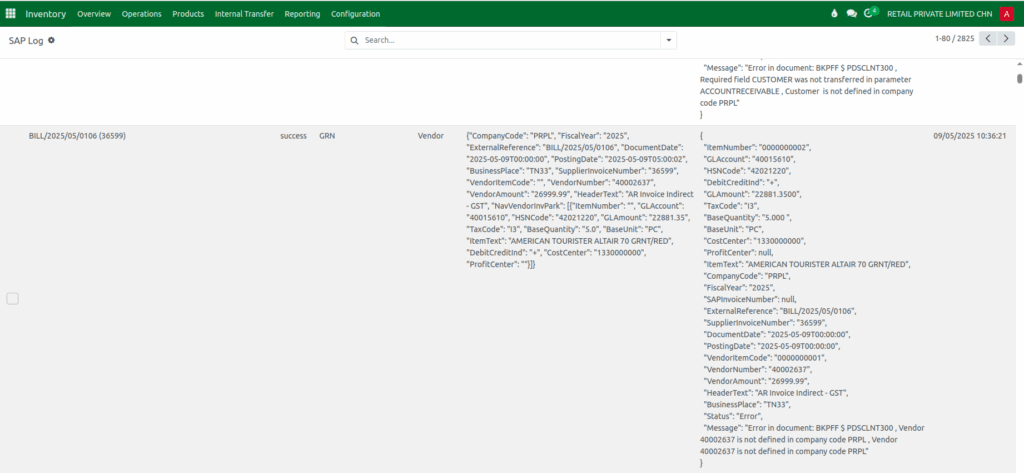
The total payable amount, including taxes, is also calculated. After syncing, the GR Bill status is reflected in the SAP log. The log shows whether the sync was successful or if any errors occurred, helping users track and verify the process.
SAP Log Details and Status Tracking
The SAP log provides a detailed view of GR Bill integration. You can access it via Inventory → SAP API → SAP Log. The log displays the GRN document number for reference, the transaction status, type (GRN), and API name.
The status field indicates if the sync was successful (“Parked”) or failed (“Error”). This allows users to quickly monitor which bills have been successfully sent to SAP and identify any issues that need correction.

GR Bill Sync Request Format
The GR Bill Sync Request Format is a structured JSON file sent from Odoo to SAP whenever a vendor bill is synced. It contains two main parts: header details and line-item details. The header section includes information like the company code, fiscal year, vendor number, business place, invoice date, and posting date. These fields tell SAP where the invoice belongs and how it should be posted in accounting.
The request also includes the external bill reference from Odoo and the supplier’s invoice number to avoid duplicates. The line-item section carries details such as GL account, HSN code, tax code, quantity, amount, cost center, and item description.
SAP uses these values to calculate taxes, validate GL postings, and assign expenses to the correct departments. The entire request ends with the total invoice amount, which SAP uses to match with the line-item totals.
SAP Response Format for GR Bill
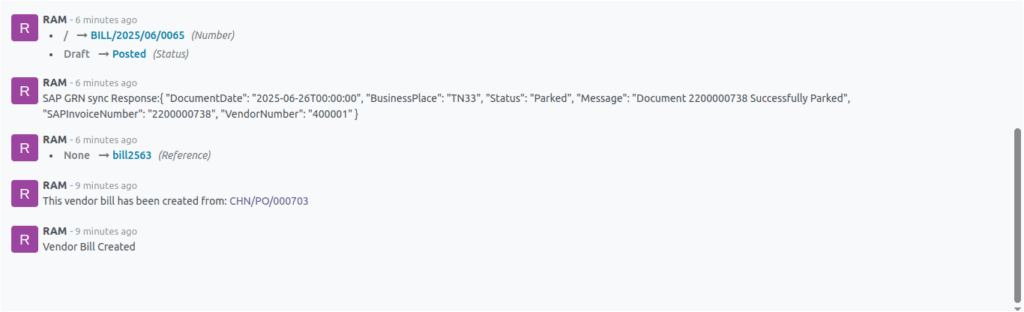
The SAP Response Format sends back the result of the sync after processing the request. It includes the invoice document date, business place, status, a confirmation message, and the SAP-generated invoice number. If the request is correct, SAP returns a “Parked” status, meaning the invoice is saved for review or approval; if there is a problem, SAP sends back an “Error” status with a message describing the issue.
The response also returns the vendor number to confirm that the invoice was linked to the correct supplier in SAP. This response helps Odoo users easily verify whether the GR Bill synchronized successfully or if further action is needed.