How the eCommerce Integration Works in Odoo Inventory
Odoo allows you to sync your inventory products directly with your eCommerce platform. This ensures that product details, stock, prices, and other important information are always up-to-date, helping you manage both your online store and warehouse efficiently.
Making Products Available for eCommerce
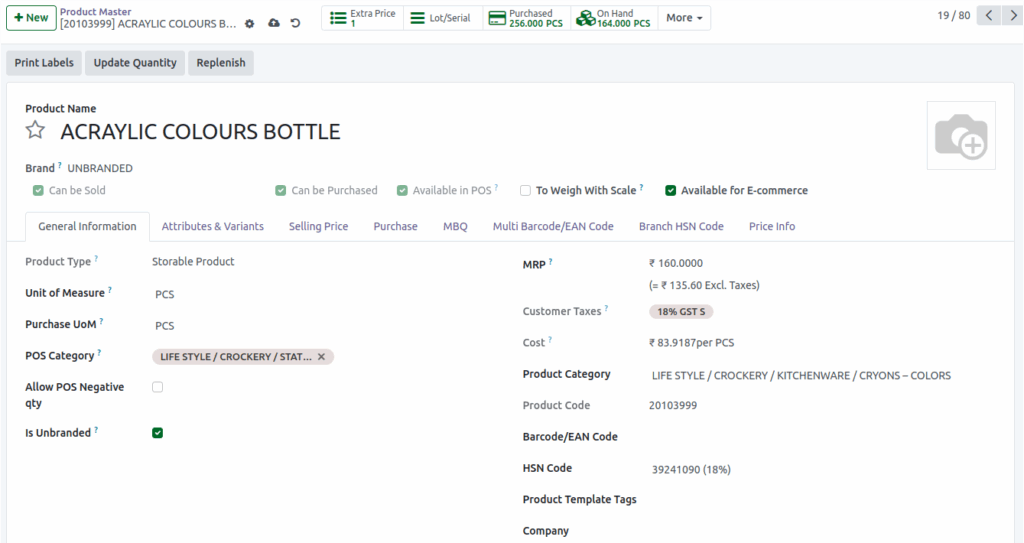
To include a product in your eCommerce store, open the Product Master from the Inventory module and enable the “Available for e-commerce” checkbox. Once saved, the product will appear in the eCommerce sync screen, ready to be sent to your online store.
Syncing Products Using Scheduler
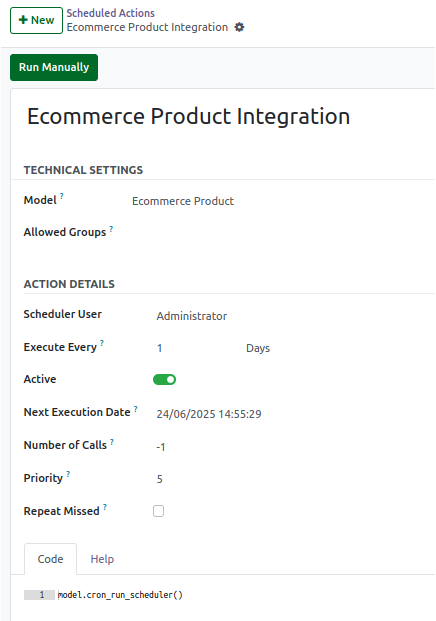
Odoo provides both manual and scheduled options to sync products. For a manual sync, go to Settings → Technical → Automation → Ecommerce Product Integration → Scheduler and click “Run Manually”. This will immediately sync new or updated products to the eCommerce platform. For scheduled sync, you can set a specific date and time in the scheduler, and the system will automatically sync the products at that time.
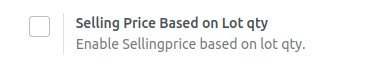
Product sync also depends on lot settings. If the option “Selling Price Based on Lot Qty” is enabled, product details like selling price, MRP, barcode, and landed cost are taken from the lot with the highest quantity. If the option is disabled, these details are taken from the latest updated lot. Products without lot tracking, such as fruits and vegetables, use the product-level information directly.
Product Data Included in the eCommerce Sync
When products are synced, the eCommerce platform receives detailed information. This includes the internal Product ID, SKU, product name, applicable tax percentage, on-hand stock, selling price, MRP, HSN code, unit of measure, barcode, landed cost, product category, brand name, weight indicator, company code, and the timestamp of the sync. Even products with zero stock are included in the sync, and newly created lot products may initially show barcode and landed cost as zero until updated.
Updating Product Details
If any product details change, such as the name, category, HSN code, tax percentage, stock quantity, or lot prices, you can update them in the Product Master. The changes will reflect in the eCommerce platform either after a manual sync or during the next scheduled sync. Updated information includes product name, category, tax, HSN code, quantity, selling price, MRP, barcode, and landed cost depending on the pricing configuration.
