How to Create a No Tracking Product in Odoo Inventory
In Odoo Managing products becomes even simpler when dealing with items that don’t require tracking. These are typically products that don’t need serial numbers or lot numbers. Setting up a no-tracking product ensures smooth inventory operations and reduces unnecessary complexity in stock management.
Creation Of No Tracking Product in Odoo Inventory
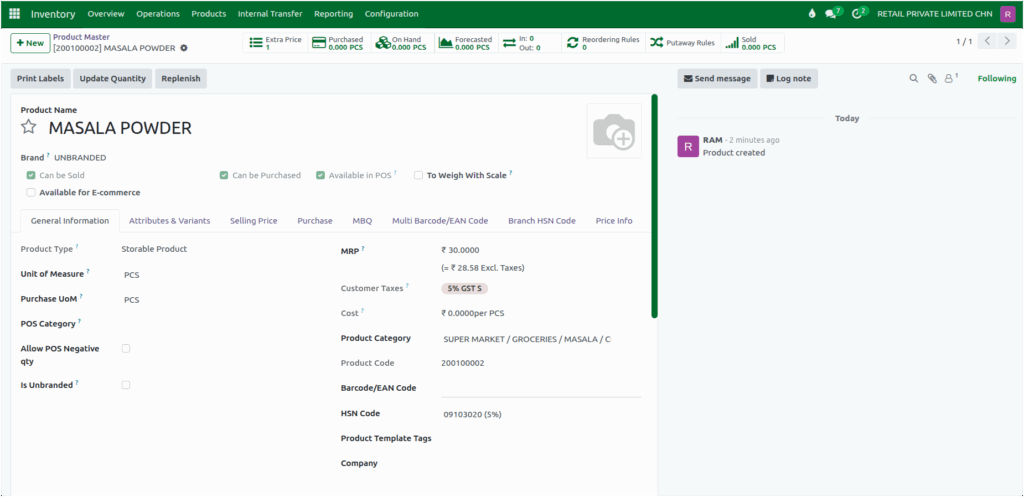
To create a new product in Odoo, go to the Inventory module, then navigate to Products → Product Master. Click the + New button to open the product creation form.
Begin by filling in the required fields such as the Product Name, Product Category and Brand. These details are mandatory because they help organize and categorize your inventory, making it easier to manage and analyze your product data in the future.
Once the basic details are entered, select the appropriate HSN Code for the item. Odoo automatically applies the corresponding Customer Tax based on the HSN configuration.

In the General Information tab of the product creation screen, scroll down to the Traceability section. Here, you will find the Tracking field, which offers three options — By Unique Serial Number, By Lots, and No Tracking. These options determine how Odoo monitors and manages your product movements in the inventory.
By default it is selected as No Tracking, it means the product doesn’t require individual serial or lot tracking.
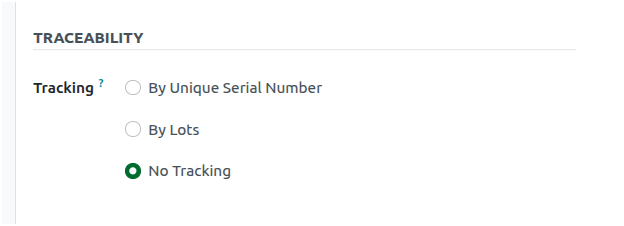
As a result, the Valuation by Lot/Serial Number checkbox will not be displayed. This happens because valuation by lot or serial number is not applicable when no tracking is enabled. By choosing
No Tracking, you simplify inventory operations, making it easier and faster to handle products that don’t need detailed traceability.
Hiding Manufacturing and Expiration Dates for No-Tracking Products
As Tracking is set as No Tracking, Manufacturing Date and Expiration Date fields are automatically hidden in the product master.
This behavior ensures that manufacturing and expiry details are not recorded for items that don’t require tracking, such as consumables or general-use materials.
No GKM% is Required
Products categorized as No Tracking do not require a GKM% configuration. Even if a value is entered, the system will not trigger any alerts if the margin does not meet the GKM.
Pricing rule for No-Tracking Products
When a product is set as No-Tracking in Odoo, the system requires either MRP or Product Cost to be selected for pricing rules. You cannot select Landed Cost for these products. If you try, a validation error will appear: “Please select MRP or Product Cost based for this product.”

Configure Basic Fields for a Product
Then, Set the MRP, assign a appropriate pricelist, choose the Unit of Measure (UOM), and map the vendor. Once all the information is filled in, save the product. The product will then be created in the system and ready for procurement, inventory, and billing processes.