How to Create Packaging Quantity for Products in Odoo Inventory
Managing product quantities efficiently is essential for smooth operations in both sales and purchasing. In Odoo Inventory, packaging allows you to define how products are grouped, stored, or sold. This streamlined approach helps ensure accurate stock management and simplifies the handling of products during sales and purchasing operations.
Creation Of Packaging Quantity in Product Screen
Begin by navigating to the Inventory module, then navigate to Products -> Product Master. This section provides a centralized view of all the Products. Search for the product you want to set the packaging quantity and open its details. In the General Information tab, scroll down to the Packaging section where you can add a new packaging line.

Here, you specify the packaging type by entering a valid name in the Packaging field (for example, BOX), and in the Contained Quantity field, enter the number of units contained in that package, Unit of Measure field (such as PCS) is automatically set based on the UOM configured for the product.
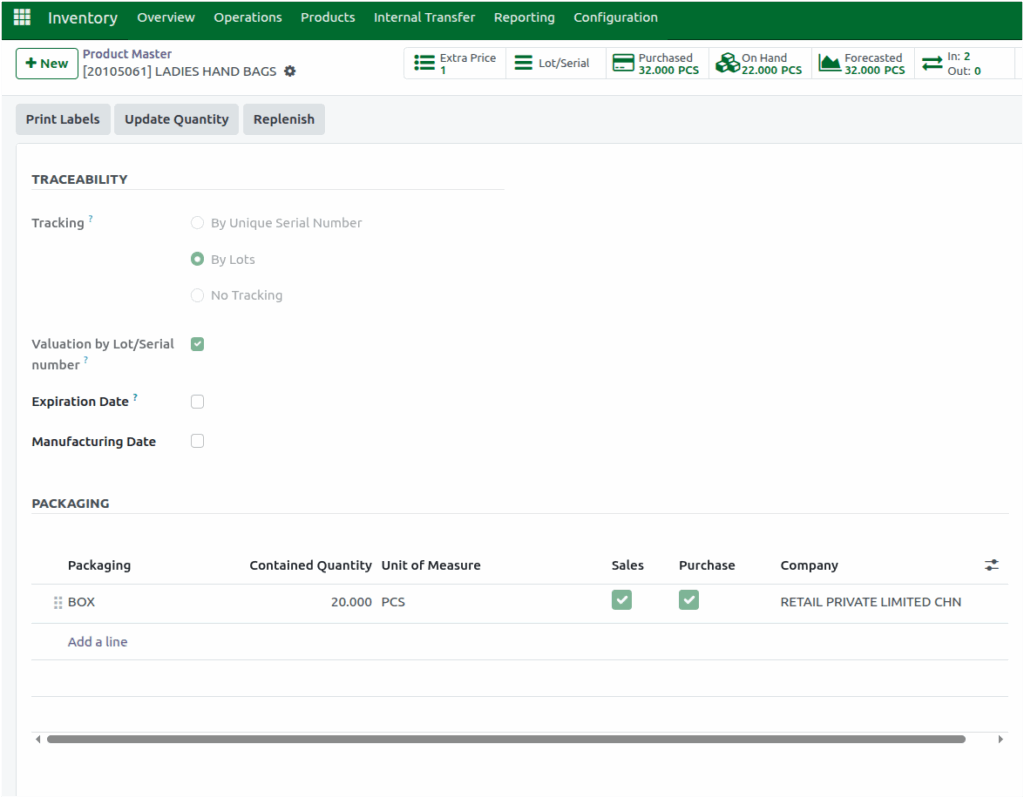
You can also enable the check boxes – Sales and Purchase to specify whether this packaging is used for sales, purchases, or both. Once saved, this helps define how products are grouped and managed during sales and purchase operations.
When a product is added to a sales or purchase order, the corresponding packaging quantity is displayed based on the configured packaging settings. This ensures accurate handling and stock management during transactions.
Odoo allows you to create multiple packaging configurations for each product. This flexibility ensures that different packaging quantities can be applied for sales and purchases based on your specific needs.
