How Lot and Serial Number Details are displayed in Odoo Inventory
The Lot/Serial Master in Odoo Inventory is a powerful tool used to manage products with lot or serial number tracking. It helps businesses maintain accurate inventory records, monitor product movement, and improve traceability across all operations.
Enabling Lots & Serial Numbers in Odoo Inventory
To get started, open the Inventory module, then go to Configuration → Settings. In the Traceability section, enable the checkbox for Lots & Serial Numbers. Once activated, this option will enable the menu Lots & Serial Numbers on the Inventory module.
Getting Started with Lot/Serial Number in Odoo Inventory
To get started, go to the Inventory module, then navigate to Products -> Lot/Serial Numbers. This section offers a centralized view of all created lots, organized and grouped by their respective products for easy tracking and management.
Viewing and Searching for Lots
In the Lot/Serial Number screen, you will find a list of all Lots, along with essential details. You can quickly search specific Lots by using the search bar at the top of the screen. Simply search by the Lot/Serial Number itself or by Product Code.
After searching the appropriate lot, you can click to view its detailed information.
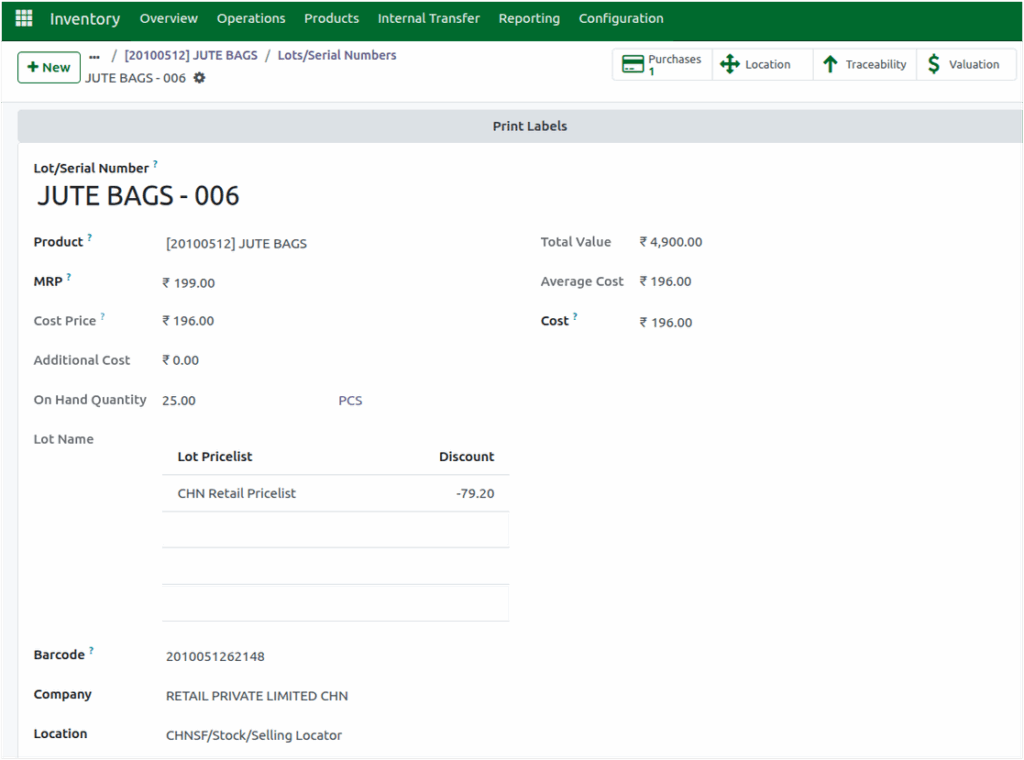
The Lot/Serial Number generated from the Goods Receipt (GR) will be displayed here in Lot/Serial Number field. The Product Name is fetched automatically from the GR and the MRP (Maximum Retail Price) is displayed in the MRP field as recorded in the GR.
Then the Cost Price field displays the unit value from the Purchase Order or GR Bill and updates automatically whenever changes are made in the PO or GR Bill.
Additionally, any additional charges(freight charges, cash discounts) from the GR Bill are displayed on a per-unit basis in the Additional Cost field.
Viewing Product Locations
If a product is stored in a single location, the Location field displays that location directly. However, if the product is stored across multiple locations, a Location smart button appears, which can be clicked to view all the locations where the product is available.

Lot Pricelist and Discount Details
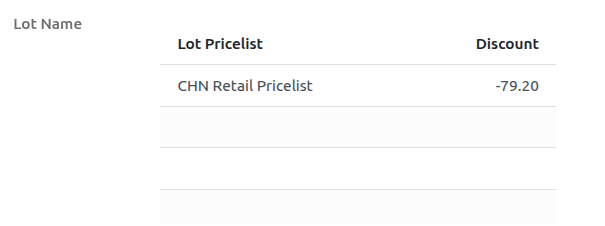
After completing a GRN, the configured pricelist is displayed in the Lot Name table with the Lot Pricelist and Discount field. Any discounts defined in the pricelist are reflected in the Discount field with the pricelist name in Lot Pricelist field.
Barcode and Serial Number Tracking
For products tracked by lot, Odoo automatically creates a lot barcode after the Goods Receipt (GR) using the format Product Code + Lot ID (e.g., 10433910461728). For serial-number products, the barcode is entered manually during the GR. These barcodes are then displayed in the Lot/Serial Master.
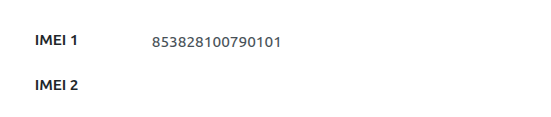
For serial-number items like mobile phones, IMEI 1 and IMEI 2 are also recorded during the GRN and displayed in the Lot/Serial Master, ensuring clear and accurate tracking.
Manufacture Date
The Manufacture Date provided during the GRN is displayed in the corresponding field. This field appears only if a manufacturing date is specified during the GRN, helping track product age and shelf life.

On-Hand Quantity and Average Cost Calculation
The On-Hand Quantity field displays the current available quantity in a lot along with its unit of measure, giving users clear visibility of how much stock remains.
When the product’s Costing Method is set to AVCO (Average Cost), Odoo automatically calculates both the Total Value and the Average Cost for each Lot or Serial Number. The Total Value updates in real time whenever any inbound or outbound transaction occurs, ensuring your stock valuation stays accurate.
Meanwhile, the Average Cost is calculated using a simple formula:
Average Cost = Total Value ÷ On-Hand Quantity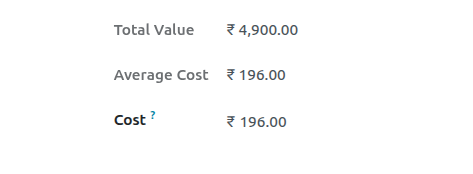
Odoo’s Lot/Serial Number Master makes inventory tracking clear, accurate, and efficient. With real-time updates and complete traceability, businesses can manage stock confidently.
