How to Create a Company and Branch in Odoo
A company is a legal entity formed to conduct business activities. It can produce goods or provide services to earn a profit. Companies can grow in size by expanding operations.
Company Creation
- To access the Company Master, go to setting -> Users & Companies -> Companies.
- Click the “New” button on the Company screen.
Enter the Company Name & Details
- Enter the Company Name, This field mandatory (For example, retail Store).
- Upload the Company Profile.
- Enter Company Address (Street, Street 2, City, State, ZIP, Country).
- Once the Country is set, the currency will also be set automatically.
- Enter the Phone and mobile numbers.
- Enter the Email id (For example, retail @gmail.com)
In General information tab:
- Tax id must be unique (e.g.,20AAACH7409R1ZF)
- Enter the Comapny id
- Enter the FSSAI No.
- Enter the CIN No.

Branch Creation
A branch is a store or location within a larger retail business. Each branch offers the same products and services as the main business. Branches operate independently to some extent.Branches allow businesses to expand their reach and cater to local needs.
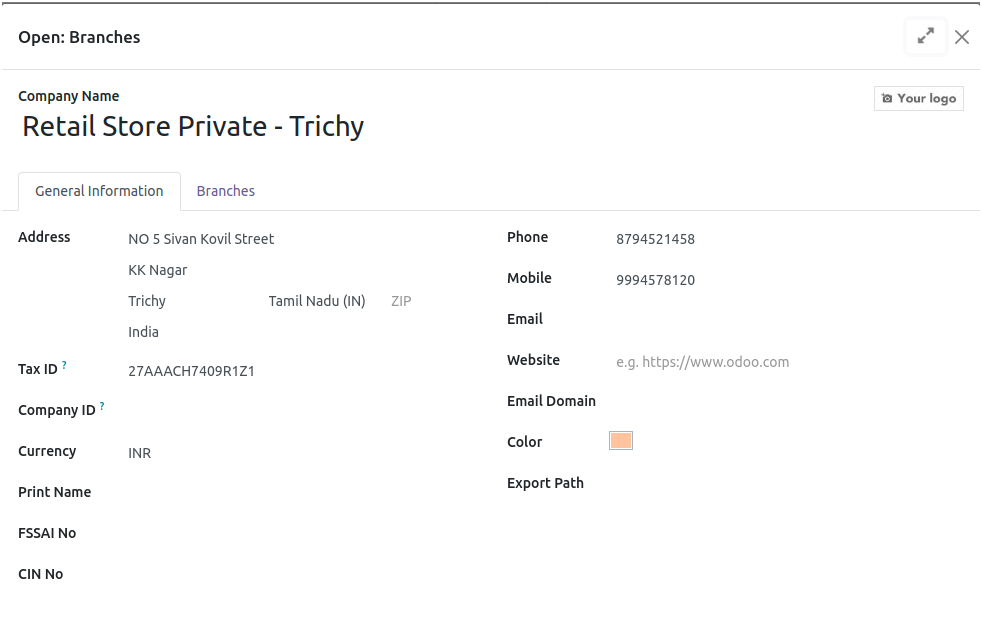
Once you create a company, Click the Branches to create a branch.
Enter the Branch Name & Details
- Enter the Branch Name, This field mandatory (For example, retail 1 Store).
- Upload the Company Profile.
- Enter Company Address (Street, Street 2, City, State, ZIP, Country).
- Once the Country is set, the currency will also be set automatically.
- Enter the Phone and mobile numbers.
- Enter the Email id (For example, retail @gmail.com)
In General information tab:
- Tax id must be unique (e.g.,20AAACH7409R1ZF)
- Enter the Comapny id
- Enter the FSSAI No.
- Enter the CIN No.