How to Create an Operation Type in Odoo
An Operation type represents a specific kind of transaction that happen with the stock in you warehouse. Its act as a classification for the movement of goods.
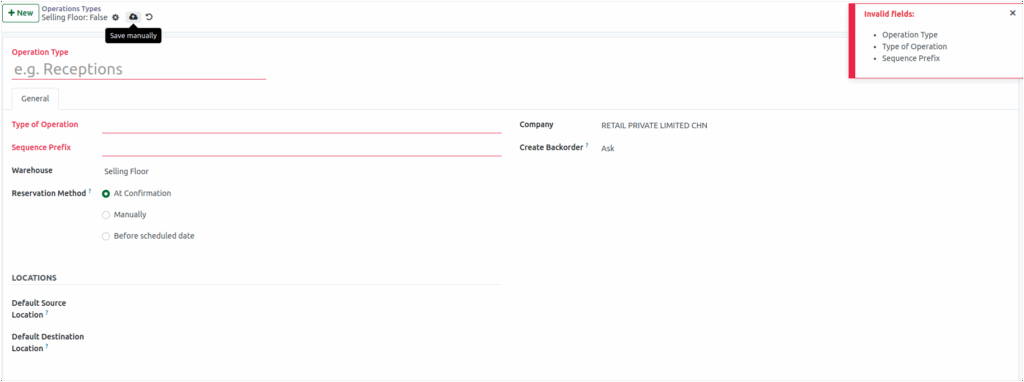
To create a Operation type Inventory -> Configuration -> Operations Type -> +new
Create a Operation Type
Enter the name of the operation in the Operation Type field. In the General Section, Select the Type of Operation Receipt-(e.g., incoming), Delivery(e.g., outgoing), Internal Transfer(e.g., an internal transfer between warehouses). Provide a Sequence Prefix that will be used in document reference number(e.g., CHN/OUT).
After filling in the required information, click the Save buttons.
Note: The above fields are mandatory field to creating a operation.
Set General Information
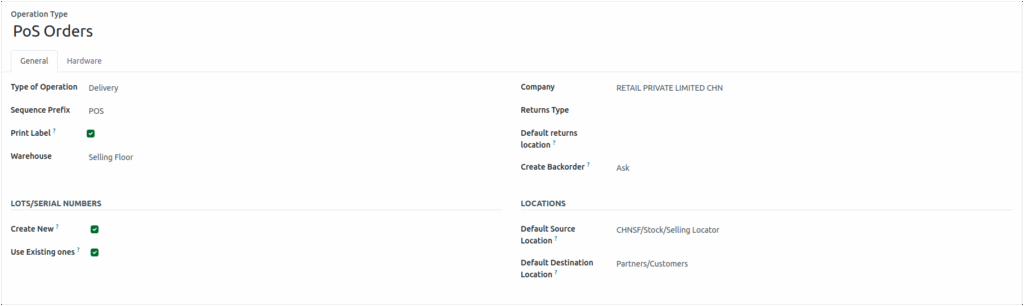
In Odoo, several settings help manage stock transfers efficiently. The Reference Sequence is used to generate unique document numbers for each transaction. You can enable Print Label to automatically print product labels during transfers. The Warehouse field allows you to select the warehouse involved in the transfer, while the Company field defaults to the company currently in use. Enabling Show Receipts Report at Validation will automatically display a reception report once the transfer is validated.
You can define the Returns Type to specify the method for handling product returns, and set a Default Return Location where returned goods are processed. The system also provides options for Create Backorder, allowing you to choose whether backorders are always created, never created, or prompted for creation. Additionally, when the operation type is set to Internal Transfers or Delivery, an extra field appears to accommodate the specific requirements of those operations.
Additional Field in General Information
Reservation method: Choose one option for reserving products:
- At confirmation
- Manually
- Before Scheduled Date
Lot/Serial Number Section
Lot/Serial numbers for products using two options. Create New allows the system to generate a new lot or serial number for a product, while Use Existing One lets you select and use an already existing lot or serial number.
Location Section
- Default Source location: The main location from where the stock is taken.
- Default Destination location: The primary location where the stock is sent or delivered.