How to create Fiscal Positions in Odoo Invoicing
Managing taxes correctly is one of the most important parts of running a business. In Odoo,
Fiscal Positions help you automatically map one tax to another depending on your customer’s location or special tax rules.
Accessing the Fiscal Positions in Odoo Invoicing
To start, open the Invoicing module. From the top menu, click on Configuration and then select
Fiscal Positions. This page shows a list of existing fiscal positions. You can also create a new one by clicking the +New button.
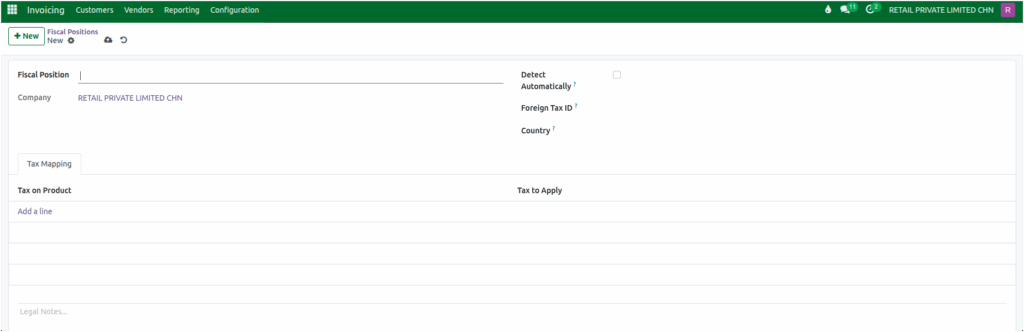
Creation Of New Fiscal Position in Odoo Invoicing
When you create a new fiscal position in Odoo, a clean and simple form appears, allowing you to define the basic settings. These details help Odoo understand when and how to apply the fiscal rules during invoicing.
Start by entering the Fiscal Position Name. This can be something easy to recognize, such as Inter State, depending on how you plan to use it. Next, the current company is displayed in the Company field, ensuring this Fiscal Position is applied only for this company.

One of the most helpful options on this form is Detect Automatically. When enabled, Odoo can identify customer conditions like their location and automatically apply the correct fiscal position without any manual selection.
Defining Tax Mapping Rules
The most important part of creating a fiscal position is the Tax Mapping section. This is where you tell Odoo which taxes should be substituted with new ones when this fiscal position is applied. It acts like a smart rule book that automatically adjusts taxes based on the customer’s location or specific tax scenario.
Inside the Tax Mapping tab, you can add multiple lines to define how each tax should change. For example:
- 5% GST (Sales) → 5% IGST (Sales)
- 12% GST (Sales) → 12% IGST (Sales)
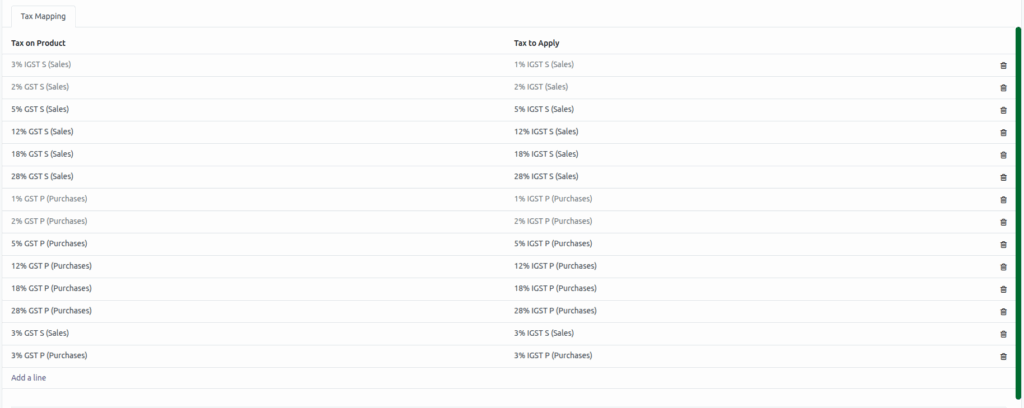
These mappings are extremely helpful when the tax rate set on your products differs from the tax you are legally required to charge. This often happens during inter-state sales, where GST and IGST rules can vary.
Once these mappings are created, Odoo handles the rest automatically. When you generate an invoice or purchase order, Odoo checks the fiscal position and instantly replaces the product’s default tax with the correct mapped tax. This not only saves time but also ensures your invoices always remain compliant with tax regulations without any manual changes or risk of error.
