How to apply Cash Rounding on a GR Bill in Odoo
In Odoo, cash rounding helps manage discrepancies when a vendor’s bill is rounded off, but the GR Bill shows the exact amount. By using the cash rounding, you can easily align the amounts in the GR Bill with the vendor’s rounded-off bill amount.
Getting Started with Cash Rounding in Odoo
To get started, go to the Invoicing module, then navigate to Configuration -> Settings, and enable the Cash Rounding option under the Customer Invoices section.
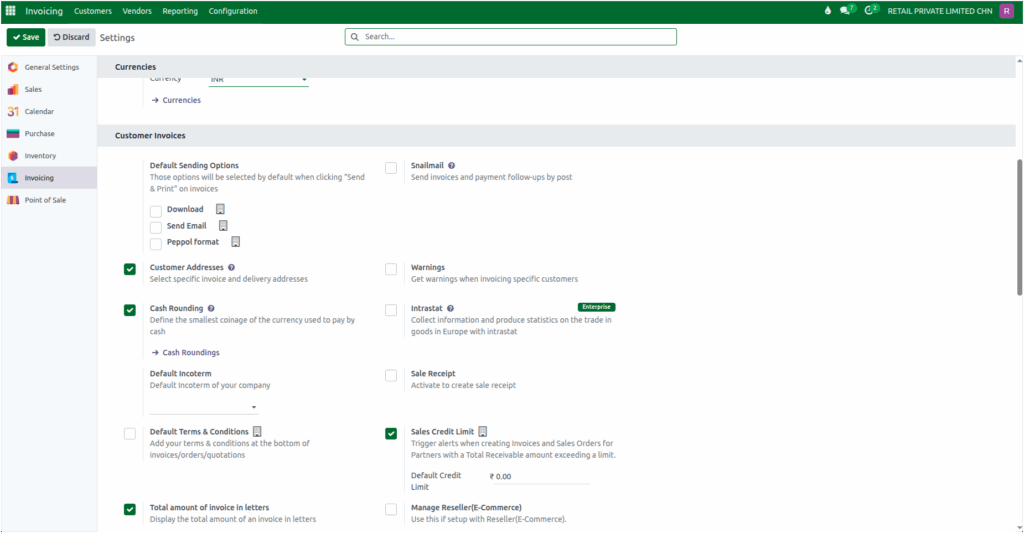
Once enabled, navigate to the Purchase module and create a purchase order for the products you need. After receiving the products, validate the GR.When you click the create GR Bill the GR Bill screen will be opened, under the Other Info tab, the Cash Rounding Method field will be displayed, allowing you to manage rounding adjustments efficiently.
Applying Cash Rounding to a GR Bill in Odoo
When you receive a vendor bill and notice that the vendor has rounded off the total amount, but the corresponding GR Bill still shows the exact amount without rounding, you can apply cash rounding to align both amounts.
To do this, go to the Other Info tab in the GR Bill and select the appropriate Cash Rounding Method (Example: CASH ROUNDING) using the drop down option.
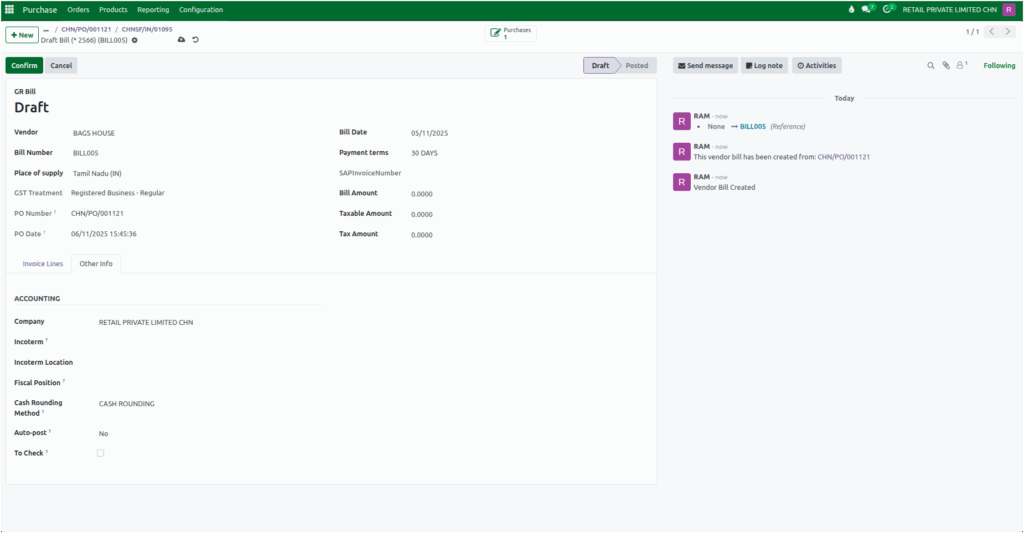
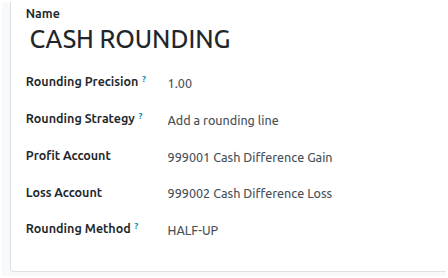
The selected cash rounding method should be configured with the following settings:
- Rounding Precision: Set as 1
- Rounding Strategy: Choose the Add a rounding line (this will add a separate line to the bill for the rounding adjustment).
- Rounding Method: Select the Half Up method.
While the selection of rounding method remains the same, but the rounding depending on the decimal values. Here are two scenarios to demonstrate how it works:
Scenario 1: Rounding Up
- GR Bill Total Amount: ₹1523.56 , Vendor Bill Total Amount: ₹1524
- After applying the cash rounding method, the system rounds the amount up by ₹0.44
- Rounding: ₹0.44 -> applied to the GR Bill
- Total Amount becomes ₹1524.
Scenario 2: Rounding Down
- GR Bill Total Amount: ₹9,881.44 , Vendor Bill Total Amount: ₹9,881
- After applying the same rounding method, the system rounds the amount down by ₹0.44.
- Rounding: ₹-0.44 -> applied to the GR Bill
- Total Amount becomes ₹9,881.

In both scenarios, the rounding method remains the same, but the final result differs due to the decimal values.
Completing the GR Bill
After applying the appropriate rounding, you need to enter the bill amount, taxable amount, and tax amount in the GR Bill. Once all the details are entered, simply confirm the GR Bill to complete the GR Bill and ready for further processing, ensuring that the total matches the vendor’s rounded amount and is accurately recorded.

