How to Calculate Product Pricing Fields in a Purchase Order in Odoo
Purchase Order (PO) process to calculate product pricing with proper cost visibility, margin control, and profitability insights and apply target margin or markup. By applying the outlined formulas and principles, companies can achieve precise cost control and stronger profitability management.
It provides the clarity needed to support data-driven, margin-focused pricing strategies.
Creating a Purchase Order
- Open the Purchase module and click the ‘New’ button to create a new RFQ.
- Select the vendor, and then choose the product based on the selected vendor from the respective field.
Product name and MRP
For example
Product :  [7979] WHISKAS ADULT OCEAN FISH FLV 50G
MRP=₹955
How to Calculate MRP (Tax Excl.)
The Maximum Retail Price (MRP) (TaxExcl). shown does not include any tax.
Formula
MRP (Tax Excl.) = MRP / (1 + Tax Percentage)For Example
    • MRP = ₹955
    • Tax Rate = 12% (i.e., 1.12), MRP(Tax Excl.) =955 / 1.12= 852.68
MRP excluding tax is ₹852.68.
Unit Value when Discount is Not Applied
When no discount is applied, the unit value displayed will be the basic cost.
Formula
Unit Value= Basic Cost- Discount PercentageNote: If the Discount is 0, the total discount amount will show be 0.
How to Calculate Tax Exclusive Value
Formula
Tax Excl.=Unit Value * QuantityFor Example
    • Unit Value= 609.3360
    • Quantity =10
    • Tax Excl.= 609.3360 *10 = 6093.36
Tax excluding is ₹ 6093.36
How to Calculate Net Cost
Formula
Net Cost = Unit Value+Tax PercentageFor Example
    • Unit Value = ₹609.3360
    • Tax =12 %
    • Net Cost =609.3360+12%=682.45632
Net Cost is ₹ 682.45632
How to Calculate Tax Inclusive Value
Formula
Tax Incl. = (Unit Value + Tax Percentage) × QuantityFor Example
Unit Value = 609.3360

Tax Rate = 12%

Quantity = 10

Tax Incl.= (609.3360+12%)*10=6824.5632
Tax Inclusive is ₹ 6824.56
How to Calculate Total Basic Cost
The Total Basic cost calculated based on basic of the unit price of the product multiplied by the purchase quantity.
Formula
Total Basic Cost = SUM(Basic Cost * Quantity)For Example
    • Line 1: Basic Cost = 609.3360, Quantity = 10
    • Line 2: Basic Cost = 533.89, Quantity = 15
    • Total Basic Cost=(609.3360×10) + (533.89×15) = 14101.71
Total Basic Cost is ₹14101.71
How to Calculate Total Discount
Formula
Total Discount = SUM(Total Discount)For Example
    • Line 1: Total Discount = 0
    • Line 2: Total Discount =0
    • TotalBasic Cost = 0 + 0 = 0
Total Discount is ₹0
How to Calculate Taxable Amount
Formula
TaxableAmount=TotalBasicCost−Total DiscountFor Example
    • Total Basic Cost = 14101.71
    • Total Discount = 0
    • TaxableAmount=14101.71 − 0 = 1410
Taxable amount is ₹14101.71
How to Calculate Total
Formula
Total=TaxableAmount+TaxAmountFor Example
    • Taxable Amount = 14101.71
    • SGST = 846.10
    • CGST = 846.10
    • Total = 14101.71 + (846.10 + 846.10) = 15793.91
Total is ₹15793.91
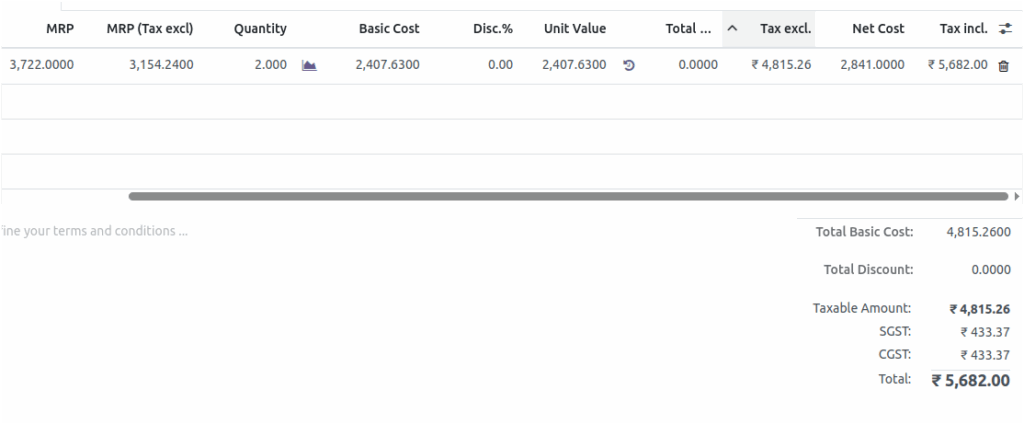
How Mark Down % and Mark Up % are Calculated in Purchase Orders in Odoo
Mark Down% Calculation
Formula
Mark Down% = ((MRP (Taxable) - Unit Value) / MRP (Taxable)) * 100For Example
    • MRP (Taxable) = ₹3,154.2400
    • Unit Value = ₹2407.6300
    • Mark Down % = ((3154.2400-2407.6300) / 3154.2400) * 100 =  23.67
Mard Down% is 23.67
Mark Up % Calculation
Formula
Mark Up% = ((MRP (Taxable) - Unit Value) / Unit Value) * 100For Example
    • MRP (Taxable) = ₹3,154.2400
    • Unit Value = ₹2407.6300
    • Mark Up % = ((3154.24-2407.6300) / 2407.6300) * 100  =31.01
Mark Up% is 31.01
Change in Margin%
Check the previous Purchase Order Mark Up % or Mark Down %.
Note: When the current Purchase Order Mark Up % or Mark Down % has increased, the change in margin % is shown as positive. Otherwise, if the Mark Up % or Mark Down % has decreased, the change in margin % is shown as negative.

