How to handle different taxes in purchase order in Odoo
Purpose of Handling Different Taxes in PO
Ensure correct tax calculation based on the vendor’s location and product type and automatically apply CGST, SGST, or IGST based on the transaction type (intra-state or interstate).Maintain accurate tax records for compliance and invoicing.
Create a New Purchase Order Document
Click “+New” to create a new purchase order document. Select the vendor from the list. Add the product using the product code. When you click Save, the PO document number is generated
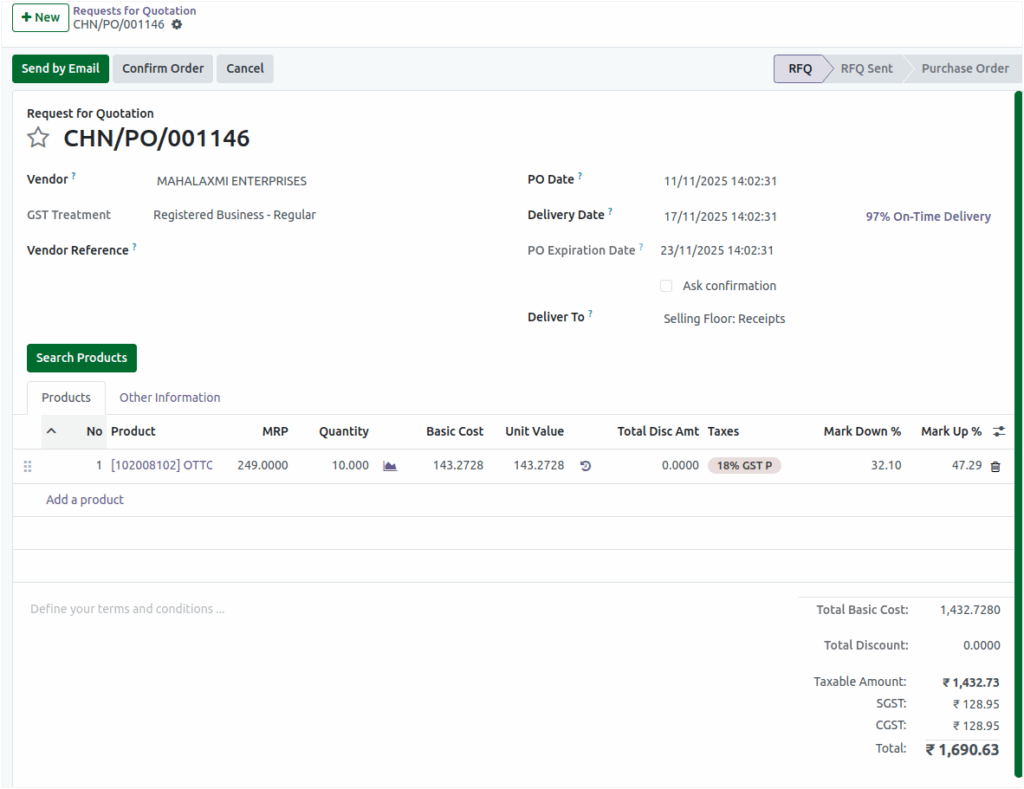
IntraState Transactions – CGST and SGST Calculation
When a purchase occurs within the same state, the applicable taxes are CGST (Central Goods and Services Tax) and SGST (State Goods and Services Tax).Each of these taxes is calculated at half of the total tax rate applicable to the product.
Example:
Let’s understand this with two products purchased from a vendor within the same state.
Product | Basic Cost (₹) | Tax Rate (%) | CGST (₹) | SGST (₹) |
Product 1 | 100 | 12% | 6 | 18 |
Product 2 | 200 | 18% | 6 | 18 |
Total Calculation:
- Total CGST = 6 + 18 = ₹24
- Total SGST = 6 + 18 = ₹24
So, in the Purchase Order screen, you will see:
CGST: ₹24 | SGST: ₹24
Calculation Details
The total tax (5%,12% or 18%) is split equally between CGST and SGST because the supplier and buyer are located in the same state. This ensures that both the Central and State governments receive their share of the tax revenue.
InterState Transactions – IGST Calculation
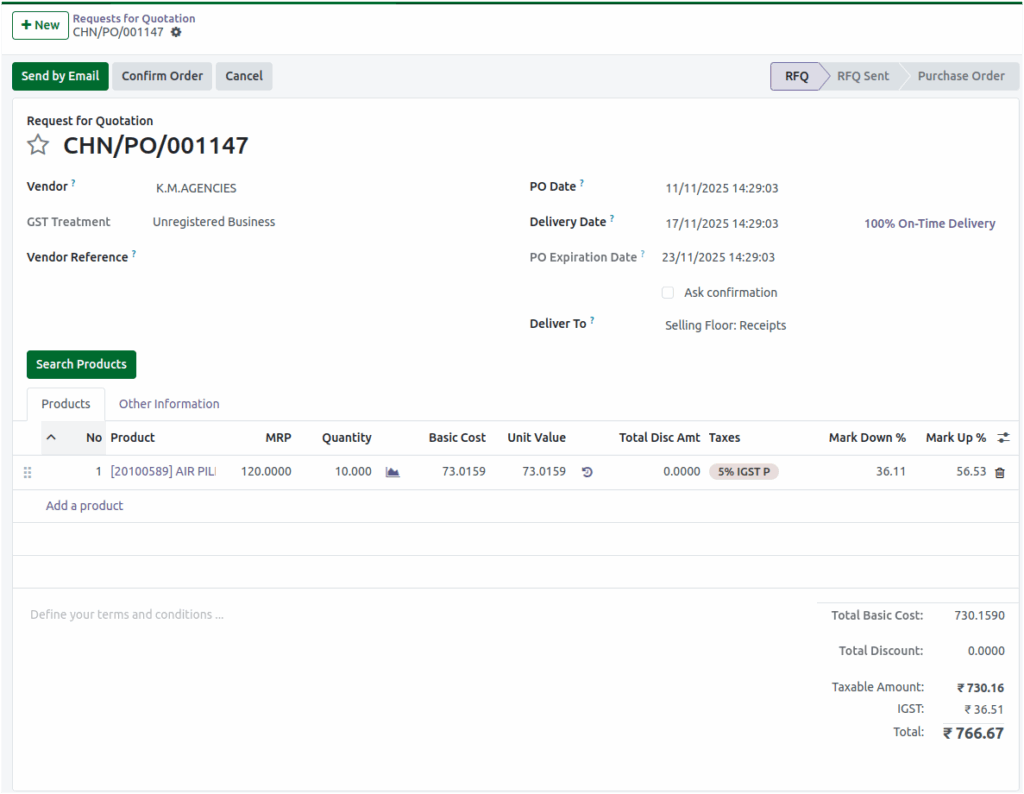
When purchases are made from a vendor in another state, the tax applied is IGST (Integrated Goods and Services Tax). In this case, there is no division between CGST and SGST; the entire tax amount is collected as IGST by the Central Government.
Automatic Application in the System
For the vendor’s Fiscal Position is set to InterState, the system automatically applies IGST to all taxable products.The Taxes field on the PO screen will display the tax rate in the format:“Tax Rate IGST P” (for example, 18% IGST P).
Example:
Product
Basic Cost (₹)
Tax Rate (%)
IGST (₹)
Product 1100 12% 12
Product 2200 18% 36
Total Calculation
- Total IGST = 12 + 36 = ₹48
At the bottom of the Purchase Order screen, you will see: IGST: ₹48
Calculation Details
IGST simplifies tax processing for interstate trade. The collected amount is later distributed between the Central and the destination State government, ensuring a smooth flow of tax credits across states.
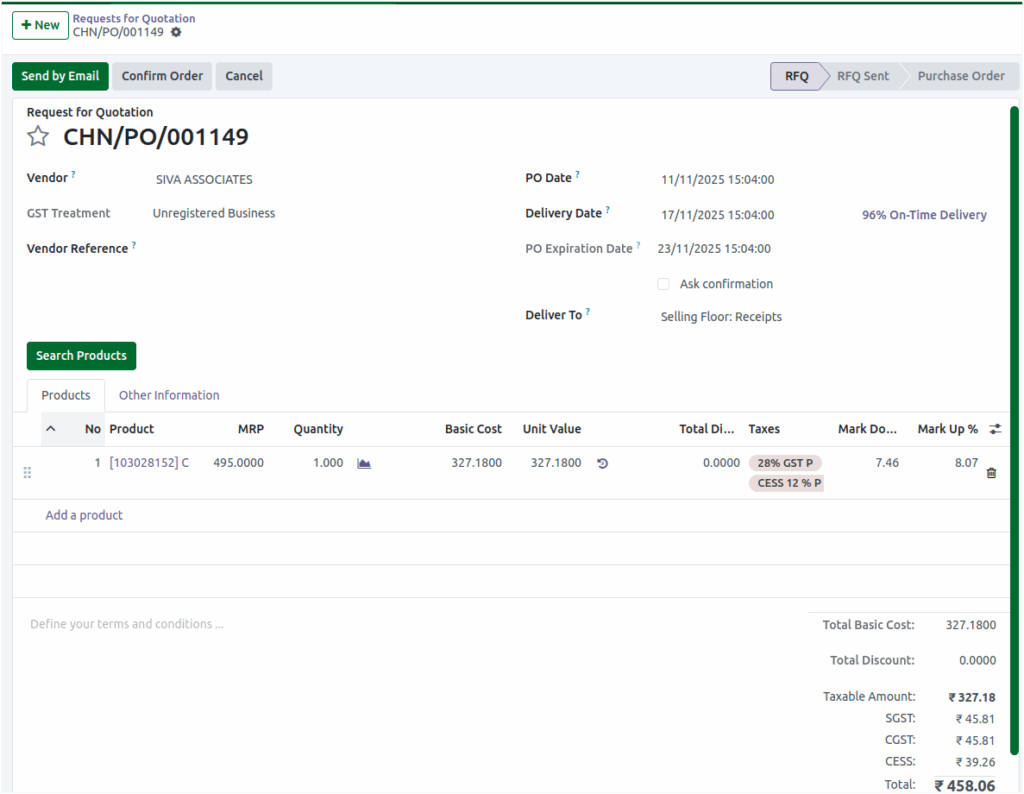
Cess Calculation for Products
Apart from the standard GST components, certain products attract an additional Cess—a specific tax levied to generate revenue for particular government programs or sectors (like the compensation cess on luxury goods or tobacco products).When a product includes Cess, the tax rate and cess rate are both displayed in the Taxes field of the Purchase Order.
Calculation Details
Cess is calculated separately from GST (CGST/SGST or IGST).The total amount of Cess for all products will be shown separately at the bottom of the PO
Example:
Product | Basic Cost (₹) | Tax Rate (%) | Cess Rate (%) | CGST (₹) | SGST (₹) | CESS (₹) |
Product 1 | 100 | 28% | 12% | 14 | 14 | 12 |
Total Calculation:
- CGST: ₹14
- SGST: ₹14
- CESS: ₹12
Thus, at the bottom of the PO Screen, it will display: CGST: ₹14 | SGST: ₹14 | CESS: ₹12