How to Process a Sales Order & Delivery Order for a Serial Number Product in Odoo
For a serial-numbered product, we can process the delivery through a Sales Order. In the Sales Order, you can verify the customer address, unit price, and product quantity. When the delivery order is confirmed, it indicates that the goods have been delivered to the customer.
Creating a Sales Order in Odoo
To create a Sales Order, first choose the customer. Once the customer is selected, the Invoice Address and Delivery Address are automatically filled in. These three fields are mandatory. The Payment Terms field is optional.
In the Order Lines section, click Add a Product. You can add the product using the product code or the lot/serial bar code. For a serial-numbered product, you must select the correct Lot/Serial Number; otherwise, an invalid operation error will occur.
Check the Unit Price, and ensure that the Quantity is set to 1, because each serial number represents exactly one unit in the lot.

To view and Complete the Delivery Order
Once the Sales Order is confirmed, it becomes locked. Click Delivery to view the Delivery Order.
Check the product availability. If the product is not available, you cannot proceed with completing the Delivery Order, and a validation error will occur.

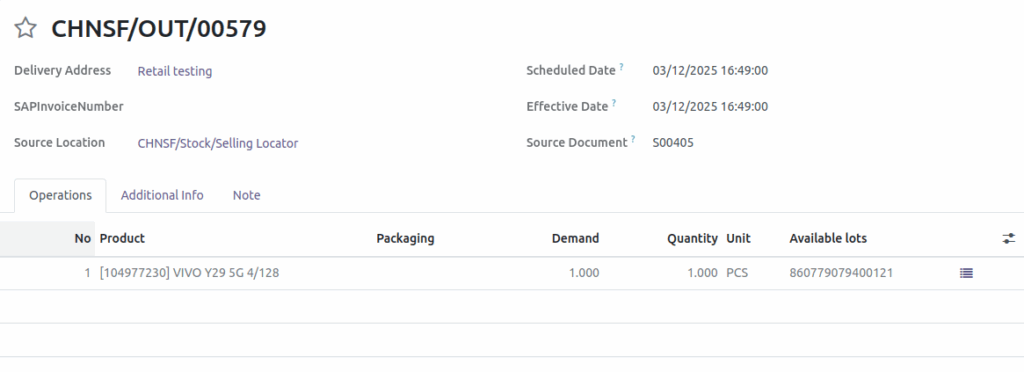
Once you change the correct source location, the product availability will show as Available. The Source Document will also display correctly based on the Sales Order number (e.g., S00405). You can change the Scheduled Date, but it is not necessary. The Delivery Order ID will be generated automatically. In the Operations tab, you will see the product, quantity, and unit price pulled from the confirmed Sales Order. Once you Validate the Delivery Order, the product will be dispatched and delivered to the customer’s address.
Once the Delivery Order is validated, the Operations tab in the Sales Order will show the delivered quantity as 1.

