How Cost Details Work in iDempiere
Cost Details is the transaction-level cost ledger in iDempiere. It records every event that changes inventory cost and explains which transaction affected cost, by how much, and why. Every meaningful inventory movement ultimately leaves a trace in Cost Details.
When Cost Details Is Created
Cost Details is created only when a completed document has a real inventory value impact. Planning, demand, or commercial intent alone is not sufficient. The system deliberately ignores documents that do not transfer ownership or change valuation, ensuring cost data remains precise and defensible.
Cost Details responds exclusively to physical inventory movements and cost-bearing events, such as stock entering or leaving the warehouse, inventory adjustments, or valuation corrections. Transactions that only reserve, promise, or plan stock never generate Cost Details records.
How Cost Details Works Across the Transaction Lifecycle
Purchase Order Phase
A Purchase Order defines a commercial agreement, not ownership of goods.
- No inventory increase
- No realized cost
- No valuation impact
Result:
No Cost Details record is created.
Material Receipt Phase (Incoming Stock)
Material Receipt is the primary entry point for Cost Details.
When a Material Receipt is completed:
- Inventory quantity increases
- Cost becomes real and owned
- Valuation must be recorded
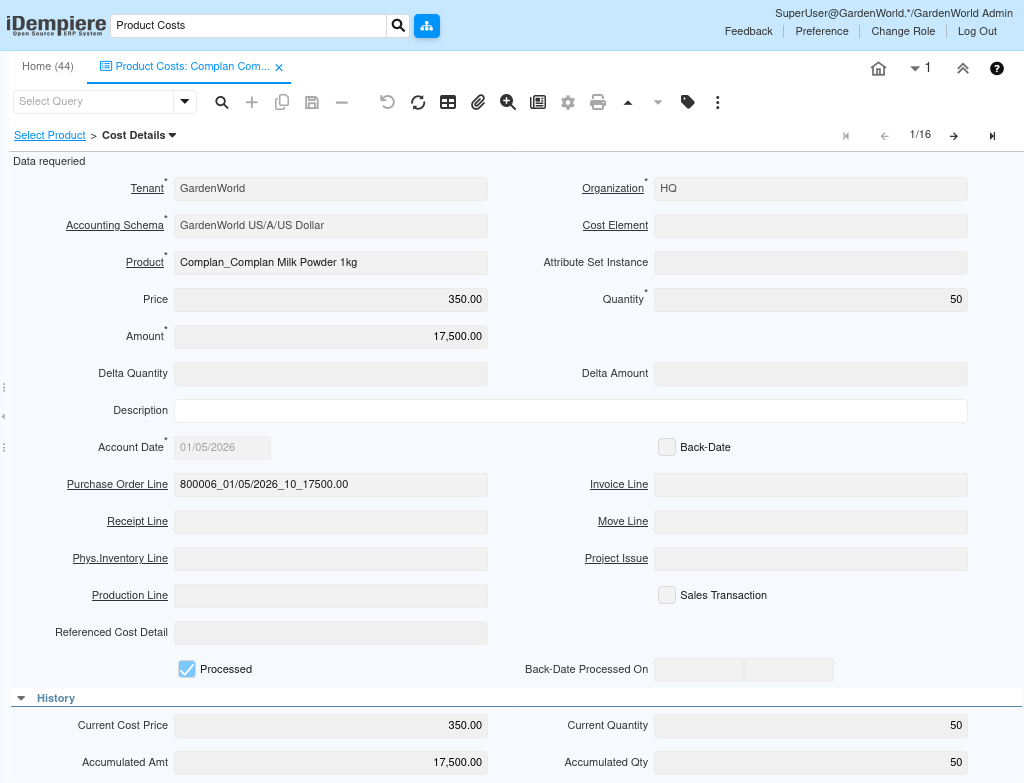
The system inserts a Cost Details record that captures:
- Unit cost at receipt time
- Received quantity
- Total receipt amount
- Accounting date
- Reference to the Purchase Order line and Receipt line
This happens regardless of costing method (Average PO, FIFO, Standard, etc.).
Sales Order Phase
A Sales Order only represents demand. It does not move stock.
- No inventory decrease
- No cost relief
- No valuation change
Result:
Cost Details remain unchanged.
Shipment (Customer) Phase (Outgoing Stock)
Shipment is where inventory leaves the system.
When a Shipment is completed:
- Inventory quantity decreases
- Cost must be relieved
- Valuation must be adjusted
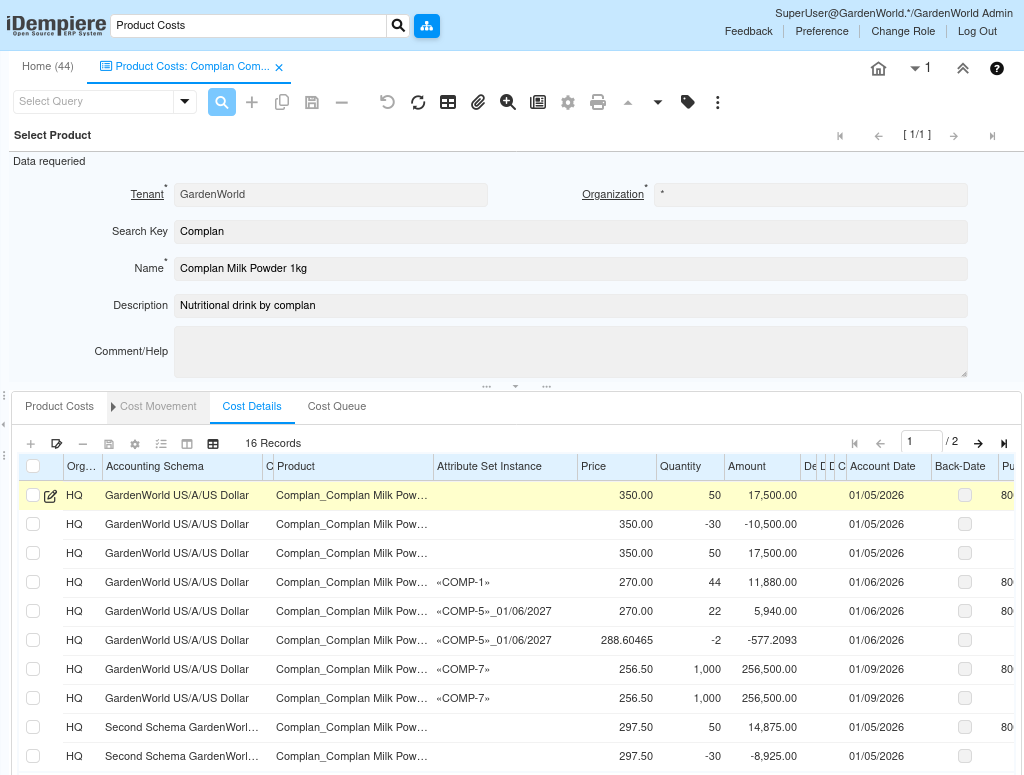
iDempiere creates a negative Cost Details record that represents:
- Quantity issued (negative)
- Cost relieved (negative amount)
- Costing method applied (FIFO, Average, etc.)
- Link to the Shipment line
This ensures that outbound inventory always reduces the total inventory value.
Meaning of a Cost Details Record
Each Cost Details entry represents one accounting truth, not an aggregate or recalculation. It records the exact transaction that changed inventory value, the cost price used at that moment, and the quantity and amount impact. Over time, these records form a complete chronological cost history, allowing precise tracing of how inventory value evolved.
Because of this granularity, Cost Details functions as the audit trail for inventory valuation, rather than a reporting convenience.
Relationship with Product Cost and Cost Queue
Cost Details sits structurally between Product Cost and Cost Queue. Product Cost reflects the current snapshot after all Cost Details are applied, while Cost Queue—when used—tracks receipt layers for specific costing methods. Even if Cost Queue is empty or unused, Cost Details continues to operate fully, ensuring costing accuracy.
- Product Cost shows the latest rolled-up cost
- Cost Details records each cost-changing event
- Cost Queue optionally tracks receipt layers
Negative Quantities in Cost Details
Negative quantities are intentional and correct. They indicate inventory leaving the system and corresponding cost relief. Every outbound transaction that reduces stock value will generate a negative Cost Details record, ensuring the inventory balance remains financially accurate.
This design separates inventory valuation from sales revenue, which is handled independently through invoicing and accounting.
Use Cases
Cost Details is critical for:
- Inventory valuation audits
- Cost reconciliation
- Margin analysis (when paired with revenue)
- Debugging costing behavior
- Understanding how average or FIFO costs evolved
It provides complete traceability from source transaction to cost impact.
Outcome
Cost Details is essential for inventory valuation audits, cost reconciliation, and analyzing how FIFO or Average costs evolved over time. It is also the primary source for debugging costing behavior, especially when investigating unexpected valuation changes or margin discrepancies.