How Expense Type Works in iDempiere
Expense Type is a master definition that categorizes different kinds of expenses your business may incur, such as travel costs, meals, office supplies, or field services. It standardizes how expense entries are classified, processed, and accounted across the system.
Process Flow
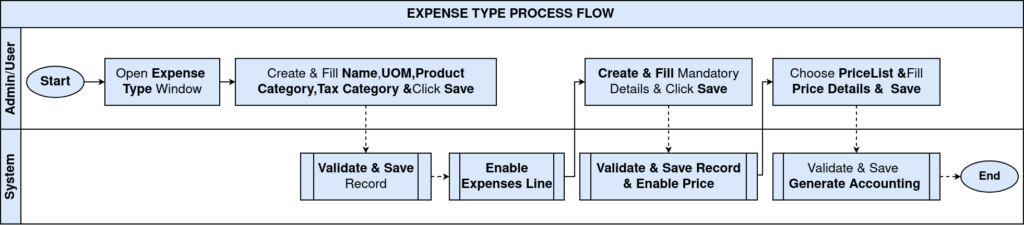
Expense Type Core Purpose
Expense Types provide central expense categories for consistent recording and reporting. They determine invoiced vs reimbursed expenses and link to proper accounts and cost categories.
Expense Type Key Fields
Each Expense Type record includes important fields:
- Name — A meaningful label for the expense type.
- Search Key — Unique code for fast lookup.
- Description — Optional detail about the expense category.
- Unit of Measure (UOM) — Defines the measurement unit if needed (e.g., Quantity, Hours).
- Invoiced — Determines whether this expense type generates an invoice (Yes/No).
- Product Category & Tax Category — Helps group the expense for pricing and tax purposes.

Expense Type Usage
- Expense Entry — When users record expenses (e.g., travel, supplies), they select the relevant Expense Type.
- Expense Report — Expense entries are grouped by Expense Type for analysis and review.
- Accounting Posting — Expense Types determine how costs are posted to general ledger accounts.
- Invoicing — If the Expense Type is marked “Invoiced,” iDempiere will create invoice entries related to those expenses.
In iDempiere, Expense Type is a key configuration that defines how different kinds of expenses are categorized, managed, and processed. It ensures that expense transactions are consistently recorded with the correct accounting, tax, and reporting behaviors across your ERP.