How Payment Print And Export Works in iDempiere
The Payment Print/Export screen in iDempiere is used to print checks or export electronic payment files after a Payment Selection has been processed. It serves as the final operational step in the payment cycle . This screen ensures that payments are issued correctly, formatted according to banking requirements, and ready for business partner settlement.
Purpose and Role in the Payment Cycle
Payment Print/Export acts as the execution point for outgoing payments.
While the Payment Selection prepares which invoices will be paid, this screen handles how the payments are delivered to partners.
Payment Selection Reference Linking the Batch
The screen begins by referencing a Payment Selection document. This tells iDempiere which group of payments is ready for printing or exporting.
This link defines
- The invoices included
- The total amount of the batch
- The payment method (rule) used
It ensures that the print/export process is tied directly to the prepared payment run.
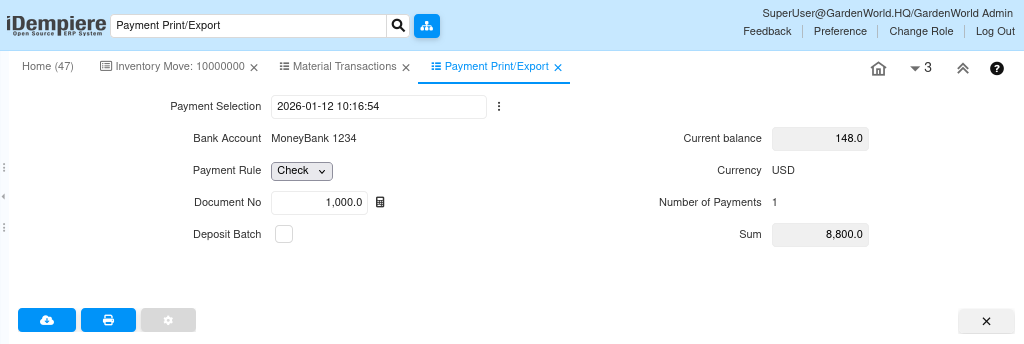
Bank Account and Current Balance for Validating the Source of Funds
The screen displays the bank account used for the payment run along with its current balance.
This helps users verify
- That the payment batch aligns with the intended account
- That sufficient funds exist
- That the currency matches the payment method
This provides final financial validation before issuing checks or sending electronic files.
Document No for Identifying the Payment Batch
The Document No uniquely identifies the Payment Selection batch being printed/exported.
It is essential for
- Audit trails
- Bank reconciliation
- Tracking payment print runs
This identifier ties the print/export back to the originating payment data.
Number of Payments for Understanding the Batch Size
The screen shows how many individual payments are included in the batch.
This helps users understand
- How many checks will be printed
- How many transfer records will be exported
It is a quick summary of batch complexity before printing/exporting.
Exported Payment
The exported CSV represents a single payment record generated from the Payment Print/Export process in iDempiere. It includes the vendor’s details (name, contact, and full address), the associated payment or invoice document number, the payment date, currency, and the total amount to be paid. Additional fields such as DepositBatch indicate whether the payment is part of a remittance batch, while Comment may contain internal references. This file is used for check printing, electronic payment processing, or sending payment details to a banking system.