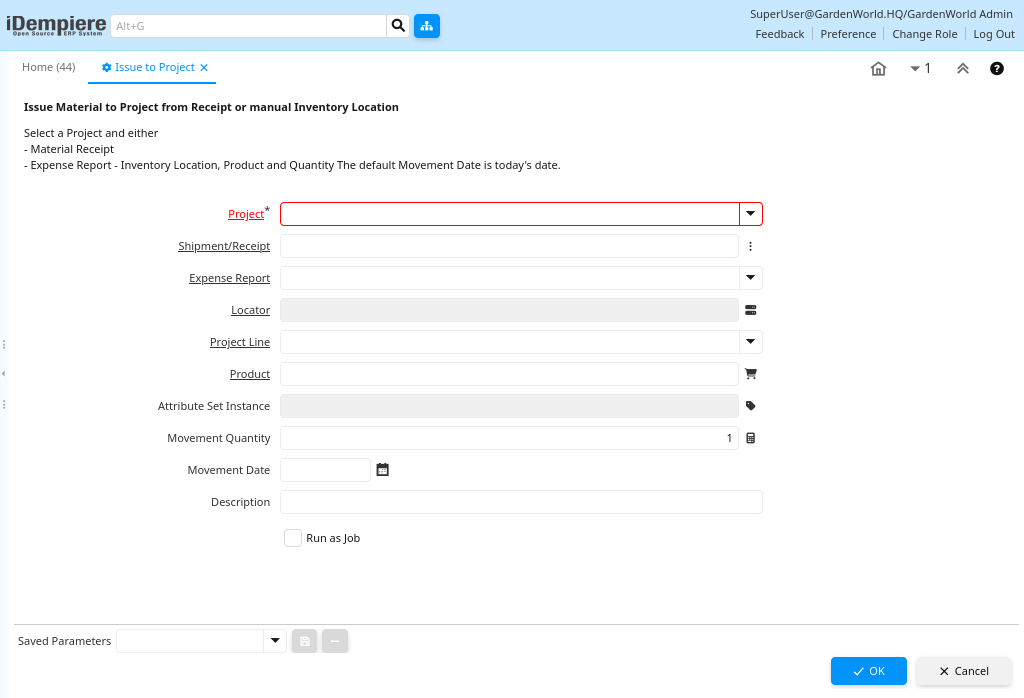
How Issue to Project Works in iDempiere
In iDempiere ERP, Issue to Project enables users to issue materials directly to a project. This process is typically used when inventory materials, received via Material Receipt or recorded in a Manual Inventory Location, need to be allocated to a specific project.
This process allows organizations to manage inventory usage for specific projects, ensuring that the materials are properly tracked and billed, and that the project’s expenses are updated accordingly.
Process Flow Diagram
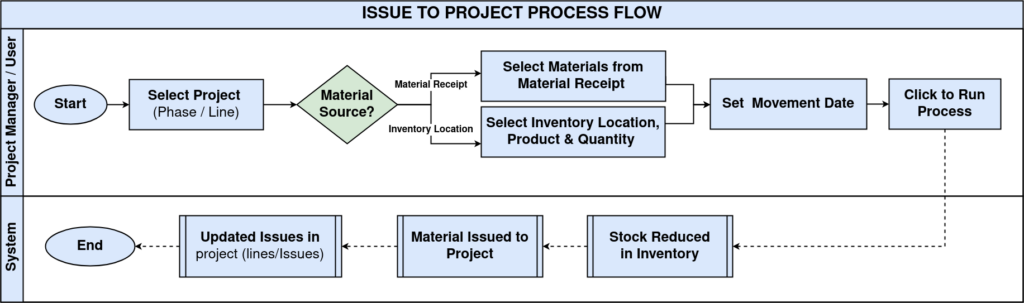
Issue Material Process
Project Selection
The first step in the Issue to Project is selecting the project that the material will be issued to.
- Projects in iDempiere are usually linked to a specific cost center or task, and materials issued to the project will be tracked as project expenses or part of the project’s inventory needs.
Material Sources
You can issue materials to the project from two primary sources:
- Material Receipt:
- If you have already received materials through Material Receipts, you can issue those materials directly to the project.
- Materials already received will appear as available for allocation.
- Expense Report – Inventory Location:
- You can also manually select an Inventory Location where the materials are stored, as well as the Product and Quantity of materials to be issued.
- This method is used when materials are directly taken from a specified location.
Movement Date
The Movement Date is automatically set to today’s date by default, but you can adjust this if necessary. This date will be used for tracking and reporting material movements in the system.
Transaction Confirmation
After selecting the relevant project, materials, and movement date:
- Confirm the transaction to issue the selected materials to the project.
- iDempiere will automatically update the inventory and the project’s material expenses, ensuring that everything is properly tracked.