How Request Status Works in iDempiere
The Request Status window defines the status values that a request (ticket or case) can have during its lifecycle — for example Open, In Progress, Closed or Investigating. These status entries are used to drive request tracking and workflow behavior. Request Status is part of iDempiere’s Request Management system, which lets you record, track, and manage internal or external requests (similar to support tickets or case records).
Process Flow
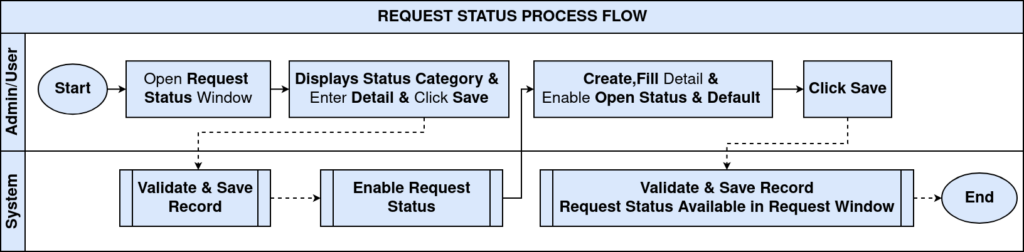
Status Value Definition
System administrators create meaningful statuses such as:
- New
- Pending
- Investigating
- Resolved
- Closed
Each status entry belongs to a status category (e.g., Open vs Closed).

Request Status Assignment
When a request is created (e.g., a customer issue or internal ticket), one of the defined statuses is selected. This indicates the current state of the request and helps users know what action is expected next.
Status Behaviour Control
Because each status has flags like Is Open or Is Closed, iDempiere can:
- Restrict edits based on status
- Filter requests in reports
- Trigger alerts or notifications
This ensures requests are handled in a structured way rather than all being treated the same.
Request Status Importance
- Provides a standard label for each step in a request’s lifecycle
- Enables clear visibility into work progress
- Allows automation rules and escalation logic
- Improves reporting and service quality tracking
Using properly defined statuses helps teams respond consistently and measure performance over time.

Request Status in iDempiere is a configurable list of states used on request records to track lifecycle progress. Each status has attributes that affect how requests are processed, reported, and even moved automatically over time. Proper setup of Request Status values ensures structured request handling, transparency, and auditability.