How to Configure and Use Sales Stages and Opportunities in iDempiere
Sales Stages and Opportunities form the pre-sales control layer in iDempiere. They help track potential revenue, manage sales efforts, and forecast outcomes before accounting impact, ensuring sales intent is evaluated and converted into transactions only when deals are mature.
Sales Stages – Definition
Sales Stages represent the company’s standard sales pipeline. They define how a deal progresses from early contact to final decision. These stages are master data, meaning they are configured once and reused across all customers, opportunities, and reports.
Each Sales Stage carries a probability value. This probability is not just informational—it directly controls forecasting and weighted revenue calculations across the system. When a stage is selected in an Opportunity, the probability is automatically applied, ensuring consistency and eliminating manual errors.
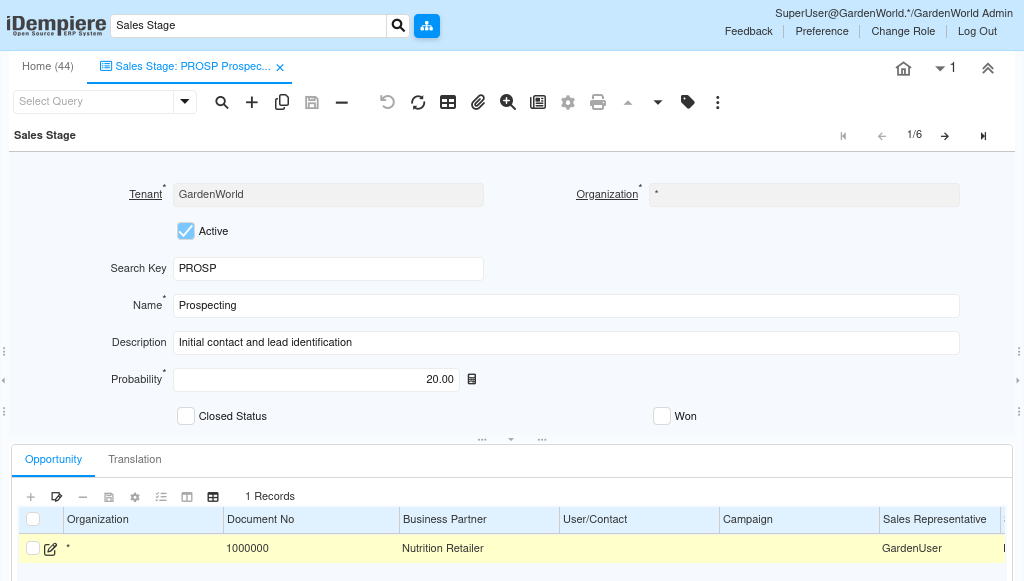
Sales stages are not transactional. They do not create documents or records by themselves. Their role is to standardize sales thinking across the organization and make reporting reliable.
Important configuration fields
- Search Key – Short internal identifier (e.g., PROSP, QUAL)
- Name – Business-friendly stage name
- Description – Explains the meaning of the stage
- Probability – Likelihood of winning at this stage
- Won – Enabled only for the final successful stage
- Closed Status – Enabled for final stages (Won or Lost)
Opportunities – Deal-Level Tracking
An opportunity represents one potential deal with one customer. It captures the intent to sell, the estimated value, ownership, and timing—without touching inventory, pricing commitments, or accounting.
Opportunities are transactional records, but they are CRM-only transactions. They exist to track sales effort and pipeline health, not to execute business operations.
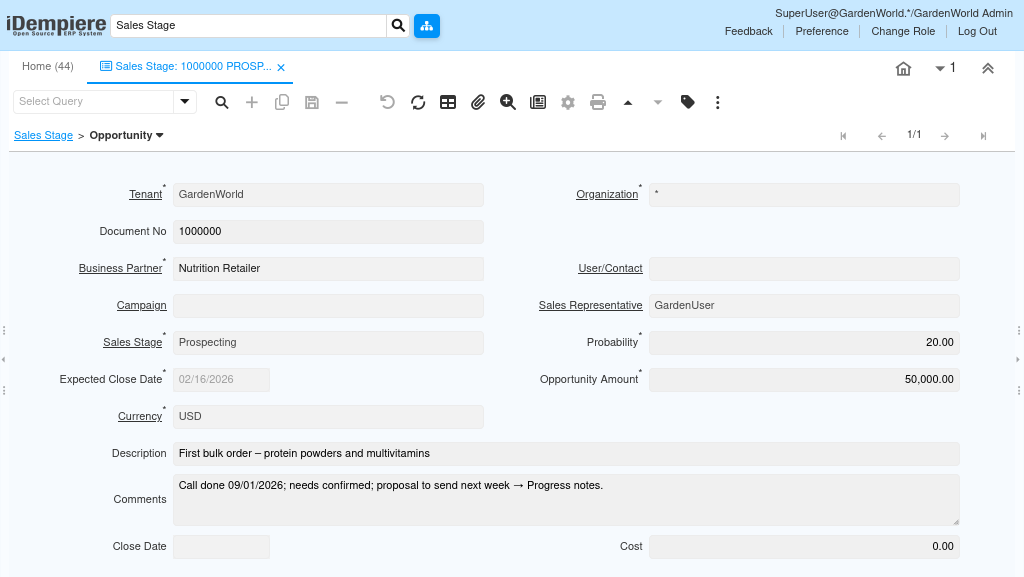
When an Opportunity is created, the selected Sales Stage immediately controls the probability. This drives the weighted amount, which is used in pipeline and forecast reports. Sales users only focus on moving the deal forward; the system handles forecasting automatically.
Core opportunity fields
- Business Partner – Customer involved in the deal
- Sales Stage – Current pipeline position
- Expected Close Date – Target decision date
- Opportunity Amount – Estimated deal value
- Probability – Auto-filled from Sales Stage
- Weighted Amount – System-calculated forecast value
- Sales Representative – Deal owner
- Description / Comments – Business context and progress notes
Sales Stage Progression in Practice
Opportunities evolve by changing the Sales Stage, not by creating new records. Each stage change reflects real business progress and immediately updates probability and forecasting values. This approach keeps the sales pipeline clean, auditable, and realistic, while avoiding duplication or confusion.
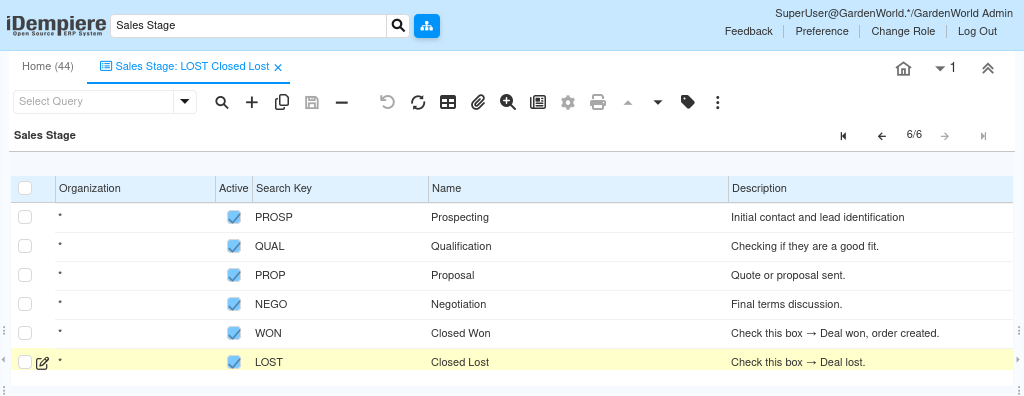
Typical lifecycle alignment:
- Early stages represent discovery and qualification
- Middle stages represent commitment and pricing discussion
- Final stages represent confirmed outcomes (Won or Lost)
Conversion to Quotation or Sales Order
Once an Opportunity reaches Closed Won, it becomes eligible for execution. At this point, users can convert the opportunity into a Quotation or Sales Order using the Quote / Order sub-tab. This conversion is manual and intentional, ensuring that only approved deals move into operational processing.
For conversion to work smoothly, the customer must already have:
- At least one Location
- At least one Contact
- Valid Price List and Payment Terms
The created document remains linked to the Opportunity, preserving a full trail from lead to order.
Key outcomes
- Prevents premature order creation
- Ensures sales approval before execution
- Maintains traceability from CRM to operations
What This Workflow Intentionally Excludes
Sales Stages and Opportunities are designed to stay outside operations and accounting. They do not reserve stock, calculate costs, or generate financial postings. This separation protects inventory accuracy and financial integrity while still allowing sales teams to work freely.
They do not:
- Affect inventory
- Create cost records
- Generate accounting entries
- Trigger shipments or invoices
Outcome
Sales Stages and Opportunities provide a structured, low-risk pre-sales workflow that connects business intent with operational execution at the right time.
They deliver:
- Accurate sales forecasting
- Clear deal ownership and progress tracking
- Reduced operational mistakes
- Clean separation between CRM and transactions
Once converted, the standard sales flow takes over (Sales Order → Shipment → Invoice → Accounting), while the Opportunity remains as historical sales context for reporting and analysis.