How Currency Type Works in iDempiere
Currency Type controls which exchange rate iDempiere applies during currency conversion. It acts as the decision layer between a currency and its rate, allowing different processes to use Spot, Average, or Period End rates for accurate, compliant reporting.
Currency Type in the Overall Currency Workflow
Currency Type sits between Currency and Currency Rate.
It does not store rates itself, but tells the system which rate to pick at runtime.
Workflow hierarchy:
Currency
→ Currency Type
→ Currency Rate
→ Business Transaction (Order, Invoice, Accounting)
This design allows the same currency pair (EUR → USD) to behave differently depending on business context.

Creating and Managing a Currency Type
A Currency Type represents how rates are interpreted, not the numeric value itself. When creating one, you define its identity, purpose, and whether it should be used automatically.
Most systems start with Spot as the default Currency Type, which uses the current market rate. Other types are added later to support accounting or reporting needs.
Key points users must understand while creating a Currency Type:
- Search Key and Name uniquely identify the rate logic.
- Active must be enabled, otherwise the type is ignored.
- Default determines which rate is picked automatically when no type is specified.
Using Currency Type with Currency and Rates
Once a Currency Type exists, it becomes usable only when conversion rates are linked to it. The same currency pair can have multiple rates, each under a different Currency Type.
For example:
- EUR → USD using Spot for sales orders
- EUR → USD using Period End for financial closing
- EUR → USD using Company for internal costing
At runtime, iDempiere checks:
- The transaction date
- The Currency Type
- The valid rate range
It then applies the correct Multiply or Divide rate automatically.
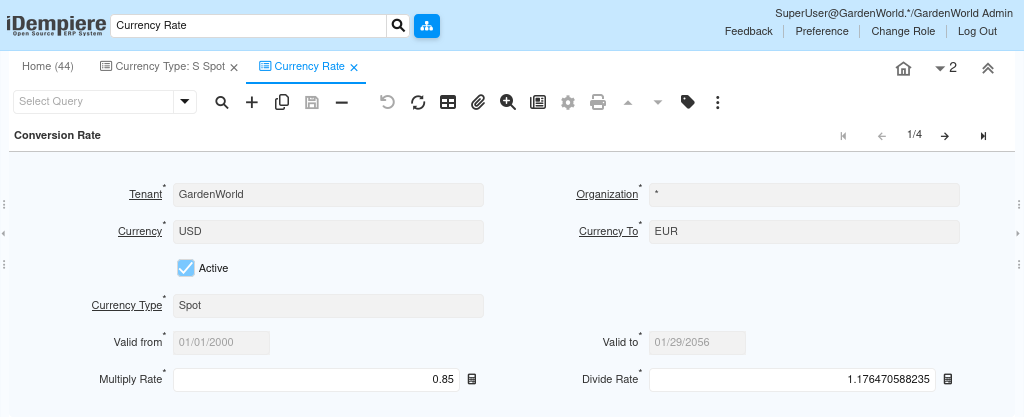
How Currency Type Is Applied During Transactions
Users never manually choose exchange formulas during transactions. Instead, Currency Type is selected implicitly based on document setup or accounting schema.
When a document is completed:
- The system identifies the Currency Type
- Fetches the valid rate
- Converts amounts consistently across lines, taxes, and postings
This ensures sales, purchasing, costing, and accounting all remain aligned, even in multi-currency environments.
Why Currency Type Is Powerful in Daily Operations
Currency Type removes guesswork from currency conversion and replaces it with controlled financial logic. It allows businesses to respond to market volatility while still maintaining accounting discipline.
Practical outcomes users experience:
- Accurate financial statements using Period End or Average rates
- Operational flexibility using Spot rates for live transactions
- Clear audit trails showing which rate logic was applied
- Consistency across modules without manual intervention
Things Users Should Be Careful About
- Every Currency Type must have at least one valid conversion rate, otherwise documents fail.
- Only one Currency Type should be marked as Default.
- Rate valid-from dates must not overlap for the same currency pair and type.
- Multiply and Divide rates are linked; users typically maintain only one direction.
Outcome
By configuring Currency Type correctly, users gain full control over how money is converted across the system—without touching each transaction manually. It becomes the foundation for reliable multi-currency operations, supporting daily business activity as well as long-term financial reporting.