How Business Partner Identification and Classification Work in iDempiere
Business Partner identification and classification in iDempiere organize all external entities customers, vendors, employees, or prospects defining their roles and controlling how defaults are applied across sales, purchasing, accounting, and reporting.
Process Flow
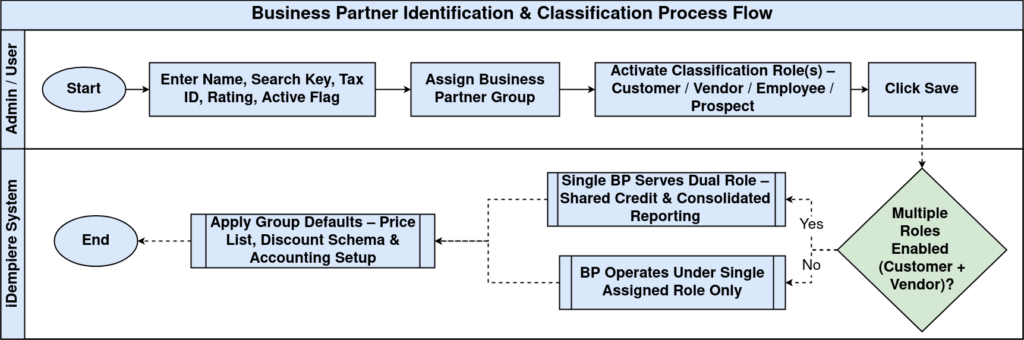
Relationship Between Identification and Classification
The Business Partner model in iDempiere works by combining identity fields with classification fields. Together, these define both who the BP is and how they function operationally.
- Identification – Name, Search Key, Logo, Reference information
- Classification – Customer, Vendor, Employee, Prospect
- Grouping – Business Partner Group
These layers collectively determine the BP’s default price lists, payment rules, accounting settings, and document behavior.
Business Partner Identification
Business Partner identity is established through core descriptive fields. These fields improve master data clarity, enforce legal identification, and support reporting.
Key identification elements include
- Name / Name 2 – Primary naming records
- Search Key – Unique internal reference for quick search and document linkage
- Tax ID – Legal identification for tax and compliance
- Rating / Reference No – Internal evaluation or external reference
- Active Flag – Controls whether the BP can be used in transactions
These fields ensure the BP is uniquely identifiable and compliant with statutory and organizational requirements.

Business Partner Classification
Classification defines the Business Partner’s operational role. A single BP can hold multiple roles, preventing duplicate records and enabling better lifecycle management.
- Customer – Enables sales orders, invoices, receivables settings
- Vendor – Enables purchase orders, invoices, payables settings
- Employee – Used for HR and expense workflows
- Prospect – Used for CRM before converting to Customer
Activating these roles exposes additional configuration tabs that tailor BP behavior for each corresponding module.
Business Partner Group
The Business Partner Group is the central classification layer that drives system defaults. Assigning a BP to a group automatically applies:
- Default accounting setup
- Default price list
- Discount schema
Groups ensure consistency across large numbers of BPs and reduce manual configuration time.
Impact on Transactions
When a Business Partner is used in a transaction, iDempiere evaluates:
- The BP’s role (Customer/Vendor/Employee)
- The assigned Business Partner Group
- The identification fields (e.g., Tax ID, Search Key, Name)
These elements determine:
- Applicable price list
- Default payment term
- Relevant discount schema
- Accounting schema
- Tax rules
- Document processing behavior
Multi-Role Flexibility
iDempiere allows a single Business Partner to assume multiple roles simultaneously (e.g., Customer + Vendor). This improves master data management by:
- Eliminating duplicate BP records
- Allowing shared credit management
- Consolidating reporting
- Reducing administrative maintenance
This multi-role structure supports a wide range of business scenarios.