How Warehouse Accounting Works in iDempiere
Warehouse Accounting defines how inventory movements in a warehouse impact financial accounts. It links receipts, issues, adjustments, and transfers to correct ledger entries. Configured once per warehouse, it applies automatically to all inventory transactions.
Accounting as the Financial Backbone of a Warehouse
Every warehouse must be linked to an Accounting Schema. This schema determines:
- Which chart of accounts is used
- How inventory value is tracked
- How differences and adjustments are posted
Without this setup, inventory movements cannot produce valid accounting entries.
Warehouse Accounting ensures that stock quantity and stock value always move together.
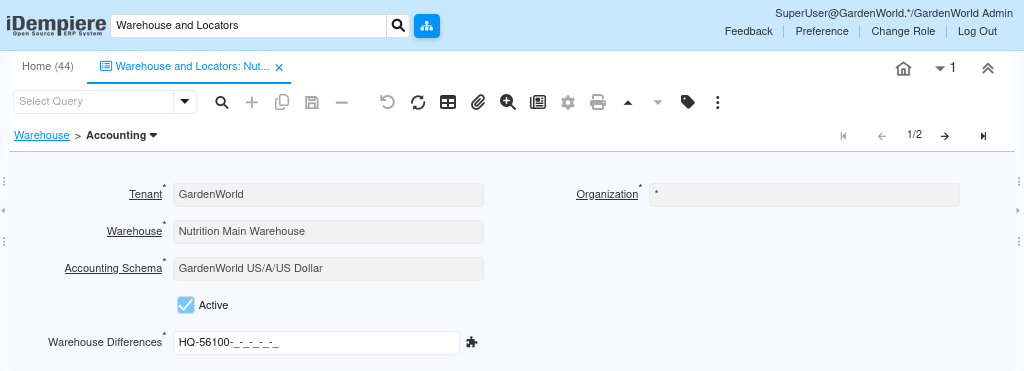
Core Accounting Configuration
The warehouse accounting setup includes:
- Warehouse (HQ Warehouse)
- Accounting Schema (GardenWorld US/A/US Dollar)
- Active flag
- Warehouse Differences account
These fields are not used daily; they are foundational settings that drive all future postings.
Once saved, the warehouse is financially enabled.
How Inventory Transactions Use Warehouse Accounting
Warehouse Accounting does not create postings on its own.
It is used automatically whenever inventory transactions occur, such as:
- Material Receipts
- Inventory Issues
- Physical Inventory Adjustments
- Internal Transfers
During posting, iDempiere looks at:
- The warehouse where the transaction occured
- The warehouse accounting configuration
- The product and category accounts
Based on this, accounting entries are generated without user intervention.
Warehouse Differences Account — Why It Matters
The Warehouse Differences account is used when:
- Physical inventory does not match system quantity
- Adjustments are made during inventory counts
- Rounding or correction entries are required
Instead of corrupting product or inventory asset accounts, iDempiere isolates such differences into a dedicated account. This keeps financial reporting clean and auditable.

What Users Actually Do
Users do not manually post accounting entries at the warehouse level.
They:
- Assign an Accounting Schema
- Define the Warehouse Differences account
- Activate the warehouse accounting setup
- Save the record
After that, all inventory transactions automatically respect this configuration. There is no daily maintenance required.
How This Fits into the End-to-End Warehouse Flow
Warehouse Accounting works together with:
- Warehouse → defines where stock exists
- Locator → defines where inside the warehouse stock is stored
- Storage → shows real-time quantities
- Replenishment → decides when to restock
Accounting ensures that every movement across these components is financially correct.
Why Warehouse Accounting Is Essential
Warehouse Accounting ensures that:
- Inventory valuation is accurate
- Financial statements reflect real stock value
- Audit trails remain intact
- Inventory adjustments do not distort revenue or cost accounts
It removes the need for manual reconciliation between inventory and finance teams.
Outcome
With Warehouse Accounting configured, iDempiere guarantees that inventory operations and accounting stay synchronized. Every receipt, issue, and adjustment is reflected correctly in financial records, providing trustworthy inventory valuation and clean financial reporting—without manual effort.