How Purchase Invoice Line Works in iDempiere
A Purchase Invoice Line represents the detailed item-level entry of a vendor bill. Each line captures the product or charge being invoiced, the quantity, pricing, tax rules, and cost allocation data.
The line-level information flows into the invoice header totals, cost postings and tax calculations. iDempiere ensures that each line is validated and calculated correctly before the invoice can be completed.
Relationship Between Invoice, Product/Charge, and Calculations
Each invoice line connects three important elements
The invoice to which it belongs, the product/charge that identifies what is being billed, and the quantities and prices used to calculate the financial amounts.
This structure works as
- Invoice → the parent financial document
- Product/Charge → defines what is being purchased
- Quantity & Price → determine the line’s financial impact
All further calculations tax, totals, costing depend on this relationship.
Invoice and Procurement References
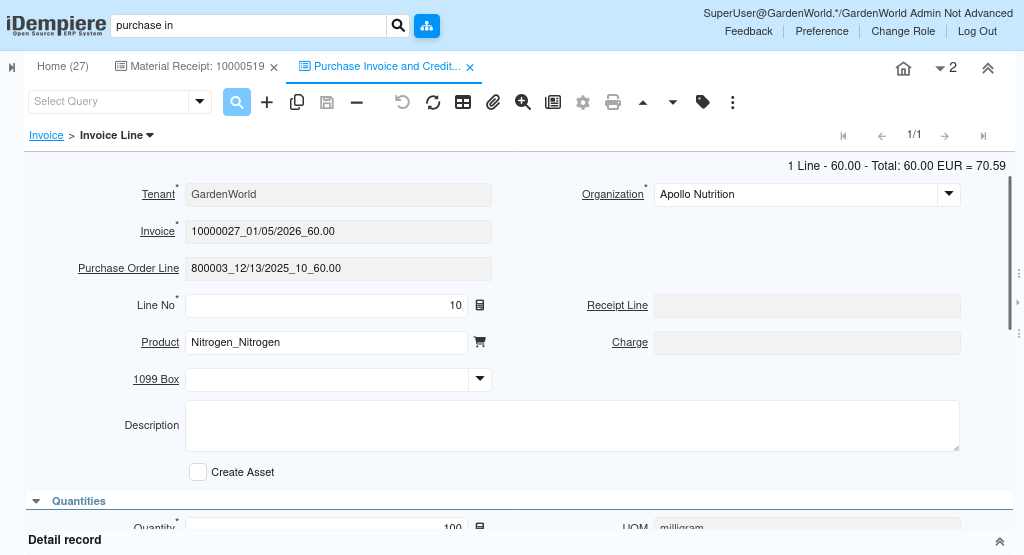
The line is always tied to an Invoice, Purchase Order line and optionally Receipt line. These references ensure consistency with procurement and matching rules.
Key Functional Relationships
- Purchase Order Line allows pulling ordered quantity, price, and tax defaults
- Receipt Line supports 3-way matching (PO → Receipt → Invoice)
- Line No defines the sequence in which lines appear on the invoice
Identifying What Is Being Invoiced
A line can reference either a product (goods/services) or a charge (freight, duties, fees).
- Selecting a product loads defaults such as UOM, price list values, tax category, and costing implications.
- Selecting a charge instead bypasses product costing and directly posts to the charge’s account. I
- f no product or charge is selected, the line can still be used for descriptive purposes by enabling “Description Only”.
Controlling how much is being invoiced
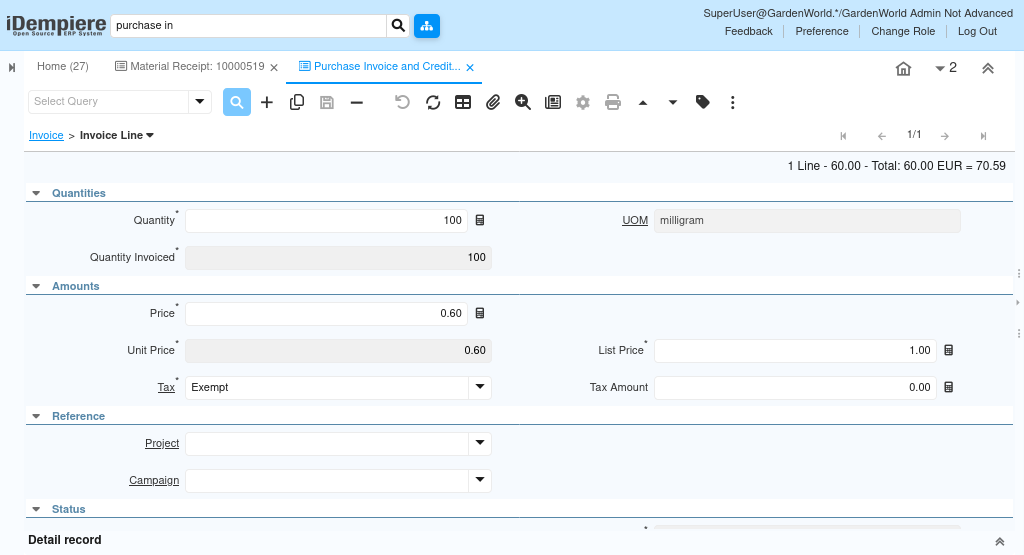
Quantity fields determine how many units are being billed and drive price calculations, tax amounts, and matching.
Important Quantity Elements
- Quantity and UOM define what is being purchased
- Quantity Invoiced ensures accurate matching with PO/Receipt
How the System Calculates Invoice Amounts
Invoice line pricing ensures the financial impact of the item is calculated correctly. The system uses:
- Unit Price as the actual billing price
- List Price for comparison which is derived from price list
- Price as the base price derived from price list or PO
Amount fields include
- Line Amount – quantity × price
- Line Total – includes additional adjustments if applicable
iDempiere continuously recalculates these values as price or quantity changes, ensuring the header totals remain correct.
Determining Tax Rules and Amounts
Tax rules are applied at line level based on tax category, vendor location, and product/charge settings.
The Tax field determines the tax rate, while Tax Amount represents the calculated tax for the line.
iDempiere updates tax automatically whenever quantity, price, or tax rule changes.