How does the Role work in iDempiere
It provides centralized control over what a user can see and do. In iDempiere, a Role acts as the security backbone that connects users to windows, processes, reports, and data.
By configuring roles correctly, organizations can enforce data security, regulatory compliance, and operational discipline in iDempiere.
Relationship between Role, User, and Organization
A Role defines the scope of access within a Client (Tenant) and one or more Organizations. Users do not receive permissions directly; instead, they are assigned one or more roles.
Each role determines
- Which organizations the user can log into
- Whether the user can see data across organizations or only within their own
- Whether the role is for manual use, reporting use, or system use
This separation ensures that security rules are applied consistently across users performing similar responsibilities.
How to Create a Role in iDempiere
- Open the Role window
- Define basic role details
- Configure role behavior
- Grant window, process, and report access
- Windows (for transactional work)
- Processes (for actions and background tasks)
- Reports (for reporting and analysis)
- Assign Organization access and, if required, configure record-level access so users see only permitted data (for example, specific projects or documents).
- Open the User window, select the user, and assign the newly created role.
Save the record.

Controlling window, process, and menu access
The Role window controls functional access through permissions assigned to menus, windows, processes, workflows, and forms.
If a window or process is not explicitly allowed for the role, it is invisible to the user. This ensures that users only see the parts of the application relevant to their job, reducing errors and unauthorized actions.
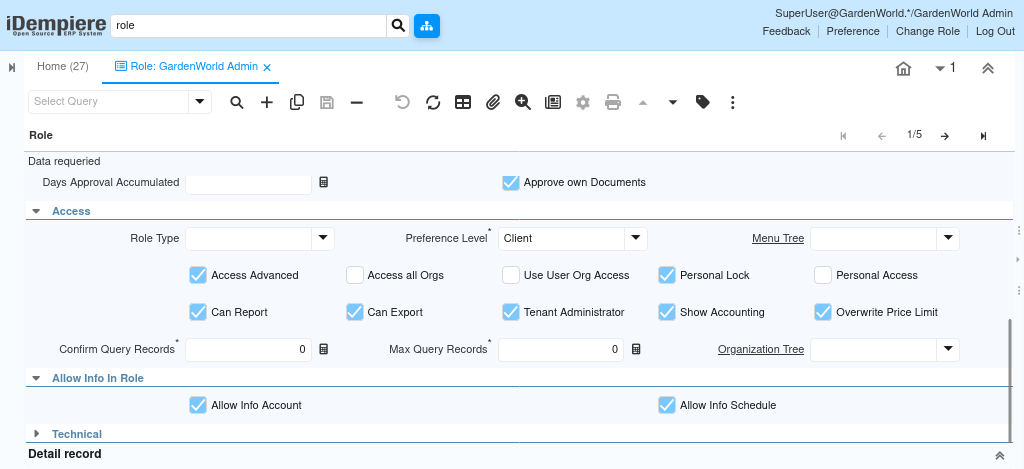
Exporting, printing, and data extraction control
The Role window also controls how data can be taken out of the system. Permissions can restrict:
- Exporting report results to formats like Excel or PDF
- Printing documents and reports
This is especially important for finance and compliance teams, where unrestricted exports could lead to data leakage or audit issues.
By defining roles carefully, iDempiere enables precise control over user access, reporting visibility, exporting capabilities, and underlying data exposure. The Role window ensures that each user sees exactly what they are supposed to see—and nothing more—while supporting scalable, secure operations across projects, departments, and organizations.