How Customer Opportunities Work in iDempiere
This guide explains how Customer Opportunities work in iDempiere and integrate with the Customer Header to manage the pre-sales lifecycle. Opportunities track potential deals, support forecasting, and follow defined sales stages without impacting accounting or inventory.
Customer Header – Foundation for Opportunities
The Customer record provides the commercial and operational context for every opportunity created under it. When an opportunity is added, iDempiere automatically inherits key defaults from the Customer header, ensuring consistency and reducing manual errors.
Important commercial controls such as credit status, price list, discount schema, payment terms, and invoice rules are already defined here. These settings do not block opportunity creation but become critical once an opportunity moves toward order conversion.
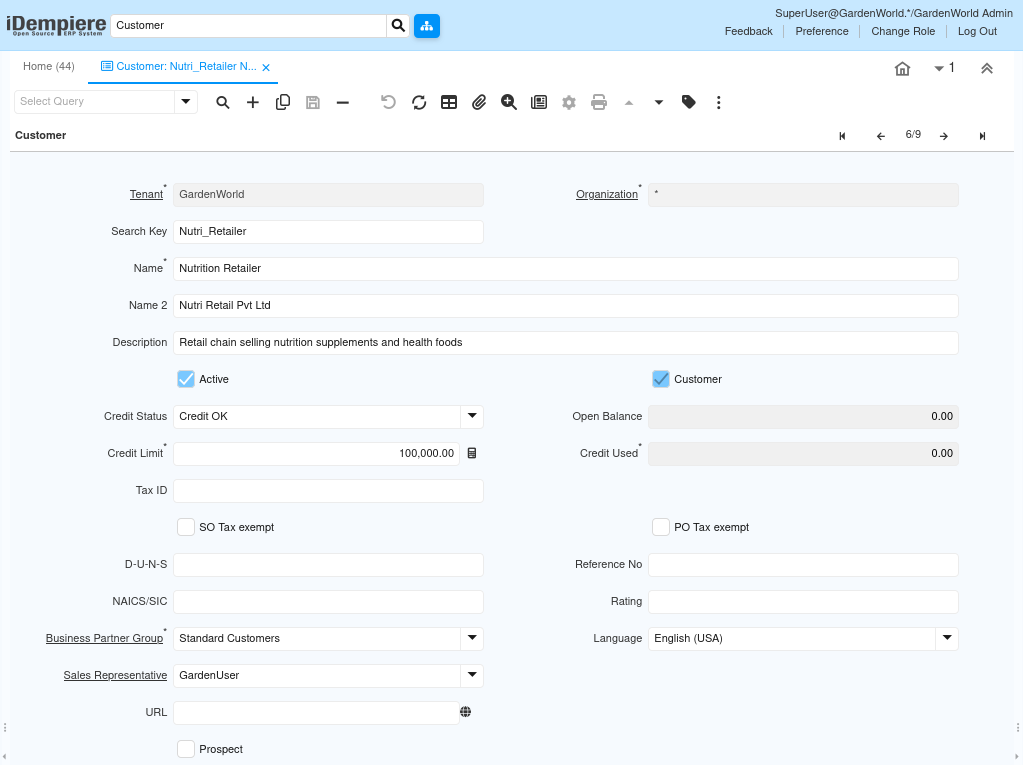
From a workflow perspective, the Customer header acts as the anchor. Opportunities cannot exist independently and always reference this master record for identity, ownership, and downstream transaction readiness.
Key customer fields that influence opportunities indirectly:
- Business Partner Group – Defines default accounting and commercial behavior.
- Sales Representative – Auto-assigned to opportunities unless overridden.
- Price List & Discount Schema – Used later during quotation or order creation.
- Credit Status & Credit Limit – Checked only when converting to orders.
- Invoice Rule & Payment Term – Determines post-sale processing behavior.
Opportunities Tab – Deal Tracking Workspace
The Opportunities tab under the Customer record is where each potential deal is captured, tracked, and matured. Each row represents one commercial opportunity with its own value, timeline, and probability of success.
An opportunity is not a transaction document. It is a sales intelligence record that evolves as discussions progress. Changing the sales stage updates the probability automatically, which directly affects pipeline forecasts and weighted revenue calculations.
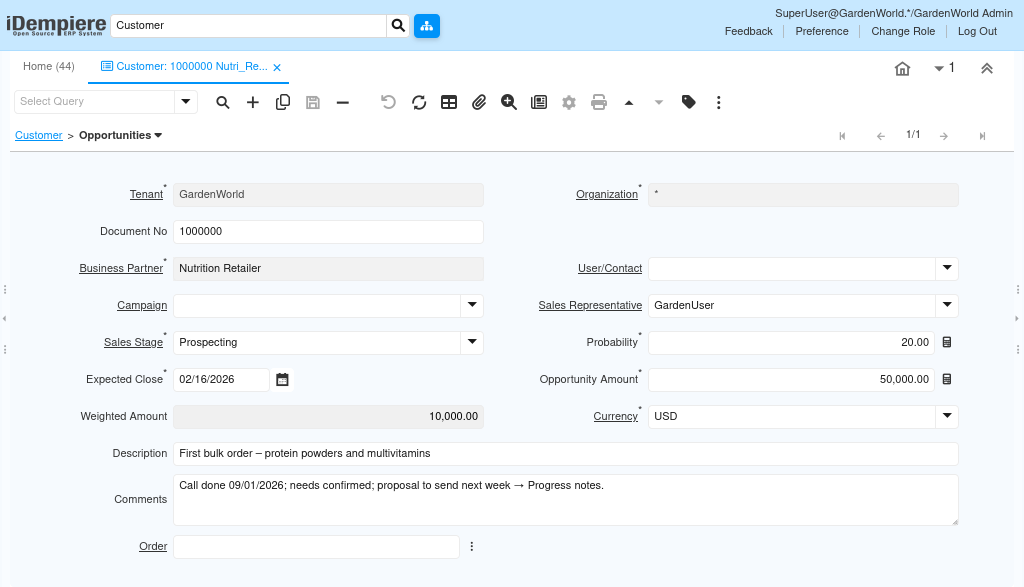
Opportunities can also be created directly from the Sales Opportunity window, but when created from the Customer, all customer context is already applied.
Opportunity Header – Core Configuration Fields
Each opportunity header captures what the deal is, how much it is worth, and where it stands in the sales cycle. These fields work together to provide real-time sales visibility.
The Sales Stage drives behavior. It automatically sets the Probability, which then calculates the Weighted Amount. This is the number used in sales forecasts and pipeline reports.
Critical fields and their roles:
- Business Partner – Identifies the customer for the deal.
- Sales Stage – Controls probability and pipeline status.
- Probability – Auto-filled from stage, editable if needed.
- Opportunity Amount – Total expected deal value.
- Weighted Amount – System-calculated (Amount × Probability).
- Expected Close Date – Used for time-based forecasting.
- Sales Representative – Owner of the deal.
- Currency – Defines deal valuation currency.
- Description & Comments – Capture deal context and progress notes.
Sales Stage Interaction and Progression
Sales Stages define where the opportunity currently sits in the sales journey. When a stage is changed, iDempiere immediately recalculates the probability and weighted amount without requiring manual updates. This creates a living pipeline where forecasts update automatically as sales teams progress deals.
Typical progression reflects real-world sales behavior:
- Early stages focus on identification and qualification.
- Middle stages represent proposal and negotiation.
- Final stages mark closure (Won or Lost).
Once an opportunity reaches Closed Won, it becomes ready for quotation or order creation, depending on business policy.
Customer–Opportunity Relationship in Practice
Opportunities are child records of the Customer. This allows users to view all potential deals for a customer in one place and understand the full relationship history before any order exists.
From a workflow standpoint:
- Multiple opportunities can exist for the same customer.
- Opportunities do not reserve stock or affect finance.
- Customer data ensures continuity when converting to sales documents.
This separation keeps pre-sales flexible while protecting core transactional data from premature impact.
Purpose
Customer Opportunities are primarily a sales control and forecasting tool. They provide structure without enforcing premature financial or logistical commitments.
They are especially useful when:
- Sales cycles are long or consultative.
- Deal values are large and need tracking.
- Management requires pipeline visibility.
- Sales teams need accountability and ownership.
Common business use cases include:
- Tracking first-time customer deals.
- Managing bulk or contract negotiations.
- Forecasting monthly or quarterly revenue.
- Reviewing stalled or lost opportunities.
- Converting successful deals into orders smoothly.
Outcome
When configured and used correctly, Customer Opportunities give organizations a clear, measurable, and structured pre-sales workflow. Sales teams gain visibility, management gains forecasting accuracy, and operational teams receive cleaner handovers when deals convert into orders.
- The Customer header ensures consistency.
- The Opportunities tab ensures visibility.
- Sales Stages ensure control and predictability.
Together, they form the foundation of iDempiere’s CRM-to-Sales workflow without impacting accounting or inventory until the business is truly ready to commit.