How Project Phases Work in iDempiere
Project phases define the major execution stages of a project in iDempiere. Each phase represents a logical block of work and acts as a control layer between the project and detailed activities, helping plan timelines, allocate budgets, and track progress clearly.
Creating Phases Using Project Type
Project phases are not usually created manually from scratch. Instead, they are generated automatically using a project type.
After creating the project header and selecting the appropriate line level (commonly set to Task), the user clicks ‘set project type’ and chooses a predefined project type such as construction project. When confirmed, iDempiere automatically copies all standard phases defined in the selected project type into the phase tab of the project. These phases serve as a working template, not locked data. This step instantly creates a complete phase structure, saving time and ensuring consistency across projects.

Review the Auto-Created Phases
After the project type is applied, navigate to the phase tab.
You will now see multiple phase records already created, such as Foundation, Civil Structure, Electrical, and Finishing.
Each row represents one phase and follows the sequence defined in the project type. At this stage, the phases are active and editable, allowing the project team to adjust them to match real project requirements.
This approach ensures consistency across projects while still allowing flexibility at execution time.

Open and Adjust an Individual Phase
To work with a specific phase, open it directly from the Phase tab.
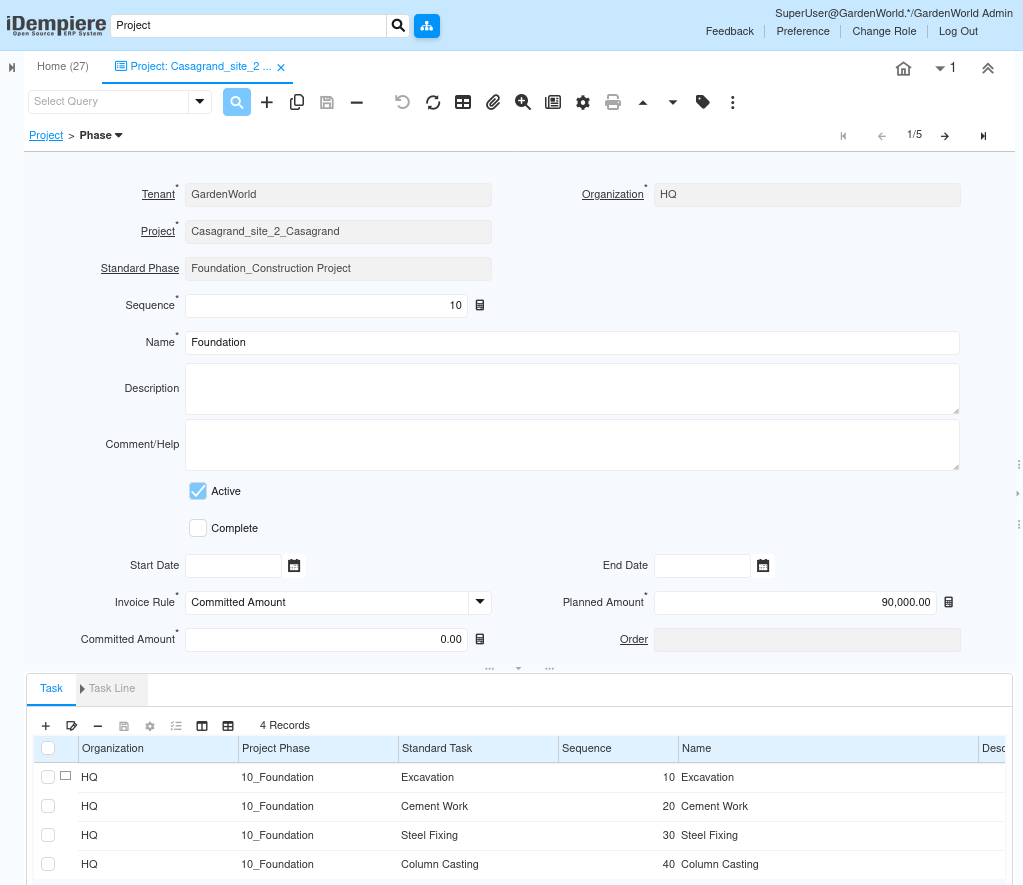
This opens the phase detail screen, where execution-level adjustments are made.
Here, the user typically:
- Confirms the phase name aligns with actual site activity.
- Adjusts the sequence if the execution order needs refinement.
- Updates start and end dates to reflect realistic timelines.
- Reviews or updates the planned amount, especially if budgets differ from the template.
The phase remains linked to the project but is now fully controlled at the project level, independent of the original project type.
Using Phases for Budget Planning
Each phase can carry its own planned amount, allowing the overall project budget to be split across stages. This enables better financial control and early visibility into where money is intended to be spent.
As the project progresses:
- Each phase shows its allocated budget
- Cost monitoring can be done phase by phase
- Overruns or under spending become visible early
This makes phases a key tool for financial discipline within projects.
Control Phase Execution Status
Each phase has two key status controls:
- Active – Determines whether the phase can be used for task creation and transactions.
- Complete – Indicates that the phase has finished execution.
A phase should remain active while work is ongoing. Once all related tasks are completed and no further costs are expected, the phase can be marked as complete. This helps track project progress at a high level and prevents accidental postings to closed phases.
Completing a Phase
A phase should be marked as complete only after:
- All work planned under the phase is finished
- No further costs are expected
- The phase’s objectives are fully met
Completing phases in sequence provides a clear execution trail and helps ensure that project reporting reflects the true state of work.
Outcome
By using project phases effectively, iDempiere enables structured execution by breaking the project into manageable stages with defined timelines and budgets. Phases provide clear visibility into progress and cost at each stage of the project, support disciplined budget control, and ensure that execution moves forward in an organized and measurable way. This results in better planning accuracy, early identification of delays or overruns, and clearer high-level project tracking without losing operational flexibility.