How Unposted Documents Works in iDempiere
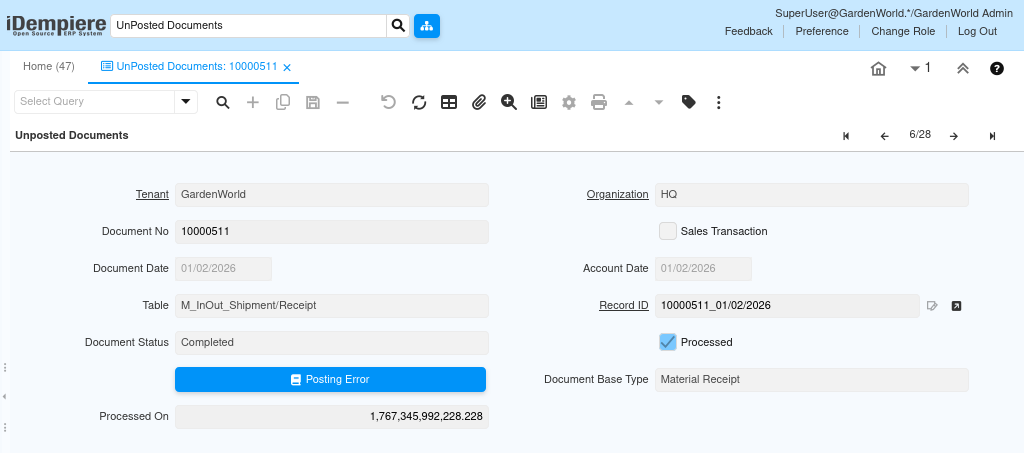
The Unposted documents window in iDempiere is a monitoring and control screen that allows users to identify business documents that have been completed or processed at the operational level but have not yet been posted to accounting.
Its purpose is not to create or modify transactions, but to provide transparency and control over the accounting posting lifecycle.
Process Flow

What Unposted Documents Represents
Unposted documents represent the gap between business processing and accounting posting.
In iDempiere, most documents such as invoices, receipts, shipments, or journals, go through two major stages. First, they are processed at the application level, meaning the business transaction is completed. Second, they are posted to accounting, meaning corresponding debit and credit entries are created in the general ledger.
The unposted documents window shows documents that have completed the first stage but are still pending the second stage.
Document Identification and Traceability
Each row in the unposted documents window represents a single business document waiting to be posted.
The document no uniquely identifies the transaction from a business perspective. It is the same number users see in the original document window, making it easy to trace back to the source transaction.
Transaction Context and Direction
The sales transaction field indicates whether the document belongs to the sales side or the purchasing side of the business. This distinction is important because posting logic, accounts, and rules often differs between sales and purchase transactions.
The document base type further classifies the document into its functional accounting category, such as invoice, shipment, receipt, or journal. This base type determines which posting rules, document types, and accounting logic apply when the document is posted.
Processing and Posting Status
The processed flag indicates whether the document has completed its business workflow. Only documents that are processed are eligible for posting. If a document is not processed, it will not move forward into accounting and will typically not appear here.
The document status provides additional context about the document’s lifecycle state, such as completed, closed, or reversed. Certain statuses may prevent posting, depending on configuration and document type.
The processed on field shows the timestamp when the document was processed. This helps users understand how long a document has been waiting to be posted and supports troubleshooting delays in accounting.