How Generate Purchase Order from Project Works in iDempiere
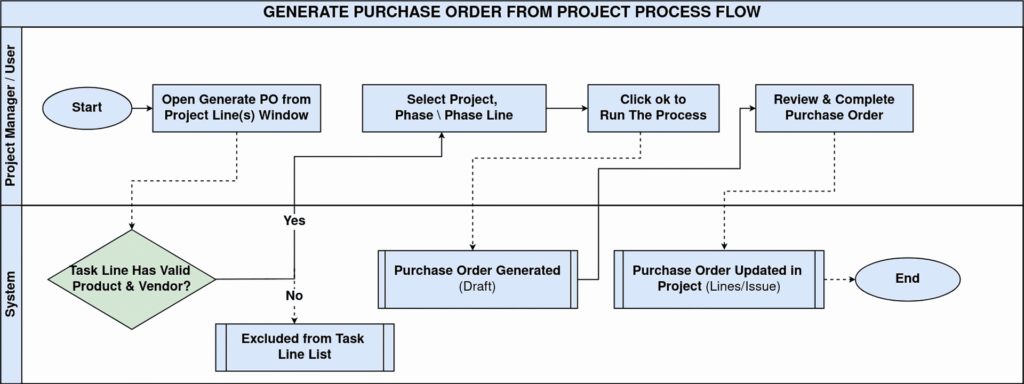
In iDempiere, project procurement is driven from planned work. Purchase orders are generated directly from project task lines, keeping purchasing, costing, and tracking aligned. The Generate PO from Project process converts approved requirements into purchase orders while preserving project references.
Process Flow Diagram
Prerequisites Before Generating a Purchase Order
Before running this process, the project structure must already be in place. The project should have phases, tasks, and task lines defined, and the task lines must represent items that can be purchased.
At this stage, the system expects that:
- The project is active
- The relevant project phase and task exist
- Task lines are created for materials or services
- Each task line is linked to a product or service
- The product has a valid vendor (business partner) defined
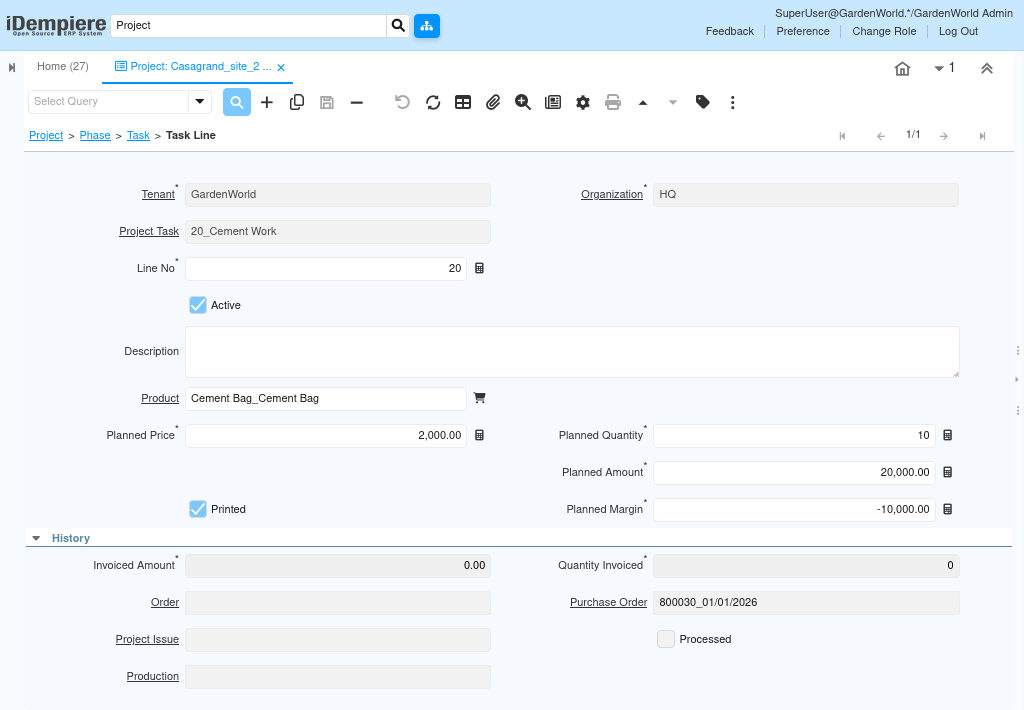
Only task lines meeting these conditions will be available for purchase generation.
Launching the Generate PO from Project Process
Once the project data is ready, the purchase process begins by opening the Generate PO from project line(s) window. This process acts as a controlled filter that ensures only valid project requirements are converted into purchase orders.
When the window opens, you select:
- The project
- The project phase
- The project line (task line)
The system dynamically populates each drop down based on your previous selection. Only task lines that contain purchasable materials or services appear in the list, preventing incorrect or incomplete data from being processed.
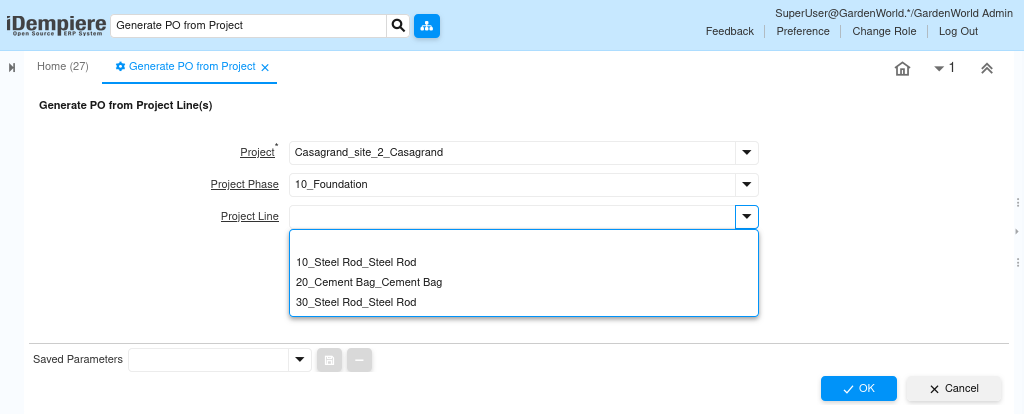
Selecting Project, Phase, and Task Line
The selection sequence is intentional and enforces data accuracy. When you choose a project, the system limits the available phases to those belonging to that project. After selecting a phase, only the task lines created under that phase are shown.
This ensures that:
- You cannot generate a PO for the wrong project
- You cannot select a task line outside its phase
- Only planned, approved requirements are processed
Once the correct task line is selected, the system already knows what to buy, how much to buy, and from whom to buy.
Generating the Purchase Order
After confirming the selection, you complete the process. iDempiere automatically creates a purchase order in draft status using the information defined at the project level.
The generated purchase order includes:
- The business partner (vendor) mapped from the product
- The product or service from the task line
- The planned quantity and price
- A direct reference to the project and task line

At this point, no manual re-entry is required. The purchase order is fully aligned with the project plan
Reviewing and Completing the Purchase Order
The generated purchase order remains in draft status to allow review and final adjustments. This step ensures procurement control without breaking project linkage.
You may optionally:
- Review pricing or taxes
- Adjust delivery dates or warehouse
- Confirm payment terms
- Validate vendor details
Once verified, you complete the purchase order using the standard document action.
After completion:
- The purchase order becomes active
- Commitments are reflected against the project
- Downstream processes such as material receipt and vendor invoice can proceed
- All accounting entries remain linked to the project automatically
Outcome
By generating purchase orders directly from project task lines, iDempiere ensures that procurement is driven by planned project work, not manual assumptions.
Every purchase remains within the project scope and contributes to accurate project cost tracking and real-time visibility. This approach maintains clean project-to-procurement traceability, while keeping purchasing, inventory, and accounting fully synchronized with the project structure. The result is reliable cost control and consistent project reporting without manual reconciliation.