How Freight Category Work in iDempiere
In iDempiere, the Freight Category is a classification master used to logically group and identify freight or delivery-related charges. It provides a standardized way to categorize freight so it can be referenced consistently across transactions and reporting..
Process Flow
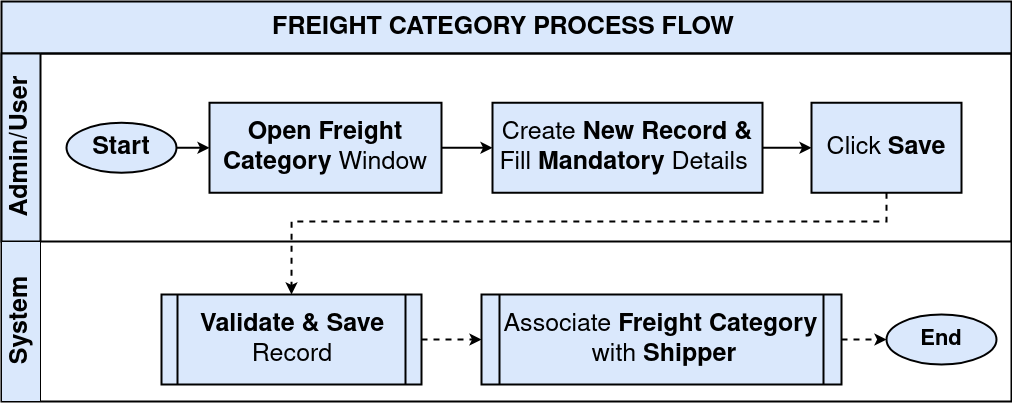
Creating a Freight Category
The first step is to define a Freight Category that represents a specific type of freight or delivery classification used by the organization.
- Navigate to the Freight Category window
- Create a new Freight Category record
- Enter the required field details
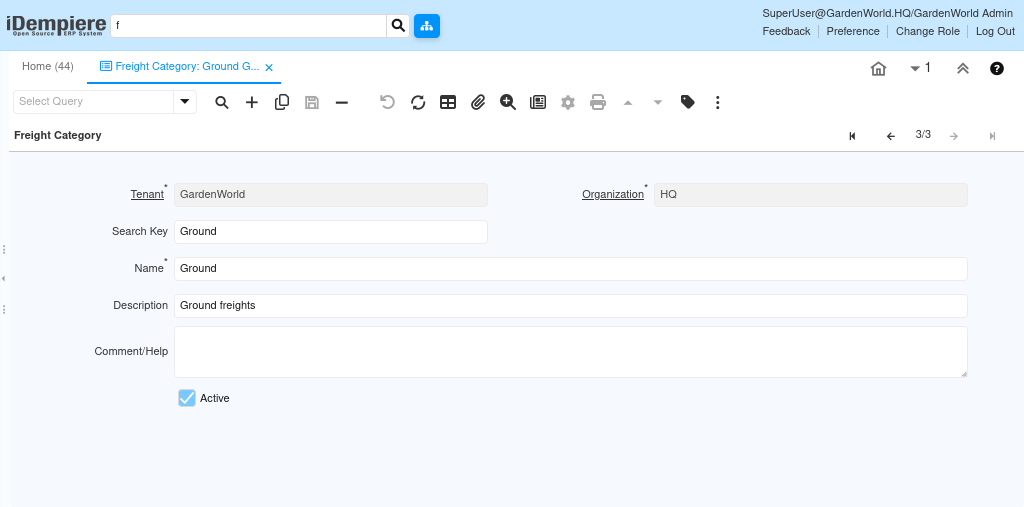
Field usage includes
- Organization – Determines organizational visibility and usage
- Search Key – Used for quick identification and internal referencing
- Name – Clearly identifies the freight category
- Description – Explains the purpose or usage of the category
- Comment / Help – Provides guidance for users selecting the category
By using Freight Categories as a classification master, organizations can maintain consistent identification of freight-related entries, improve data clarity, and support cleaner reporting. This ensures freight information is structured and understandable without adding unnecessary calculation logic at the master data level.