How Shipper Configuration Works in iDempiere
Shipper configuration defines how goods physically leave the warehouse. It combines carrier rules, freight pricing, packaging, labels, and pickup logic into one flow, allowing shipments to be created automatically with consistent charges, labels, and approved shipping behavior.
Process Flow
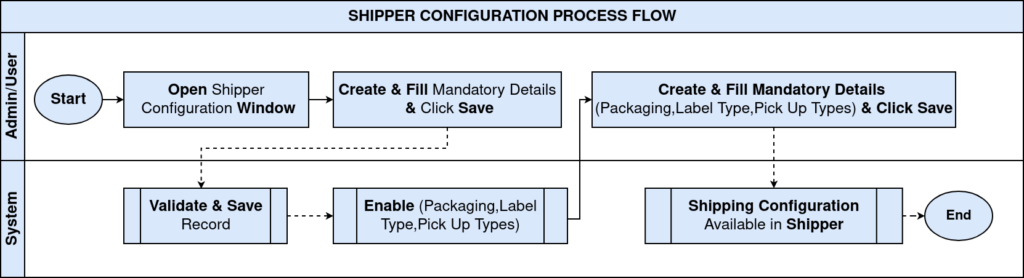
Core Configuration Logic
At its core, shipper configuration acts as a bridge between business intent and warehouse execution. When a shipment is created, iDempiere does not ask the user “how to ship”. Instead, it derives the answer automatically from this configuration.
The system evaluates the selected shipper, applies freight rules, validates package limits, assigns the correct label format, and enforces the pickup method—without additional user decisions.
Key responsibilities of shipper configuration include:
- Defining which carrier is used
- Controlling how freight is calculated
- Restricting what packaging is allowed
- Standardizing label printing
- Enforcing pickup behavior
Shipper Configuration Setup
The shipper record represents the carrier service definition inside iDempiere, such as DHL Express or a local courier.
Important fields exist to ensure the shipper behaves predictably during transactions:
- Shipping Processor Configuration links the shipper to the freight calculation engine.
- International / Residential flags control shipment eligibility.
- Tracking URL enables post-shipment traceability.
- Service Code maps internal shipments to carrier service levels.
Once saved and activated, this shipper becomes selectable during shipment execution.

Packaging
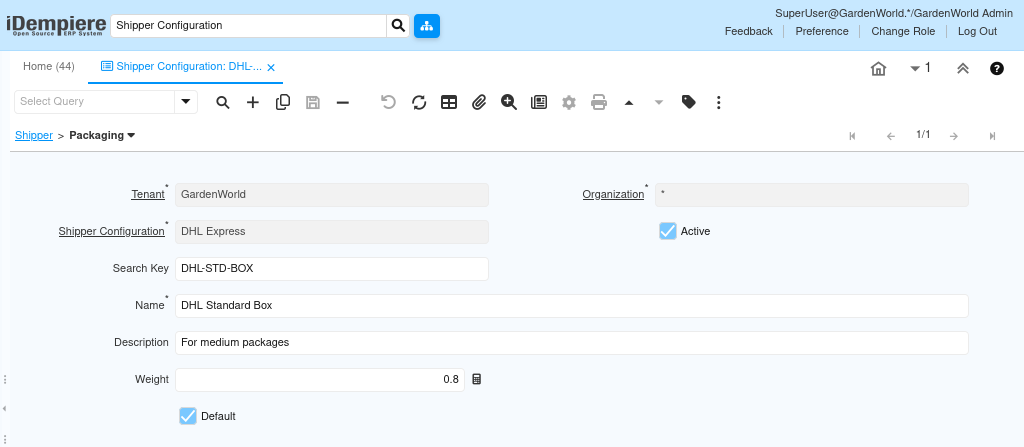
Packaging defines what physical containers are allowed for this shipper. Each packaging record represents a real-world box, envelope, or pallet type that the carrier supports.
During shipment creation, packaging ensures the shipment:
- Uses approved box types
- Applies correct tare weight
- Prevents invalid package selection
Packaging directly influences freight calculation because weight and dimensions affect pricing.
Typical configuration includes:
- Weight of empty package
- Default packaging for faster shipment entry
- Active control to retire unused package types
Label Type
Label Type controls how shipping labels are printed, not just how they look. It ensures compatibility between the carrier, printer hardware, and warehouse process.
This configuration removes ambiguity for warehouse users by enforcing:
- Standard label dimensions (e.g., 4×6 thermal)
- Supported print methods (Zebra, Epson, etc.)
- A default label format for all shipments
Once set, users do not choose label sizes manually—labels are generated automatically during shipment confirmation.

Pickup Type
Pickup Type defines how the carrier collects shipments from your warehouse. It removes operational guesswork by pre-defining the pickup behavior for each shipper.
This ensures consistency in daily operations:
- Scheduled pickups for regular dispatch
- On-demand pickups for urgent shipments
- A default pickup method to reduce user input
Pickup Type becomes part of the shipment’s execution context and is reused across all shipments using that shipper.

Transaction Flow in Real Use
Once configuration is complete, users interact with a simplified shipping experience.
When a shipment is created:
- The shipper determines allowed packaging, labels, and pickup rules.
- The freight processor calculates charges automatically.
- Packaging weight contributes to freight accuracy.
- Label Type defines how labels are generated.
- Pickup Type determines how the carrier collects the shipment.
Users complete shipments without understanding carrier rules, because those rules are already embedded in the configuration.
Value and Use Cases
This setup is critical for organizations handling frequent shipments, multiple carriers, or regulated logistics processes.
Common use cases include:
- Standardizing shipping across multiple warehouses
- Preventing incorrect carrier or package selection
- Reducing freight disputes caused by manual errors
- Accelerating warehouse throughput
By centralizing shipping rules, businesses achieve repeatable, auditable, and scalable shipping operations.
Outcome
After implementing Shipper Configuration with Packaging, Label Type, and Pickup Type:
- Shipments are created faster and with fewer errors.
- Freight charges are consistent and predictable.
- Labels print correctly every time.
- Pickup processes follow defined operational rules.
- Warehouse users require minimal training.
This configuration transforms shipping from a manual decision-making task into a controlled, system-driven workflow—ready for production use.