How Replenish Report Works in iDempiere
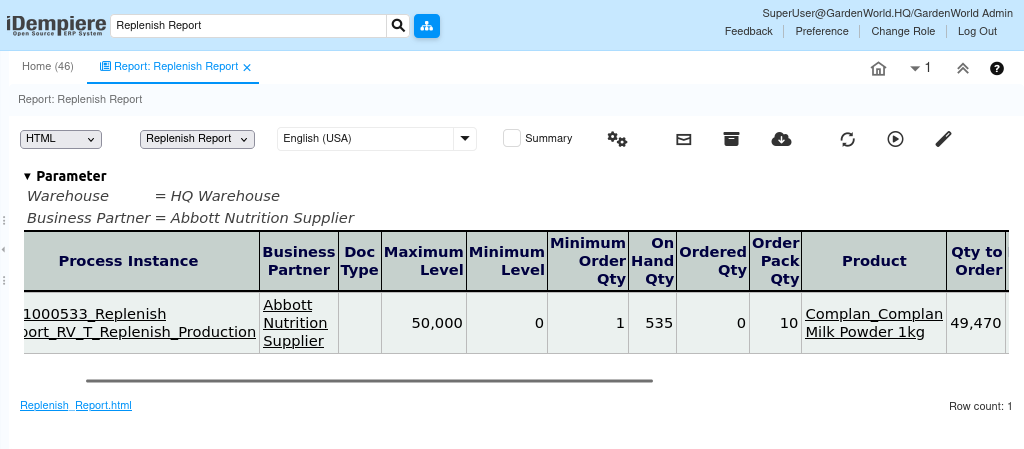
The replenish report analyzes current stock against replenishment rules per product and warehouse. It evaluates on-hand, min/max levels, and open orders to determine required quantities, acting as the decision layer between inventory visibility and replenishment execution.
Replenishment Rules Setup
Replenishment behavior is driven entirely by configuration maintained in warehouse → replenish for each product. This setup defines how the report interprets shortages and calculates quantities.
Each product–warehouse combination stores its own logic, allowing the same product to follow different replenishment strategies in different warehouses. The report reads these rules at runtime; no hard coded logic exists in the report itself.
Key configuration elements include:
- Replenish Type (e.g., Maintain Maximum Level)
- Minimum Level and Maximum Level
- Source Warehouse (for internal transfers)
- Default Locator for replenished stock

Stock Evaluation Logic
When the report runs, it evaluates inventory using real transactional data. It starts by checking on hand qty from storage records and then adjusts the effective availability by considering quantities already committed or expected.
The calculation logic is conservative by design: it avoids over-ordering by accounting for what is already in motion. This ensures replenishment proposals reflect actual future shortages, not just current stock snapshots.
Evaluation considers:
- On Hand Qty from storage
- Ordered Qty (open purchase or production orders)
- Reserved Qty (sales commitments)
- Order Pack Qty (rounding rules, if applicable)
Quantity Determination
For products using maintain maximum level, the report calculates the required quantity to bring stock back up to the defined maximum. The formula is conceptually simple but applied consistently across all products.
If current and incoming stock already meet or exceed the maximum, no replenishment quantity is suggested. If stock is below the target, the difference becomes qty to order.
Core calculation logic:
- Qty to Order = Maximum Level − (On Hand + Ordered − Reserved)
The result is normalized using Order Pack Qty, ensuring that suggested quantities align with packaging or production constraints.
Report Output Interpretation
The report output presents one line per product that requires attention. Each line represents a replenishment proposal, not an executed transaction. This separation keeps planning and execution clean and auditable.
The report clearly shows:
- Product and Warehouse
- Replenish Type
- Current stock position
- Calculated Qty to Order
- Source Warehouse (when applicable)
Operational Usage
The replenish report is typically used as a planning checkpoint rather than a transactional step. Inventory or procurement teams review the suggested quantities and then decide how to fulfill them—through purchase orders, production orders, or warehouse transfers.
Because the report is rule-driven and repeatable, it is often scheduled or reviewed periodically (daily, weekly) to maintain stock discipline without manual recalculation.
Common usage patterns include:
- Reviewing shortages before raising bulk purchase orders
- Identifying products nearing zero stock despite pending orders
- Validating replenishment configuration accuracy across warehouses
Accounting and Control Boundary
The replenish report does not post accounting entries and does not reserve stock. It operates purely as an analytical layer. All financial and inventory impact occurs only when follow-up documents (PO, MM, Production) are completed.
This clear boundary ensures:
- No unintended stock movements
- No premature accounting impact
- Full control over replenishment execution decisions