How Customer Contacts and Activities Work in iDempiere
Customer Contacts and Activities form the relationship history layer in iDempiere. Contacts capture real people at the customer, while Activities record calls, meetings, and follow-ups. Together, they ensure CRM continuity, accountability, and a complete, auditable sales timeline.
Contacts Tab — What It Represents and How It Is Used
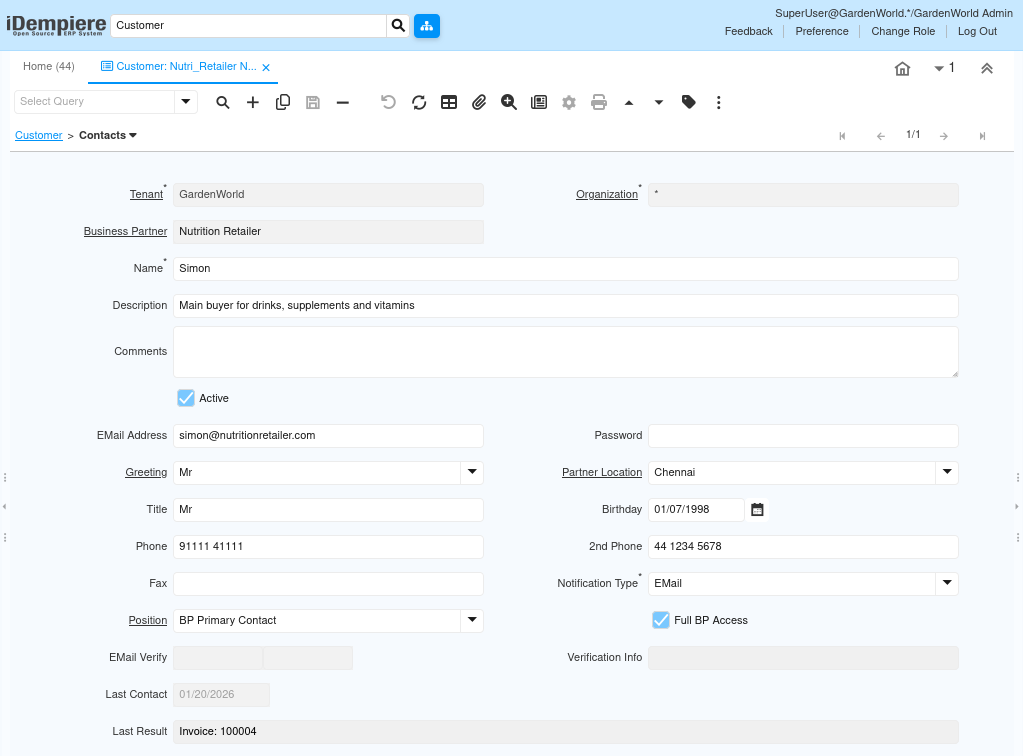
The Contacts tab defines individuals associated with a customer. These records are reused across opportunities, orders, invoices, shipments, and activities. A well-configured contact ensures communication accuracy, role clarity, and smoother transaction execution.
A contact is not just an address book entry. It is a transaction-aware entity that can receive notifications, be selected in documents, and act as the primary reference during sales execution.
Key configuration behavior:
- Each contact is always linked to one Customer (Business Partner).
- One customer can have multiple contacts, each with different roles.
- Contacts can be reused across CRM and transactional documents.
Important fields and their functional meaning:
- Name – Identifies the individual (mandatory for reuse in documents).
- Email Address – Used for document delivery, notifications, and follow-ups.
- Phone / 2nd Phone – Supports direct sales and support communication.
- Partner Location – Connects the contact to a specific customer location.
- Position – Defines role (e.g., Primary Buyer, Accounts, Manager).
- Notification Type – Controls how system messages are delivered.
- Full BP Access – Allows the contact broader visibility when portals or integrations are used.
- Active – Inactive contacts cannot be selected in new transactions.
Activities Sub-Tab — What It Represents and How It Is Used
The Activities sub-tab records actual interactions performed by your team. This is where sales work becomes visible, traceable, and measurable. Activities can exist independently or be directly linked to a Sales Opportunity, forming a chronological activity trail for each deal.
Activities are operational records, not notes. They carry ownership, timing, status, and outcomes, and are essential for follow-up discipline.
Key configuration behavior:
- Activities are linked to a Customer Contact, not just the customer.
- Activities can optionally link to a Sales Opportunity.
- Completed activities remain as history; open ones drive follow-ups.
Important fields and their functional meanings:
- Activity Type – Defines the nature of interaction (Phone Call, Meeting, Email).
- Description – Short summary of what happened.
- User/Contact – Who the interaction was with.
- Sales Opportunity – Links the activity to a specific deal.
- Comments – Detailed discussion notes and outcomes.
- Start Date / End Date – Tracks duration and timeline.
- Complete – Marks the activity as finished and locks it as history.

Workflow Integration Across CRM
Contacts and Activities are deeply integrated with the sales lifecycle. When an activity is linked to an opportunity, it becomes part of the deal history and supports better forecasting, accountability, and handovers between sales users. As opportunities move across sales stages, activities provide context, not just status changes. This prevents “stage-only CRM” and ensures that pipeline movement reflects real work done.
Typical workflow usage:
- Sales rep creates or selects a Contact → records a Phone Call activity
- Activity is linked to an Opportunity → notes capture requirements
- Next activities are scheduled based on outcomes
- Opportunity stage is updated with confidence
Use Cases
- Maintain a single source of truth for customer communication
- Ensure sales continuity when team members change
- Enable audit-ready CRM records for management review
- Improve opportunity conversion through structured follow-ups
- Reduce missed commitments and lost context
Outcome
A fully traceable, people-centric CRM record where every customer interaction is documented, linked to deals, and available across the sales and order lifecycle—without customization
- Contacts define whom you talk to
- Activities record what you did
- Opportunities capture what you may win
Together, they form a complete, transaction-ready CRM workflow inside iDempiere.