How RFQ Lines & Quantity Works in iDempiere
RFQ lines and quantity define what is requested, in what quantity, and under which commercial terms. They translate the RFQ’s intent into clear, measurable demand that suppliers can quote against, directly impacting response accuracy, comparison, ranking, and correct purchasing decisions.
RFQ Line Definition and Product Scope
Each RFQ line represents a single product or service requirement within the RFQ. It defines what exactly is being quoted.
The product selected on the RFQ line determines:
- The item suppliers are pricing
- The unit of measure used for comparison
- Whether attributes like batch, expiry, or specification apply
If an attribute set instance is specified, the RFQ becomes more precise, ensuring suppliers quote only for the exact variant requested (for example, a specific expiry date or formulation).

Key aspects defined at RFQ line level:
- Product – The exact item or SKU being requested
- Attribute Set Instance (if applicable) – Batch, expiry, or variant requirements
- Description / Comment – Business clarification for suppliers
- Work Start & Delivery Days – Expected delivery timeline
- Work Complete Date – Target completion based on delivery days
Quantity Configuration and Commercial Intent
The quantity tab defines how much is required and how the quantity should be interpreted.
The quantity field represents the requested demand and is the baseline for all supplier responses. The RFQ quantity flag explicitly marks this quantity as the one vendors must quote against. This avoids confusion when purchase or offer quantities differ later.
Optional quantity indicators support advanced scenarios:
- Purchase quantity reflects the final quantity intended for ordering
- Offer quantity allows vendors to suggest alternative quantities
This separation allows flexible negotiation while keeping the comparison base consistent.
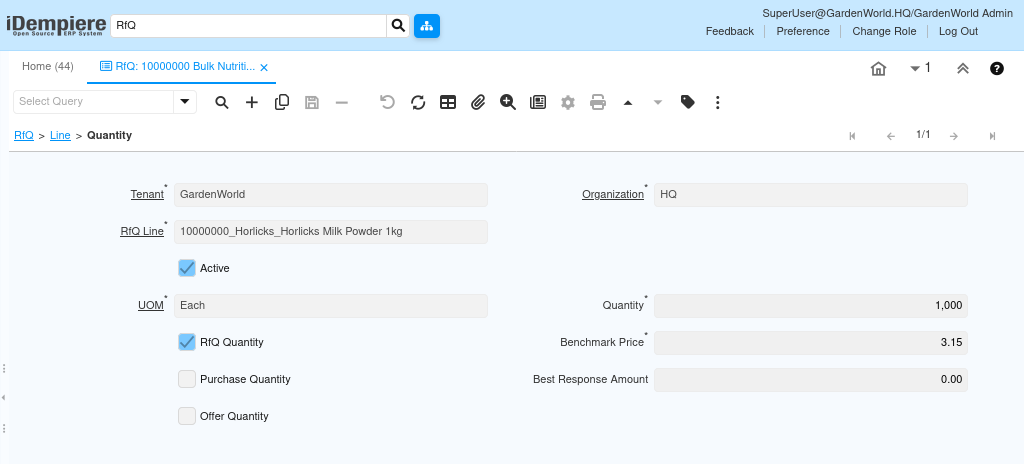
Quantity handling focuses on:
- RFQ Quantity – Requested volume for supplier quotation
- UOM – Ensures consistent unit comparison across suppliers
- Benchmark Price – Internal reference for price evaluation
- Purchase Quantity – Filled only after response selection
- Offer Quantity & Offer Amount – Supplier-proposed values
- Best Response Amount – System-updated reference for comparison
Benchmark Pricing and Evaluation Control
The benchmark price provides an internal reference price. It is not shared with vendors but is used to:
- Measure supplier competitiveness
- Highlight overpriced or under-priced responses
- Support margin and savings analysis
The best response amount is system-calculated once responses are received, enabling quick identification of the most economical offer per line.
This setup ensures objective evaluation rather than subjective decision-making.
Delivery Expectations and Timeline Alignment
Delivery-related fields on the RFQ line define time sensitivity.
- Work Start indicates when fulfillment should begin
- Delivery Days sets the acceptable delivery window
- Work Complete defines the expected completion date
These values allow suppliers to respond realistically and help buyers compare offers not just on price, but on delivery feasibility.
Purpose and Use Cases
RFQ lines and quantity exist to convert a general purchasing need into structured, vendor-comparable demand.
They are used when:
- Multiple suppliers must quote the same requirement
- Pricing depends on quantity slabs
- Product variants or specifications matter
- Delivery timelines influence vendor selection
This structure enables fair comparison and audit-ready procurement.
Outcome and Downstream Impact
When RFQ lines and quantity are configured correctly:
- Supplier responses are directly comparable
- Best prices and timelines are clearly visible
- RFQ ranking becomes reliable
- Sales orders or purchase orders can be created without rework
This ensures RFQs move smoothly from request to response, evaluation, and final order creation, making RFQ lines and quantity the foundation of the entire RFQ workflow in iDempiere.