How Inventory Move Line Works in iDempiere
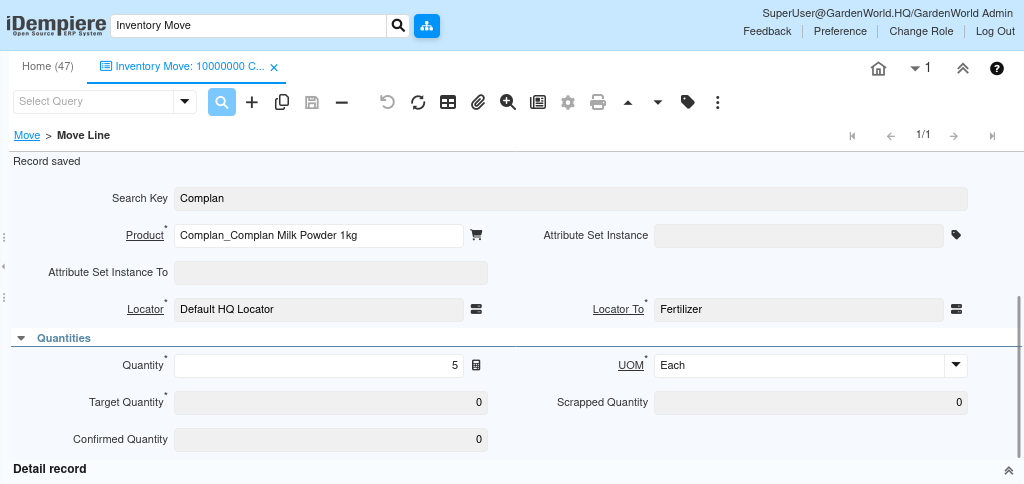
The Inventory Move Line defines the specific products, quantities, and locator-level details that are being transferred within an Inventory Move document.
While the header sets the overall context of the movement, each line represents an individual item being moved from one location to another. The line contains all operational information required to perform the physical relocation of the product, including the item being moved, its attribute set, the source and destination locators, and the movement quantities.
Line Details Displayed
Each Inventory Move Line begins with identification fields that describe what is being moved and why
- Search Key and Product
The product is selected from the item master, and the search key provides the internal reference code that uniquely identifies the item. Selecting the correct product is the basis for determining which stock will be moved.
These fields provide clarity on the item being processed but do not affect how the stock quantities are calculated.

How Attribute Tracking Works
iDempiere supports batch and serial tracking. Inventory Move Lines therefore include
- Attribute Set Instance – The batch/lot/serial for the stock being moved out.
- Attribute Set Instance To – The attribute instance for the stock at the destination (used when reassigning attributes during the move).
These fields ensure that the movement preserves or reassigns correct traceability data, especially for regulated or perishable items.
How Source and Destination Locators Work
The key operational fields in the line are the source and target locators
- Locator – The locator from which the product is currently being taken. This must reflect where the system believes the stock physically exists.
- Locator To – The locator where the product will be placed after the movement.
These locators determine how the stock will be updated. The system will reduce the quantity from the source locator and increase it in the destination locator once the document is completed.
How Movement Quantities Work
Quantities determine how much of the product is being transferred and how the system processes that quantity
- Quantity – The user-entered quantity being moved.
- UOM – The unit of measure used for the product.
- Movement Quantity – The system-interpreted quantity used for posting the movement (automatically derived from Quantity and UOM).
- Target Quantity – Used when the receiving locator expects a target amount (helpful in warehouse tasks and picking operations).
- Scrapped Quantity – Represents the amount that is intentionally scrapped during movement, not transferred.
- Confirmed Quantity – The physically confirmed quantity moved, used in processes requiring picking/confirmation workflows.
When the document is completed, the system uses the movement quantity to generate the material transactions that adjust the stock between locators.