How Period Control Management Works in iDempiere
Period Control Management is an ERP feature in iDempiere designed to help businesses manage financial periods easily and effectively. It provides a central interface where accountants and administrators can find, open, or close financial periods especially across different document types and years in a simple, aggregated view.
Process Flow

Period Control Purpose
In accounting, financial periods (months, quarters, or years) control when transactions can be recorded and posted.
Proper period management ensures:
- No new transactions are posted to old periods
- Financial reports remain consistent
- Month-end and year-end close processes are controlled
Period Control Management makes this fast and organized.
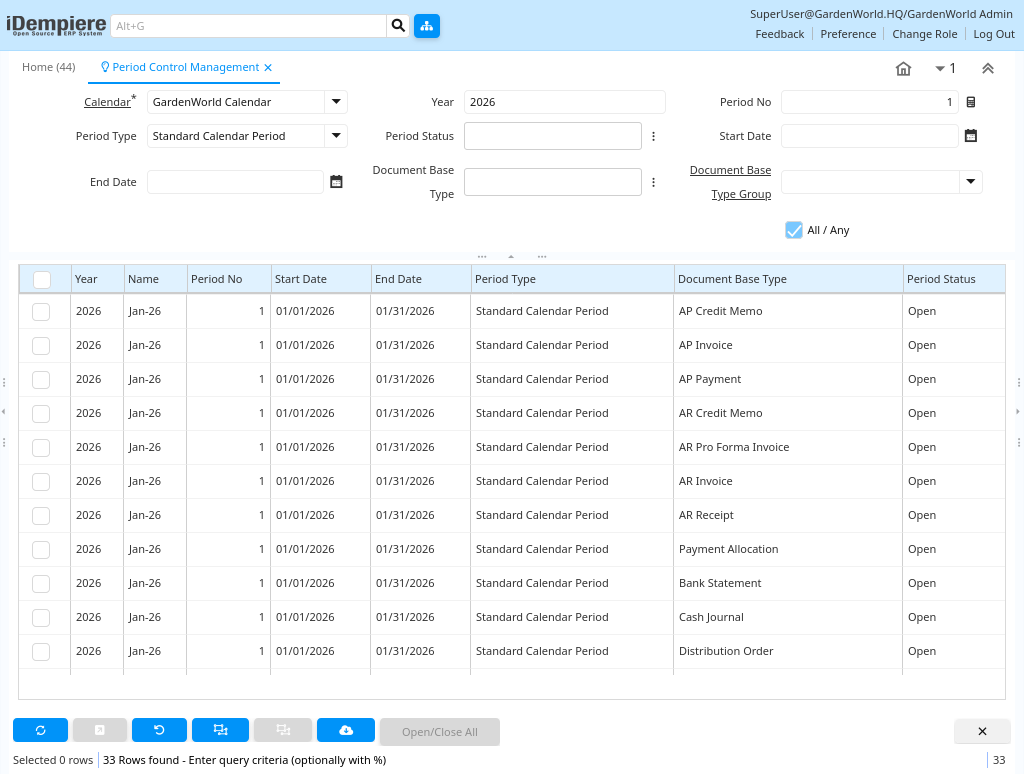
Period Filtering
Users start by selecting filter criteria, such as:
- Year (defaults to current year)
- Period number (defaults to current month)
- Period type and status
- Start and end dates
- Document type
Once filters are set, pressing the ReQuery button displays all matching financial periods.
Period Multi-Selection
After the list of periods is displayed, users can:
- Select one or more period records at once
- Use checkboxes or multi-select controls
This lets users work on several periods together instead of one by one.
Period Open/Close Actions
With the desired periods selected, the user chooses an action button such as:
- Open All
- Close All
This operation opens or closes those periods (for posting documents) in bulk. This is especially helpful at
month-end close and year-end close.
Period Control Benefits
Because Period Control Management is implemented as an Info Window, it’s easy to customize, search, and filter additional fields if needed.
Administrators can modify or enhance the filters displayed without deep development changes.
Period Control Management in iDempiere is a powerful way to manage financial periods, giving accountants a fast, flexible, and reliable interface to control which months are open for posting and which are closed. This helps ensure that financial data remains accurate, organized, and compliant with accounting best practices.