How Payment Term Schedule Works in iDempiere
In iDempiere, a Payment Schedule is used when an invoice amount needs to be collected in more than one installment instead of a single due date. This functionality works in combination with the Payment Term and becomes effective once schedule lines are defined and the payment term is applied to an invoice.
How to Create a Payment Schedule in iDempiere
- Open the Payment Term window
- Create or select a Payment Term
- Go to the Schedule tab
- Create a new Schedule line
- Enter the Percentage
Specify the percentage of the total invoice amount that should be paid in this installment (for example, 50%). - Define the Due Date
Enter the Net Days to indicate when this portion of the payment is due, calculated from the invoice date (or delivery date, if applicable). - Configure Discount
- Enter Discount Days to define the period during which a discount is valid
- Enter Discount % to specify the discount offered for early payment
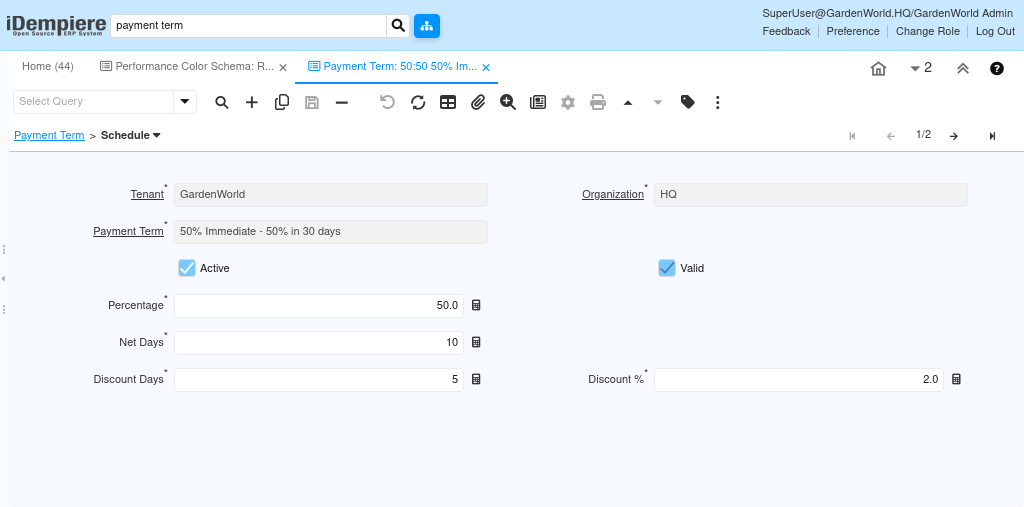
When a payment term includes one or more Schedule lines, iDempiere does not treat the invoice as a single payable amount. Instead, the total invoice value is split based on the percentage defined in each schedule line. Each schedule line represents a portion of the invoice amount, calculated as a percentage of the total invoice value.
For each split amount, iDempiere calculates a separate due date using the Net Days defined in the schedule line. If discount days and discount percentages are provided, early payment discounts are also calculated individually for each installment. This allows different portions of the same invoice to have different due dates and discount conditions.
As a result, payment schedules enable structured installment-based payments, improve receivables and payables tracking, and support flexible commercial agreements without manually splitting invoices.