How Reporting Hierarchy Works in iDempiere
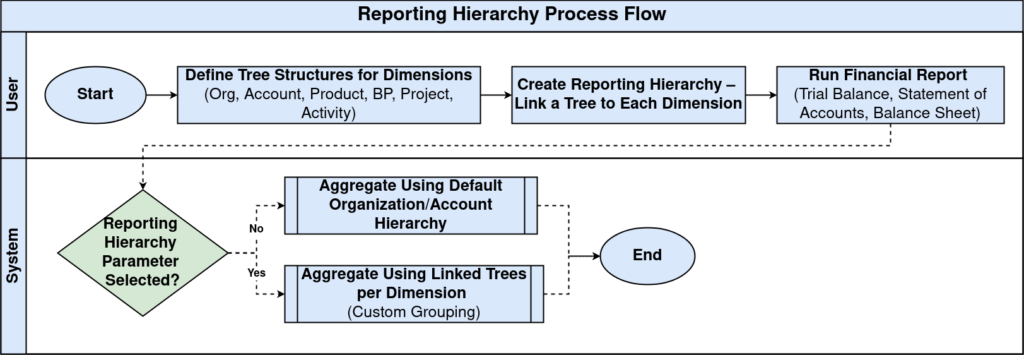
The Reporting Hierarchy window in iDempiere lets you define alternate reporting structures (trees) for key accounting dimensions such as Organization, Account, Product, Business Partner, Project, and Activity. These hierarchies are then used by financial and analytical reports to present aggregated results according to custom groupings instead of default structures.
This is especially useful when a business wants to see data from different summary perspectives without changing master data or organizational setup.
Process Flow
Reporting Hierarchy Structure
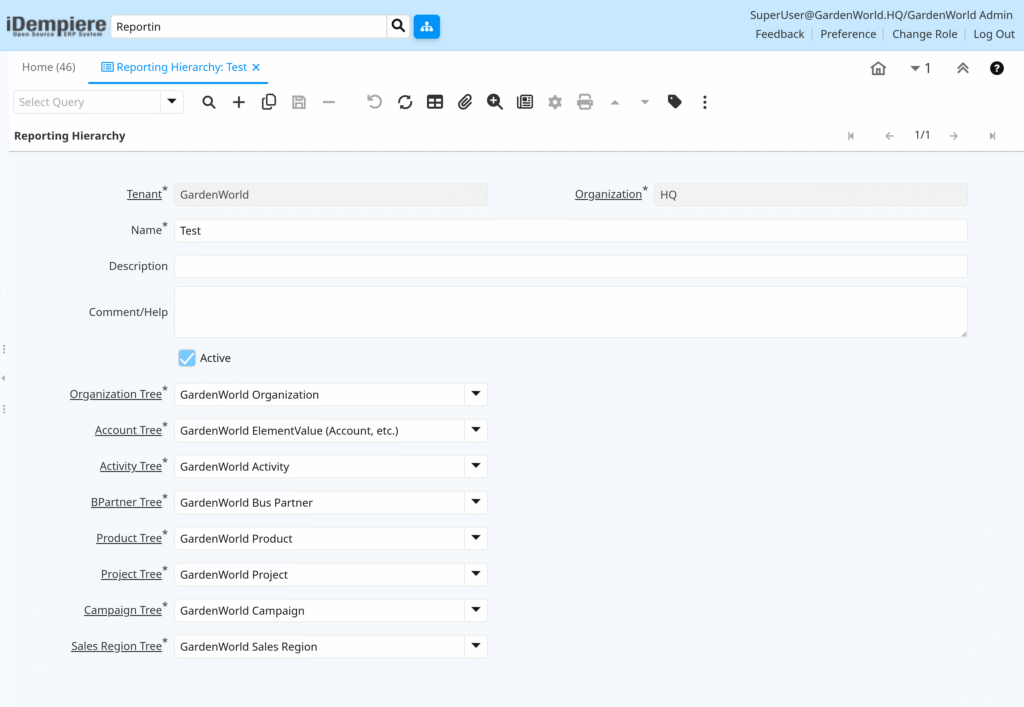
A Reporting Hierarchy links one or more Tree structures to specific accounting dimensions:
- Organization Tree: Defines how organizations are grouped (e.g., all stores under a region)
- Account Tree: Defines custom groupings of GL accounts
- Activity Tree: Defines activity or cost center groupings
- Product, Business Partner, Project Trees: Provide alternate category structures
- Campaign and Sales Region Trees: Support marketing or territory analysis
By selecting different tree structures, reports will summarize values according to that custom hierarchy.
Hierarchy Financial Reporting Impact
Most financial reports — such as Trial Balance, Statement of Accounts, and Balance Sheet — offer a Reporting Hierarchy parameter. If a hierarchy is selected, iDempiere uses the linked trees to aggregate data according to the defined structure instead of the default organizational or account hierarchy.
Trees and Hierarchies Are Definitions
Reporting hierarchies depend on Tree structures defined elsewhere in the system.
A tree defines:
- A root node
- Child elements
- Summary groups
Multiple trees can exist for the same dimension (e.g., multiple organization views). A Reporting Hierarchy selects which tree to apply for each dimension.
This allows the same underlying data to be viewed in different ways — for example:
- By department
- By region
- By cost center
In iDempiere, the Reporting Hierarchy defines how multiple tree structures should be used by reporting engines to aggregate and present financial and operational data. By selecting alternative hierarchies, reports can show results according to business segments, regions, products, or any custom groupings derived from Tree definitions.