How to Create and Use the Requisition in iDempiere
A Requisition captures internal purchase demand in iDempiere before any supplier document is created. It sits between business need and procurement execution, acting as an approval-controlled checkpoint that ensures demand is valid, traceable, and auditable before committing spend.
Requisition Creation Context
A Requisition is typically created after demand is identified—for example, follow-up procurement after an RFQ, stock shortfall, or planned purchase. It can be created manually or triggered by planning logic, but once created, it becomes the single source of truth for internal purchase intent.
Key behavior at this stage:
- The Requisition is internal-only (no vendor visibility)
- It captures product, quantity, warehouse, and urgency
- Financial commitment does not happen yet

Identity and Control Fields
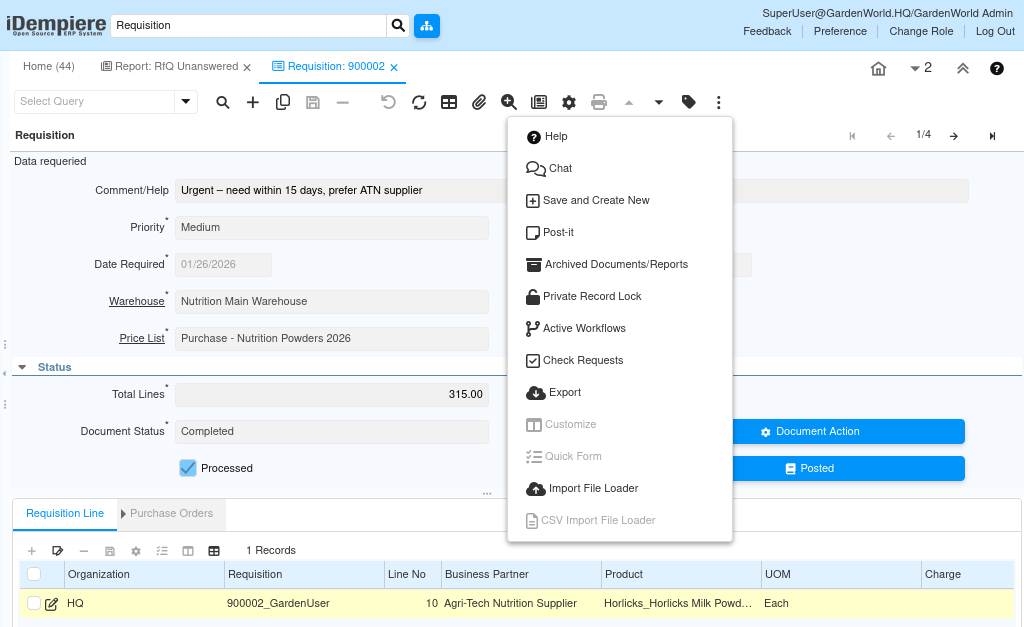
The header defines ownership, urgency, and scope of the request.
- Document Type determines workflow and downstream behavior (e.g., purchase requisition).
- User/Contact is the requester and becomes the workflow initiator.
- Priority influences approval urgency.
- Description / Comment explain the business reason (critical for approvers).
These fields ensure the approver understands why the requisition exists, not just what is requested.
Warehouse and Pricing Context
The Requisition ties demand to where stock is needed and how it will be valued.
- Warehouse defines the destination for goods.
- Price List provides a reference price for estimation (not a commitment).
- Date Required sets the operational deadline.
This allows procurement and planning teams to align timing and logistics early, before supplier selection.
Line-Level Demand Definition
Each Requisition Line represents a clear, measurable demand unit.
- Product defines what is needed.
- Quantity & UOM define how much is needed.
- Business Partner (optional) can pre-suggest a preferred supplier.
- Description can capture quality, brand, or packing expectations.
Once lines are entered, the system calculates total lines for visibility, but still keeps the document non-financial.

Approval Workflow Execution
When the requisition is completed, it enters workflow, not procurement.
The workflow:
- Routes the document to the configured approver
- Locks key fields from casual editing
- Records every approval step as workflow activity
Approval is enforced by system state, not user discipline.
Workflow Activities and Audit Trail
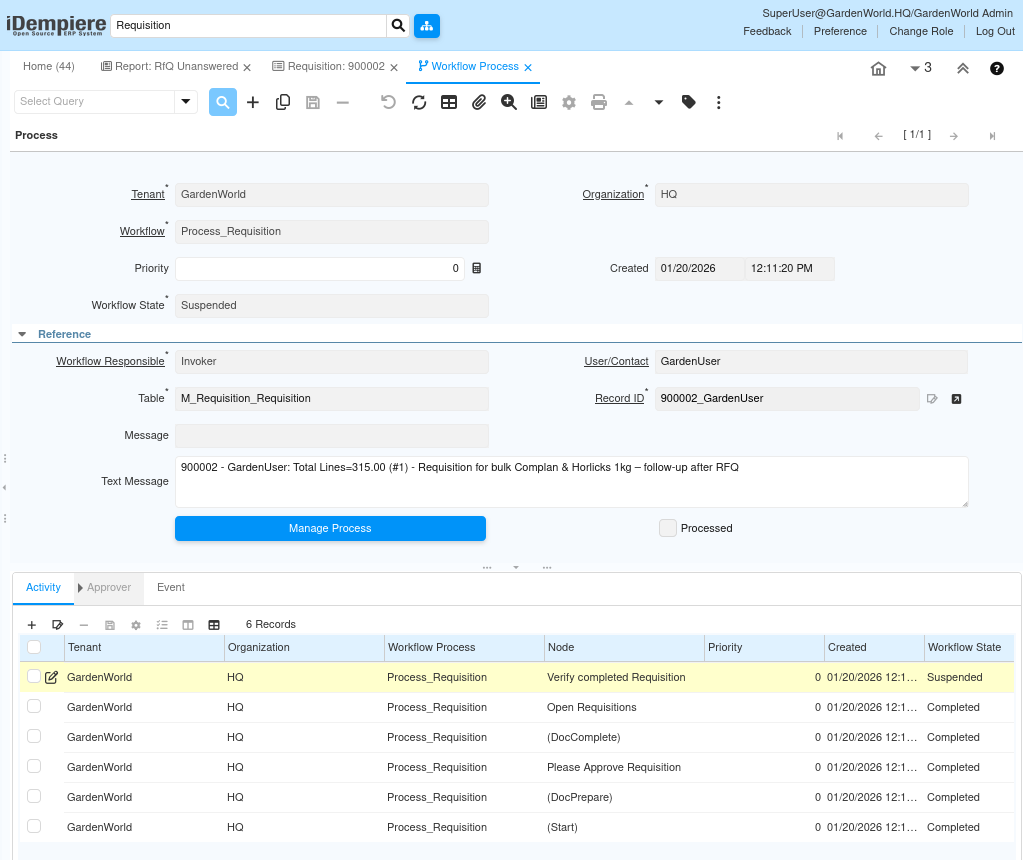
Each workflow step generates workflow activities that capture:
- Workflow process name
- Node (e.g., Please Approve Requisition)
- Responsible user
- Event type (Start, Prepare, Approve, Complete)
- Timestamps and elapsed time
This creates a full audit trail of who approved what, when, and why.
Completion and Downstream Readiness
Once approved and completed:
- Approved flag is set
- Processed flag is set
- Requisition becomes read-only
- It is now eligible to drive:
- RFQ creation
- Purchase order creation
- Procurement follow-up
The requisition itself does not create financial postings, but it authorizes downstream procurement to proceed.
Purpose
The requisition exists to separate demand approval from supplier execution.
It ensures the organization agrees internally before engaging vendors or spending money.
Common Use Cases
- Post-RFQ internal approval before issuing a purchase order
- High-value or urgent purchases requiring management sign-off
- Audit-controlled environments (finance, manufacturing, regulated industries)
Outcome and Control Impact
A properly used requisition results in:
- Approved and justified procurement demand
- Clean audit trails for compliance
- Reduced unauthorized purchases
- Faster downstream RFQ and PO processing
The requisition is the gatekeeper of procurement discipline in iDempiere—quiet, internal, but critical to financial and operational control.