How Freight & Freight Category Works in iDempiere
This section explains how shipping cost is calculated in iDempiere using Freight Category and Shipper Freight together. Freight category defines the shipping logic, while shipper freight sets the charges. Combined, they enable automatic freight calculation across orders, shipments, and invoices.
Process Flow

Why Freight Needs Structure
Shipping cost is not a flat value. It depends on urgency, weight, size, destination, and carrier rules. iDempiere separates this complexity into two layers so users don’t calculate freight manually during transactions.
This structure ensures:
- Freight pricing is predictable and repeatable.
- Different delivery modes behave differently.
- Users focus on orders, not logistics math.
Core Design Concept
Freight Category answers, “Which type of shipping?”
Shipper Freight answers, “What is the cost under that type?”
The system never guesses. It matches order data against predefined rules and applies the first valid freight rule automatically.
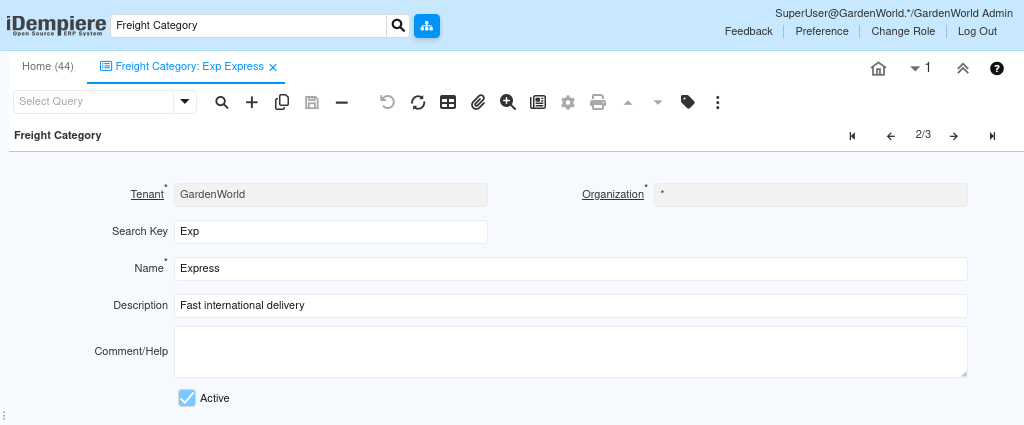
Freight Category — The Shipping Logic Layer
Freight category defines the nature of shipping, not the price itself.
Common examples:
- Express → fast, premium delivery
- Air → long-distance air cargo
- Ground → economical surface transport
This classification allows iDempiere to apply different constraints and pricing behavior without changing user actions.
What You Configure Here
- Name
Business-friendly labels like Express or Ground. This is referenced everywhere. - Search Key
Internal identifier used by the system and integrations. - Description
Explains when this category should be used. - Active
Controls availability across all shippers and transactions.
Shipper Freight — The Pricing Layer
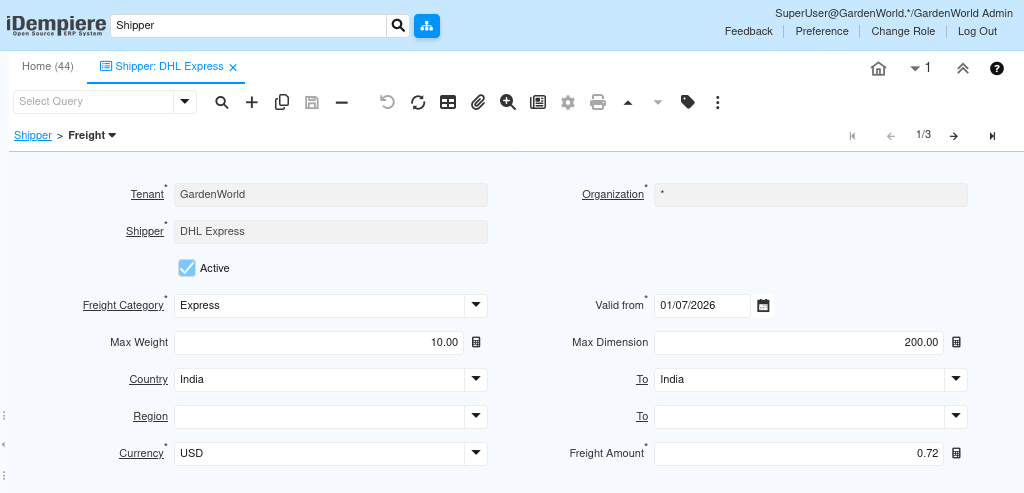
Shipper Freight connects a shipper (e.g., DHL Express) with a freight category and defines the actual freight charge.
This is where real-world logistics rules are enforced.
Why This Exists
The same freight category can cost differently:
- DHL Express vs another courier
- Domestic vs international
- Light package vs heavy package
Shipper Freight allows this variation without duplicating categories.
Key Fields and Their Purpose
These fields are not optional — each one protects freight accuracy.
- Shipper
Identifies the logistics provider. - Freight Category
Tells the system which shipping logic this rule belongs to. - Valid From
Ensures pricing applies only from a specific date.
Prevents incorrect freight on historical or future orders. - Max Weight / Max Dimension
Defines physical limits for the rule.
If exceeded, the system looks for another matching rule. - Country / Region
Narrows the rule to specific destinations. - Currency
Ensures freight aligns with billing currency. - Freight Amount
The actual charge is applied when all conditions match.
How the System Applies Freight in Transactions
During Sales Order Creation
When a sales order is created, the user only selects a shipper.
Behind the scenes, iDempiere:
- Reads the freight category linked to the shipper
- Evaluates destination, weight, and dimensions
- Matches the order against valid shipper freight rules
If a rule matches, freight is calculated automatically and added to the order.
No user decision is required.
During Shipment Processing
At shipment time:
- Freight rules are re-validated
- Actual shipment data is checked
- Freight charge is confirmed
This prevents freight errors caused by changes between order and shipment.
During Invoice Generation
When the invoice is created:
- Freight flows directly from the shipment
- Appears as a clear freight charge
- Remains fully traceable to the shipper and category
Finance teams see explainable, auditable freight costs, not manual adjustments.
Use Cases
Multiple Delivery Options
Customers can choose Express or Ground while the system applies correct pricing automatically.
Carrier Comparison
Different shippers can use the same freight category with different rates.
Regulatory and Audit Readiness
Freight logic is rule-based, date-controlled, and traceable.
Outcome
After configuring Freight Category + Shipper Freight:
- Users create orders without worrying about shipping math.
- The system selects the correct freight rule automatically.
- Shipments and invoices remain aligned.
- Logistics, sales, and finance operate on one shared logic.
Freight becomes a governed process, not a manual guess.