How Purchase Invoice Works in iDempiere
A Purchase Invoice in iDempiere is the financial document used to record the value of goods or services received from a vendor.
It drives accounts payable creation, tax calculation, matching with purchase orders, and accounting postings. iDempiere ensures that every invoice is validated and controlled before it impacts financial reporting.
Relationship Between Document Header, Vendor Data, and Accounting Dates
A Purchase Invoice is structured around three major components
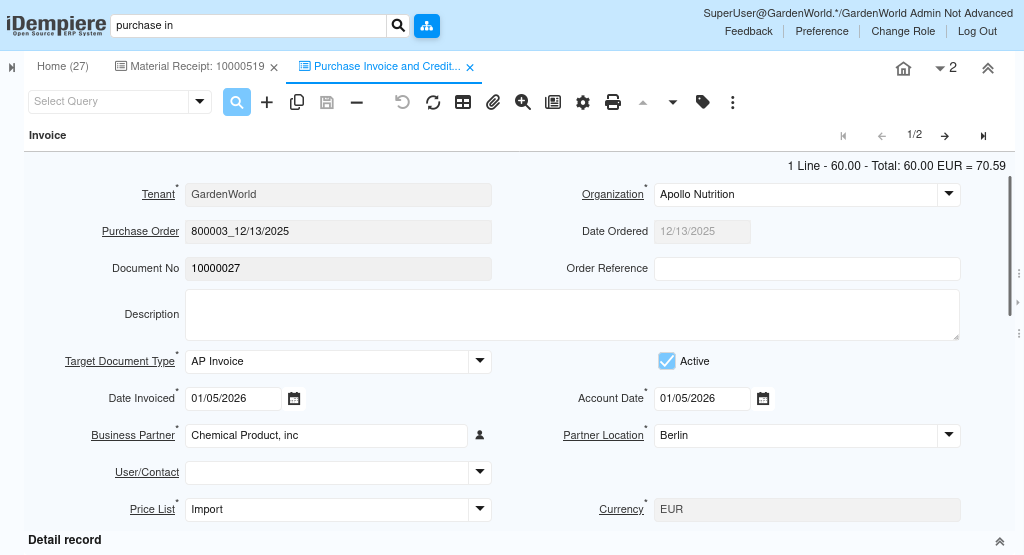
The document header, which defines the type of transaction; the vendor and order information, which supply commercial and accounting defaults; and the invoice dates, which determine when the invoice is recognized in the financial books.
This structure works as
- Document Header → defines identity and workflow
- Vendor Data → provides default terms, currency, taxes
- Accounting Dates → decide posting period and recognition
All invoice processing depends on this hierarchy.
Document Header – Defining the Invoice Identity
The document header establishes the main identity of the invoice. It determines which document type is used, how the document is numbered, and which organization owns the invoice. It also contains descriptive elements such as the document number, reference, and description.
Once the header is defined, iDempiere applies the appropriate workflow and posting logic depending on whether it is a standard vendor invoice or a credit memo.
Linking Supplier and Procurement Data
Vendor selection drives the default behavior of the invoice. When a Business Partner is chosen, the system loads its default payment terms, currency, price list, tax region, and accounting details.
Key Relationships
- Vendor determines financial and commercial defaults
- Purchase Order allows pulling un-invoiced PO lines
Controlling Financial Period Recognition
Invoice dates control how the transaction affects financial reporting. The Date Invoiced corresponds to the vendor’s bill date, while the Account Date determines the actual posting period.
iDempiere always checks whether the posting period is open before allowing completion or posting. This prevents unauthorized backdated entries and ensures period discipline.

Payment Terms & Settlement Behavior
A Purchase Invoice includes settings that determine how it will be settled. Payment Rule, payment terms, and schedules control whether the invoice is paid through credit, cash, bank transfer, or installments.
The “In Dispute” flag can temporarily block payment or posting, while the “Paid” field updates automatically once the invoice is matched with a payment.
Important System Behaviors
- Payment terms generate due dates
- Payment Rule defines how the invoice will be settled
- Payment status updates automatically after settlement
This supports controlled and transparent accounts payable processing.
Document Processing & Posting
When the invoice is completed, iDempiere validates all information, checks the accounting period, and creates the required accounting entries. It also finalizes the payment schedule and updates the document status.