How BOM Drop Works in iDempiere
The BOM Drop feature in iDempiere lets you expand a Bill of Materials (BOM) directly into an existing transaction — such as a Sales Order, Purchase Order, Invoice, or Project.
Instead of manually adding each component of an assembly or kit product, BOM Drop automatically places all BOM component lines into the chosen document.
A Bill of Materials (BOM) defines how a parent product is composed of individual components.
When you “drop” a BOM, iDempiere takes the BOM components and inserts them into the target document as separate lines. It essentially explodes the product into its parts
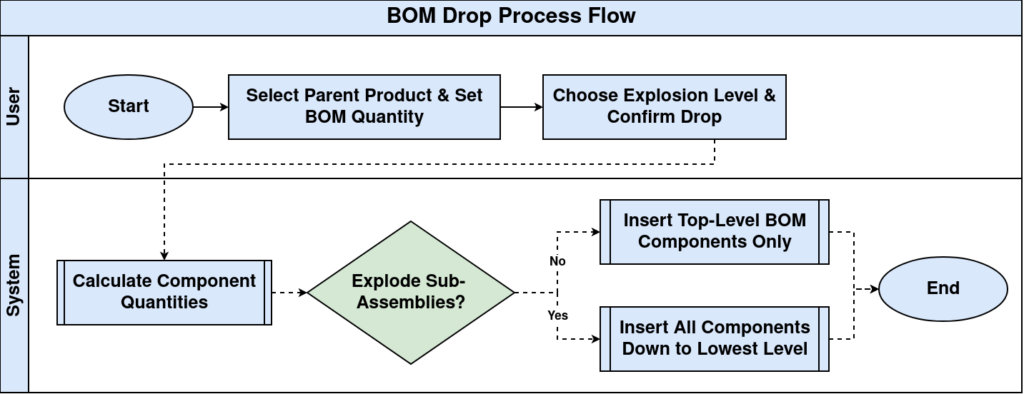
Process Flow
BOM Drop Usage
Use BOM Drop when:
- You want the individual components of a kit or assembly on a document
- You need accurate material planning and costing
- You want to ensure the right components are ordered, invoiced, or tracked per project
- Instead of adding a summary item, you expand it for line-level operations
BOM Drop makes the process consistent and automated.
BOM Drop Access
Open the BOM Drop from:
- Material Management menu
- A button/process inside an Order, Invoice, or Project
Only drafted or in-progress documents can be targets for BOM Drop.
Parent Product Selection
Choose the parent product that has a default BOM defined and is verified. This parent product is typically a kit, assembly, or manufactured item.
BOM Quantity Specification
Set the quantity you want to drop. The system then calculates the required quantity of each component by multiplying the BOM component quantities by the parent quantity.
BOM Explosion
If the BOM has sub-assemblies (nested BOMs), choose whether to explode them — meaning include all sub-components down to the lowest level. This is especially useful for complex products with multiple layers of assembly.
BOM Components Insertion
Once configured, confirm the BOM Drop.
iDempiere inserts all selected BOM components into the target document as separate lines, including:
- Product of each component
- Calculated quantity
- Unit of measure
This replaces having to manually add each part.
