How Does the GL Budget Work with GL Journals in iDempiere
In iDempiere, the GL Budget window is used to define a budget master that can be referenced during accounting entries.
One of the key usages of a GL Budget is through the Posting Type field in the GL Journal window, where users can choose whether a journal represents actual postings or budget-related entries.
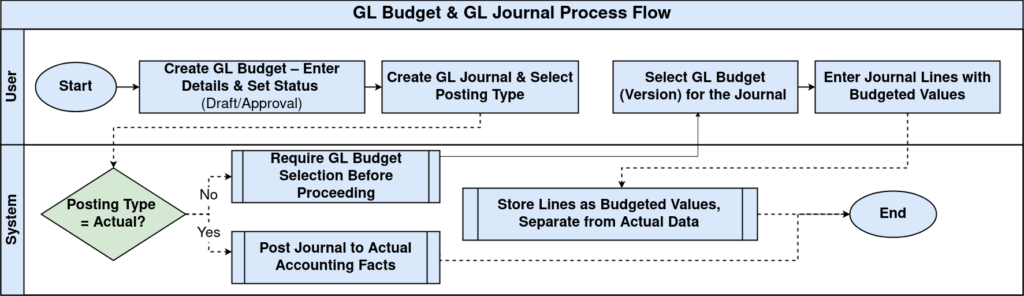
Process Flow
Creating a GL Budget
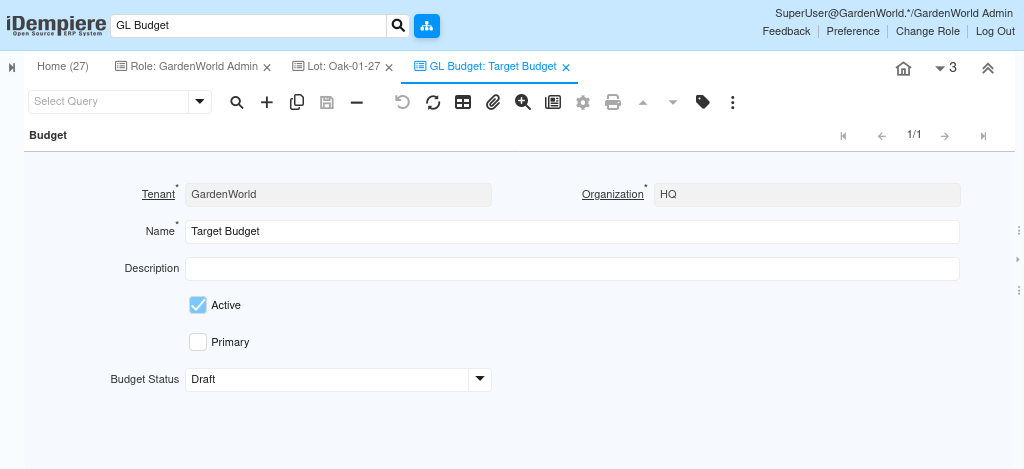
To define a GL Budget
- Navigate to the GL Budget window
- Create a new record
- Enter the required information
- Choose the budget status if needed as Draft or Approval.
This creates a budget definition that can later be referenced in journals.
How the GL Budget Is Used in the GL Journal
When creating a GL Journal, users select a Posting Type.
- If the Posting Type is set to Actual, the journal posts to accounting facts
- If the Posting Type is set to Budget, the system requires selection of a GL Budget
At this point
- The selected GL Budget determines which budget version the journal belongs to
- Journal lines entered represent budgeted values, not actual postings
- These entries are stored separately from actual accounting data
This allows users to record budget amounts using the same chart of accounts structure.
By linking GL Budgets to GL Journals through the Posting Type, iDempiere allows organizations to record, manage, and compare budgeted values using standard accounting structures. This enables controlled financial planning, clear separation of budget and actual data, and reliable budget reporting without impacting operational accounting.