How Inventory Increase and Decrease Works in iDempiere
The Inventory Increase/Decrease process in iDempiere is used to manually adjust stock quantities in the warehouse.
These adjustments are made outside of normal transactions such as purchase receipts, shipments, or inventory moves. They are typically used to correct discrepancies found during physical counts, handle damaged items, record shrinkage, or introduce opening balances. The system ensures that every adjustment is controlled, documented, and properly posted to maintain accurate stock and accounting records.
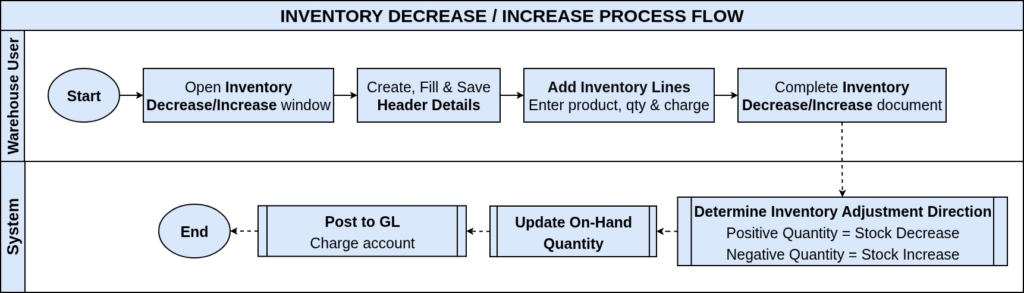
Process Flow Diagram
Purpose and When It Is Used
Inventory adjustment is performed when the system quantity does not match the physical quantity. This window allows users to either increase stock (add quantity) or decrease stock (remove quantity) for specific products and locators.
This is used for
- Physical count corrections
- Damage, loss, or expired materials
- Manual stock introductions (opening balances, corrections)
- Regular warehouse reconciliation
The document ensures that adjustments are transparent and auditable.

How the Document Works
Each Inventory Increase/Decrease document acts like an Inventory Move but with a virtual source or destination. Instead of moving items between locators, the system adjusts quantities relative to the accounting inventory account.
- Increase adds quantity to the selected locator.
- Decrease removes quantity from the selected locator.
The document header defines the warehouse, movement date, organization, and document type, while the line captures product, locator, and the movement quantity (positive or negative).

Inventory Increase/Decrease in iDempiere provides a controlled and auditable way to correct stock quantities outside normal transactions. By adjusting quantities through a formal document process with proper posting, validation, and line-level detail iDempiere maintains accurate and reliable inventory and accounting records across warehouses.