How Attributes Works in iDempiere
An Attribute in iDempiere defines what differentiates one unit of a product from another without creating separate SKUs. It captures business-relevant characteristics like flavor or size and flows silently through purchasing, inventory, sales, and reporting once configured.
Process Flow

Role of Attributes in the Overall Workflow
Attributes sit at the foundational layer of traceability.
They define what can vary, but they do not enforce when or how values are captured—that responsibility belongs to Attribute Sets.
In the overall business flow:
- Attributes define variant meaning
- Attribute Sets define tracking rules
- Attribute Set Instances capture actual batch data
Without Attributes, all batches of a product look identical.
With Attributes, the system understands context and differentiation.
Attribute Configuration
Attributes are created once and reused across products.
Each attribute defines how values are entered, controlled, and validated across the system.

During configuration, the most important decisions are made at this stage because they affect all downstream behavior.
Key configuration concepts include:
- Attribute Value Type
Most business attributes use List type to enforce controlled values and avoid free-text errors. - Attribute Values
Predefined selectable options (e.g., Classic, Kesar Badam, Royale Chocolate). - Instance Attribute
Determines whether the value can change per batch or remains fixed for the product.
Once saved, an Attribute becomes a reusable building block across multiple products and Attribute Sets.
How Attributes Are Used by Products
Attributes are not linked directly to transactions.
They are assigned to products through Attribute Sets, which determine how and when they appear.
When a product is linked to an Attribute Set that includes attributes:
- The system knows which attributes apply
- Attribute values may default from the product
- Values are captured automatically during batch creation
This design keeps product configuration clean and avoids duplication.
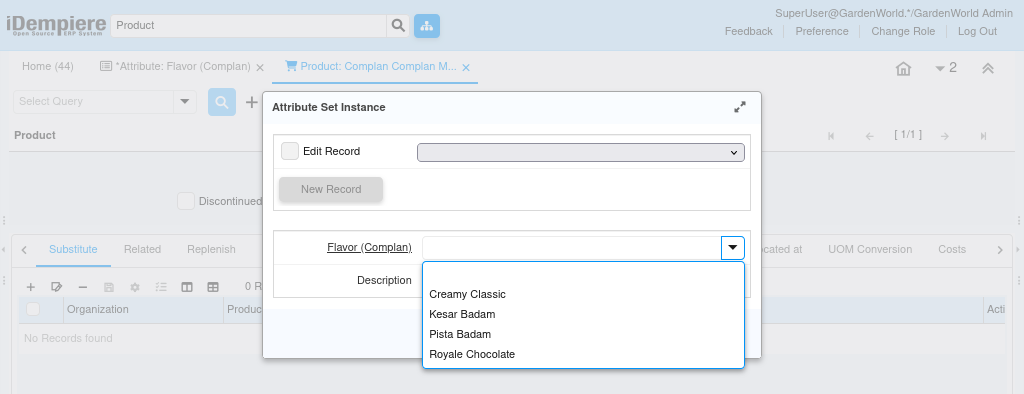
How Attributes Appear in Daily Operations
In daily usage, users do not “work with attributes” explicitly.
Instead, attributes surface naturally as part of batch handling.
For example, during material receipt or shipment:
- The system opens an attribute dialog
- Attribute values appear automatically
- Users select or confirm values only when required
Once captured, attribute values follow the stock silently across inventory movement, sales, and finance. This ensures consistency without increasing user effort.
Purpose of Attributes
Attributes exist to model real-world product variation in a controlled, scalable way.
They are especially valuable when:
- Multiple variants share the same pricing and accounting
- Inventory must distinguish characteristics
- Reporting needs insight by variant
- Compliance requires variant-level visibility
Attributes allow businesses to grow variant complexity without increasing master data chaos.
Key Capabilities Enabled by Attributes
- Variant differentiation without SKU explosion
- Controlled value selection (no manual typing errors)
- Consistent visibility across purchasing, inventory, and sales
- Reporting and filtering by product characteristics
- Foundation for batch-level traceability
Attributes alone do not enforce traceability—but they make it possible.
Outcome
With attributes correctly defined and applied, iDempiere delivers:
- Clear and consistent product variation
- Cleaner product masters
- Accurate variant visibility across all processes
- A strong foundation for batch and compliance tracking
Attributes transform products from static items into business-aware entities that reflect how goods are actually produced, stored, and sold.