How Material Transactions Works in iDempiere
The Material Transactions screen in iDempiere provides a complete, real-time history of every inventory movement that affects stock in the system.
It is a system-generated ledger of physical inventory activity, similar to a journal, but specifically focused on product movement across locators, warehouses, and transactions. This screen allows users to trace the source, destination, date, reason, and quantity of every stock change, ensuring accurate inventory reconciliation and auditability.
Process Flow

Purpose of Material Transactions
This screen gives users visibility into how and why inventory changed at any point in time. It consolidates all stock-affecting transactions, including
- Vendor Receipts
- Customer Shipments
- Inventory Moves (Move From / Move To)
- Production
- Inventory Increase/Decrease
- Project Issue Movements
How the Screen Works
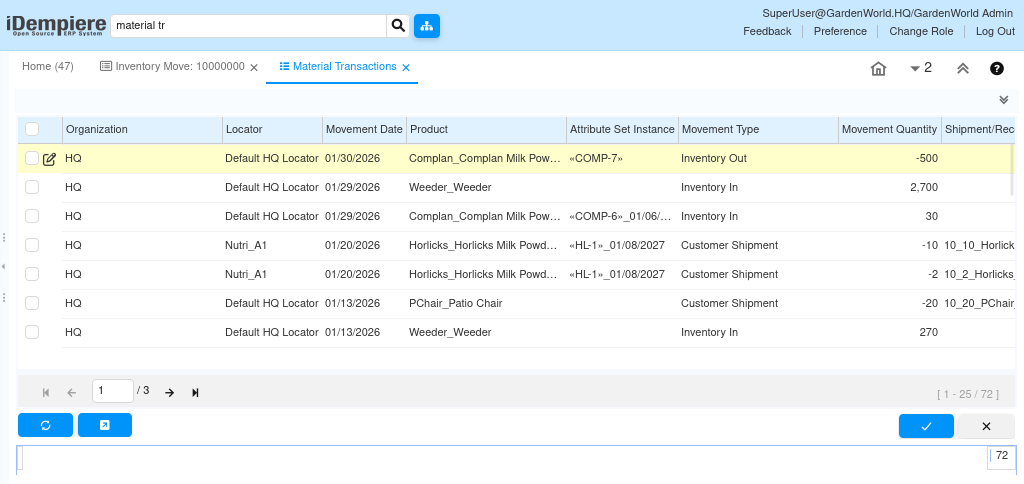
Each row in the Material Transactions window is a single movement that changes the on-hand stock of a product. iDempiere automatically creates these transactions the moment a document that affects inventory is completed.
A material transaction contains key details
- Organization and Locator where stock was affected
- Movement Date when the stock change occurred
- Product and Attribute Set Instance (lot/serial)
- Movement Type that describes the nature of the transaction
- Movement Quantity (positive for increases, negative for decreases)
- Links to the Shipment/Receipt Line, Production Line, or Project Issue that caused it
Movement Type Understanding the Flow
The system uses Movement Type to explain why the stock changed.
Some common types include
- Vendor Receipts → stock increases
- Customer Shipments → stock decreases
- Movement From / Movement To → internal warehouse relocations
- Production + / Production – → output or consumption in manufacturing
- Inventory Out → adjustments or physical counts
Movement Type is the user’s quickest way to understand the intention of the transaction.
Document Links Connecting Back to the Source
Every transaction is tied to its source document. Depending on the movement
- Vendor Receipts link to receipt lines
- Shipments link to order shipment lines
- Production uses Production Lines
- Moves use Move Lines
- Physical inventory uses Phys.Inventory Lines
These links allow users to click directly into the original document that caused the stock change, ensuring audit clarity and simplifying root-cause investigations.
Filtering and Analysis
The screen allows filtering by
- Movement Type
- Product
- Locator
- Date range
- Organization
- Attribute Set Instance
This makes it easy to analyze stock history for a specific product, validate discrepancies, or check movement patterns over time.
The Material Transactions screen is the complete movement ledger of inventory in iDempiere. By automatically capturing every stock-affecting action, linking to source documents, detailing movement types, and showing quantities and locators, it ensures total transparency and accuracy in warehouse operations. It is the primary tool for tracking, auditing, analyzing, and understanding stock changes across the entire ERP system.