How Product BOM Works in iDempiere
Product BOM defines how a finished product is built from multiple component items. In project scenarios, BOM is used to plan material requirements, control costs, and standardize work items.
BOM Parent Product Creation
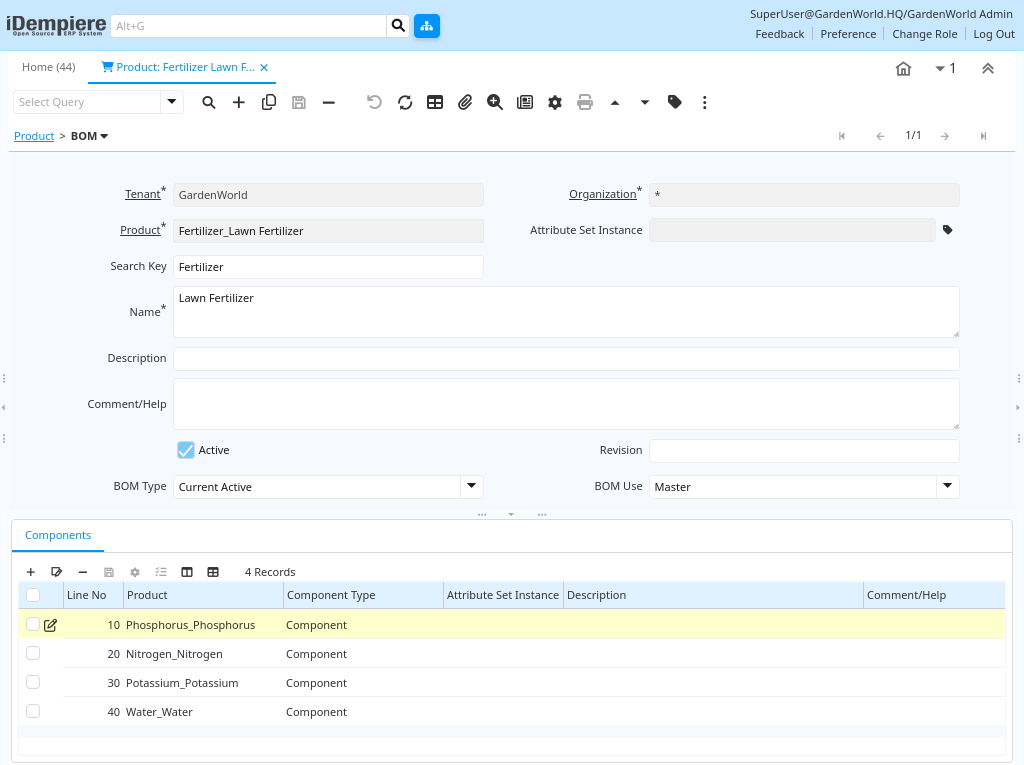
First, create a Product record and set the BOM = Yes flag. This parent product represents assemblies such as work packages, semi-finished goods, or complex construction items like RCC slabs or electrical panels.
BOM Component Definition
Next, add BOM Lines beneath the parent product. Each line specifies a component product, its required quantity, unit of measure, and optional scrap percentage, providing the exact material breakdown needed for production.

BOM Type & Behavior
The BOM controls exactly which materials are required and in what quantities. iDempiere automatically uses BOM definitions during production order generation, project material planning, and cost roll-up processes to maintain consistency.
BOM Usage in Projects
When a BOM product is added to a Project Line or Production Order, iDempiere automatically explodes the BOM into its individual component requirements, ensuring consistent and accurate material planning throughout the process.
Material Issue & Costing
During production, components are issued from inventory based on the precise BOM quantities defined. Component costs accumulate automatically to the finished product cost or directly to the associated project or work order.

Product BOM in iDempiere provides a structured way to define, plan, and cost material assemblies, enabling accurate project execution and strong cost control.