How do Currency Rate work in iDempiere
In iDempiere, Currency Rates define how amounts are converted from one currency to another during business transactions. Whenever a document (such as an invoice, payment, or journal) is entered in a currency different from the accounting schema or reporting currency, iDempiere uses the defined currency rate to calculate the equivalent amount. This ensures financial consistency across purchasing, sales, and accounting.
Creating and maintaining Currency Rates
Users define currency rates by specifying the source currency, target currency, conversion date (or date range), and the conversion rate. Keeping currency rates up to date is critical, as missing or outdated rates can prevent documents from being completed or posted.
How to Create a Currency Rate in iDempiere
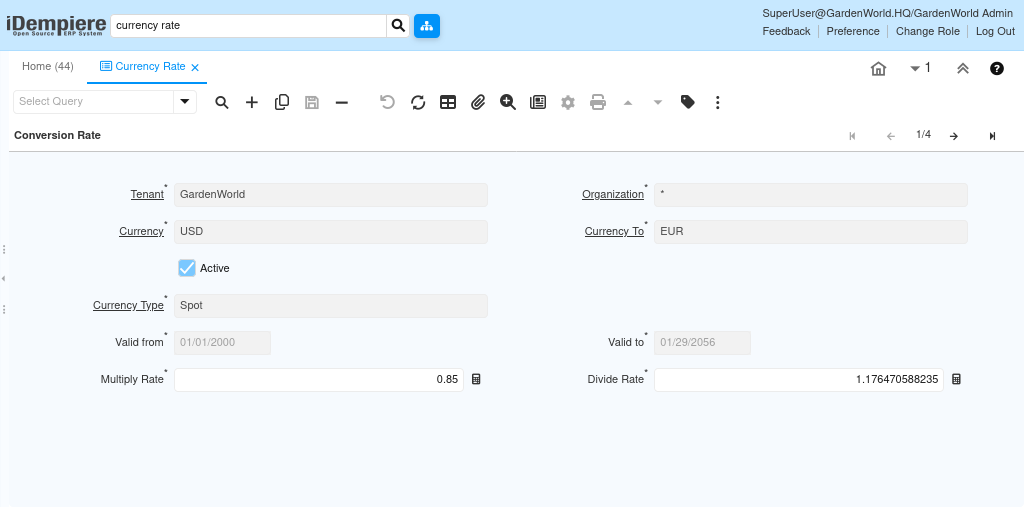
- Navigate to the Currency Rate window.
- Click New to create a new record.
- Select the From Currency (the original transaction currency).
- Select the To Currency (the currency to convert into).
- Choose the Conversion Type (for example, Spot, Corporate).
- Enter the Valid From and Valid To date for the exchange rate.
- Enter the Multiply Rate.
- Save the record.
By configuring currency rates correctly, iDempiere ensures that multi-currency transactions are processed smoothly, financial postings remain accurate, and reports reflect consistent values across currencies. This allows organizations to operate confidently in international and multi-currency environments without manual recalculations.