How Replenishment Works in iDempiere
Replenishment defines when and how stock is refilled for a product in a warehouse. Configured per product and warehouse, it links inventory visibility with procurement or transfers, automatically monitoring stock levels to prevent shortages without manual tracking.
Replenishment as a Stock Control Mechanism
Replenishment does not move inventory by itself. Instead, it provides clear rules that the system uses to decide when new stock must be ordered or transferred.
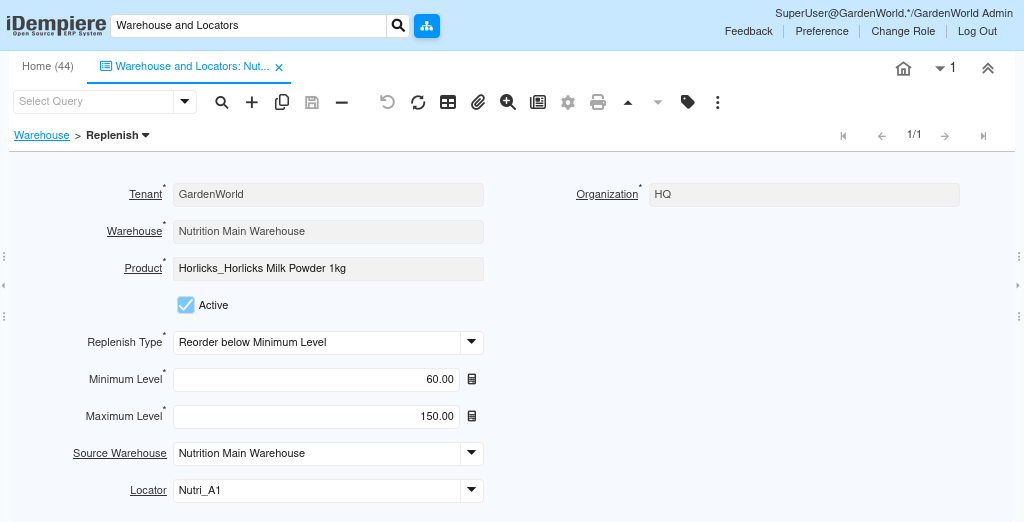
From the screenshot, Replenishment is defined for:
- A specific Warehouse
- A specific Product
- With clearly defined minimum and maximum stock levels
This ensures that replenishment decisions are predictable, consistent, and aligned with business needs.
Defining When Replenishment Should Trigger
The core of replenishment logic is the Replenish Type.
In this case, the type is Reorder below Minimum Level, which means the system continuously compares available stock against the minimum threshold.
When the available quantity falls below the Minimum Level, iDempiere marks the product as needing replenishment.
Key values that control this behavior:
- Minimum Level defines the safety stock (60 units here)
- Maximum Level defines the target stock after replenishment (150 units here)
Users only define these values once; the system handles the rest.
How Replenishment Fits into Daily Operations
Replenishment works silently in the background. Users do not manually trigger it during daily work. Instead, it supports downstream processes such as purchase planning and warehouse transfers.
When stock drops:
- Storage reflects reduced On-Hand Quantity
- Replenishment rules are evaluated
- The product appears in replenishment or planning views
- Purchase Orders or internal movements can be created confidently
This prevents last-minute shortages and avoids overstocking.
Source Warehouse and Locator Role
Replenishment can optionally define:
- A Source Warehouse
- A Target Locator
When configured, this allows the system to support internal replenishment, such as transferring stock from a central warehouse to a local warehouse, instead of purchasing externally.
If these fields are left empty, replenishment typically drives procurement decisions rather than internal transfers.
This flexibility allows the same replenishment logic to support simple warehouses and multi-warehouse operations.
What Users Actually Do — and Don’t Do
Users configure replenishment rules, not replenishment transactions.
They:
- Define minimum and maximum levels
- Choose the replenishment strategy
- Activate the rule
They do not:
- Manually monitor stock daily
- Calculate reorder quantities
- Track shortages manually
Once saved, the record becomes a standing instruction for the system.
Why Replenishment Matters
Replenishment ensures that inventory decisions are rule-based instead of reactive. It protects operations from stock outs, stabilizes purchasing behavior, and aligns inventory levels with real demand. When combined with storage and warehouse setup, replenishment completes the end-to-end inventory control loop.
Outcome
Replenishment turns inventory levels into actionable signals.
Instead of guessing when to reorder, users rely on clear thresholds and system intelligence.
The result is balanced stock, reduced risk, and smoother operations — without daily manual effort.