How Storage Detail Works in iDempiere
Storage Detail provides real-time inventory visibility in iDempiere at the warehouse, locator, product, and batch level. It is built from live storage records, showing exactly what stock is available, where it is stored, and its condition—critical for batch, lot, or expiry-controlled items.
Inventory data foundation
Storage Detail reads directly from M_Storage / M_Storage On Hand, joined with locator, product, warehouse, and attribute set instance (ASI) data. Every row represents a unique combination of product + locator + ASI, meaning quantity is always context-aware and never merged across incompatible attributes.
Quantities shown here already reflect all completed inventory-affecting transactions such as material receipts, customer shipments, inventory adjustments, and internal movements. Draft or unprocessed documents do not influence this report.

Attribute Set and traceability handling
If a product uses an attribute set (Lot, Serial No, Expiry, Guarantee Date, etc.), Storage detail expands the stock into multiple rows, one per attribute set instance. This is why the same product can appear multiple times under the same locator with different lot numbers or expiry dates.
When no attribute set is used, stock is grouped under a default ASI (*), clearly distinguishing controlled and non-controlled inventory without ambiguity.
Key traceability fields commonly surfaced include:
- Lot / Lot No
- Guarantee Date and Remaining Shelf Life
- Serial No (if applicable)
- Attribute Set Instance description
These fields are not derived or calculated at report time; they are persisted attributes tied to each inventory transaction.
Locator and warehouse structure alignment
Each row is strictly bound to a single locator. Even within the same warehouse, quantities are never auto-aggregated across locators. This ensures physical storage logic remains intact, supporting bin-level picking, replenishment, and internal audits.
Locator metadata such as locator value, warehouse, and organizational ownership are included to prevent cross-org or cross-warehouse misinterpretation, especially in multi-org environments.
Quantity interpretation and reservations
The primary quantity exposed is on hand quantity, which represents physically available stock at that locator and ASI. Depending on report configuration and column visibility, additional quantity dimensions can be displayed to provide operational clarity.
Typical quantity-related columns include:
- On Hand Quantity
- Reserved Quantity
- Ordered Quantity
These quantities are maintained independently by the system and allow users to understand availability pressure without altering stock figures.
Report parameters and filtering behavior
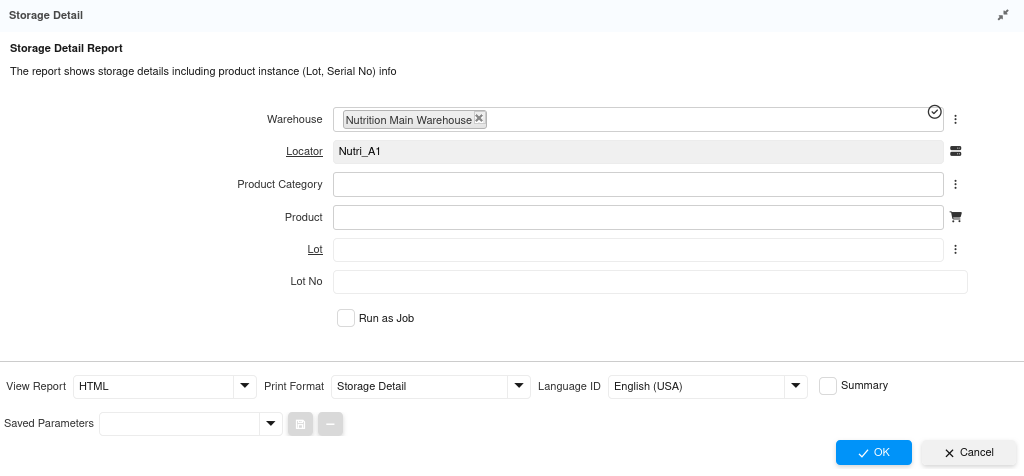
The report allows precise filtering to narrow the storage view without changing underlying data. Filters are applied before rendering, ensuring performance and accuracy even with large datasets.
Commonly used filters:
- Warehouse and Locator
- Product or Product Category
- Lot / Lot No
- Attribute Set Instance
- Summary vs detailed view
Using filters does not recalculate stock; it only constrains visibility, preserving data integrity.
Operational relevance
Storage detail is the reference point for downstream operational processes. Picking, replenishment checks, expiry reviews, and discrepancy investigations all rely on this view to validate physical stock reality against expectations.
Because it is transaction-backed and attribute-aware, this report is trusted in scenarios where inventory accuracy directly affects compliance, customer fulfillment, or financial reconciliation.